BSOD: Event 41, Kernal-Power debugging/support

Anonymous
2020-09-10T16:34:40+00:00

Hello All,

Please help me identify what's causing my PC to crash!

I use a laptop for most of my day-to-day tasks but I put a PC together for more processing power when working on projects. I built it over the summer using an older motherboard as the base and installed new hardware, software and updated Windows. I downloaded Adobe Creative Studios several weeks ago but I'm only starting to work on projects where I need to use it. My PC shuts down when demand on the system passes a threshold, most frequently when I'm using InDesign and yesterday, it happened three times. 

PC Information
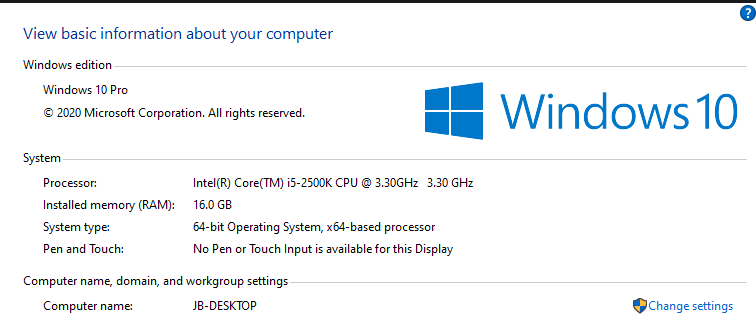
Here is a OneDrive link to the Kernel dump file:

https://mmreis-my.sharepoint.com/:u:/g/personal/jonathan\_brouhard\_marcusmillichap\_com/EVgiHvx7C1NBo0iHnicMGDABd8WgN4HnAtDg4HlWy6vCHQ?e=8IXptQ

-All three are the same events. Information from Windows Event View Below
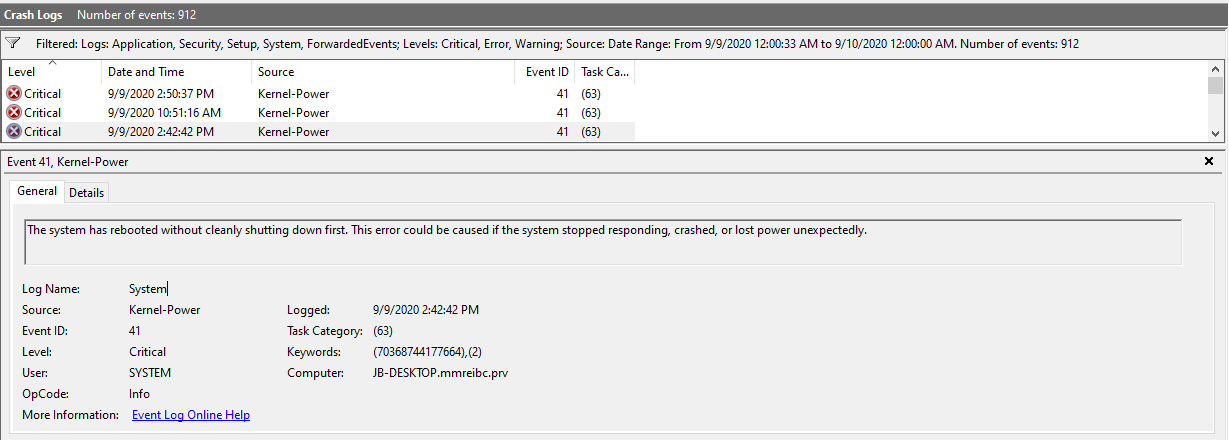
Task Category: (63)

Keywords: (70368744177664),(2)

-           System

-           Provider

[ Name]            Microsoft-Windows-Kernel-Power

[ Guid] {331c3b3a-2005-44c2-ac5e-77220c37d6b4}

**** EventID            41

**** Version 8

**** Level    1

**** Task     63

**** Opcode            0

**** Keywords         0x8000400000000002

**** -           TimeCreated

[ SystemTime] 2020-09-09T18:42:42.5202848Z

**** EventRecordID 23349

**** Correlation

**** -           Execution

[ ProcessID]      4

[ ThreadID]      8

**** Channel            System

**** Computer         JB-DESKTOP.mmreibc.prv

**** -           Security

[ UserID]          S-1-5-18

**** -           EventData

BugcheckCode  0

BugcheckParameter1    0x0

BugcheckParameter2    0x0

BugcheckParameter3    0x0

BugcheckParameter4    0x0

SleepInProgress            0

PowerButtonTimestamp           0

BootAppStatus 0

Checkpoint       0

ConnectedStandbyInProgress   false

SystemSleepTransitionsToOn   0

CsEntryScenarioInstanceId        0

BugcheckInfoFromEFI   false

CheckpointStatus         0

CsEntryScenarioInstanceIdV2    0

LongPowerButtonPressDetected           false

Windows for home | Windows 10 | Performance and system failures

Locked Question. This question was migrated from the Microsoft Support Community. You can vote on whether it's helpful, but you can't add comments or replies or follow the question.

0 comments No comments
{count} votes

6 answers

Sort by: Most helpful
  1. Igor Leyko 108.4K Reputation points Independent Advisor
    2020-09-10T16:49:29+00:00

    Hi,

    I'm Independent Advisor not Microsoft employee or support person. But I'm in contact with Windows developers since 1995 - as a one of the best Windows beta-testers till 2009 when program was closed, as an MVP in 2005-2017 including Windows System & Performance nomination. So I have deep enough Windows knowledge and you may trust me. It's a pleasure for me to help others and I'll do all my best to help you.

    Kernel-Power 41 (63) error mostly means the problem with power supplying. Can you replace power supply unit for checking? It may mean problems with power management in BIOS or motherboard too.

    And carefully look at motherboard and PSU for leaked or swelled up capacitors (little barrels).

    0 comments No comments
  2. Deleted

    This answer has been deleted due to a violation of our Code of Conduct. The answer was manually reported or identified through automated detection before action was taken. Please refer to our Code of Conduct for more information.


    Comments have been turned off. Learn more

  3. Anonymous
    2020-09-10T16:57:31+00:00

    Igor, Thanks for reaching out.

    I don't have a replacement PSU. I will try and do an autopsy on the motherboard and PSU capacitors. Is there any system diagnostic I could do to identify an issue with the management stemming from the motherboard or BIOS?

    0 comments No comments
  4. Igor Leyko 108.4K Reputation points Independent Advisor
    2020-09-10T18:14:10+00:00

    You may try to turn off all CPU power saving modes in BIOS (different C states). If this helps the problem is in motherboard.

    0 comments No comments
  5. Anonymous
    2020-09-10T18:20:54+00:00

    Ok great, How do I do that?

    0 comments No comments
