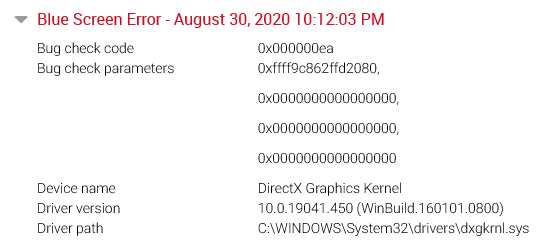
Thread Stuck in Device Driver Error - Bug Check Code: 0x000000ea DirectX Graphics Kernel. Dell Precision 3540 // AMD Radeon Pro WX 2100

Anonymous
2020-08-31T19:05:46+00:00

Good afternoon. I recently updated a users PC (just went to settings and took a look to see if he had any available updates, he did, so I started the download/install for him) and then ran the Dell support assistant for the maintenance on his laptop, it found a few things to update and did as normal. A few days after I did that the user reached out to let me know he receives this error whenever he attempts to run Adobe Photoshop. I feel I have it narrowed down to potentially a driver issue with the AMD card, as i've noticed if I disable it, the user can run Photoshop just fine, but obviously can't run the powerful stuff within the software due to having to use the onboard laptop graphics. 

I have attempted to re-run the support assistant to see if it picks up any failures or anything but nothing. I've attempted to install the latest AMD driver for that version card and also attempted previous driver versions. I've also attempted to update the driver via Device Manager by having Windows search and attempted a youtube fix by selecting one on the system already, to no avail. 

If anybody could offer up some troubleshooting tips i'd greatly appreciate it.
Windows for home | Windows 10 | Devices and drivers

Locked Question. This question was migrated from the Microsoft Support Community. You can vote on whether it's helpful, but you can't add comments or replies or follow the question.

0 comments No comments
{count} votes

10 answers

Sort by: Most helpful
  1. Anonymous
    2020-09-01T19:12:05+00:00

    Hi Jan- Sorry to bug you again. 

    I ran the DDU in safe mode and just completed reinstalled the AMD drivers. I gave it a test spin and Photoshop did not crash! I am waiting for the end user to give it a test spin as I don't normally do much in Photoshop, so I am going to have him stress test it. Will report the news! So far it looks promising! Thank you. (Fingers crossed!)

    0 comments No comments
  2. Jan J.23 12,275 Reputation points Independent Advisor
    2020-09-01T19:23:19+00:00

    Great. I hope that it will resolved the BSOD issues. I checked the dump files from 8/30 and it shows dxgkrnl.sys ( DirectX) causes it. Most likely this is caused by your AMD drivers causing DirectX to fail.

    0 comments No comments
  3. Anonymous
    2020-09-01T19:54:21+00:00

    Still waiting on the end user to come back from a photoshoot (hes in marketing).

    While i'm waiting for him I realized a few things. He connects his laptop to a docking station (via USB C). I noticed when he is docked and I attempt to run PS, it gives me a crash report via PS. However, when its not docked it opens PS with no issues or crashes/blue screens.

    0 comments No comments
  4. Jan J.23 12,275 Reputation points Independent Advisor
    2020-09-01T20:06:49+00:00

    If the dock is causing the crash. Most likely it is caused by its drivers. Download the latest drivers or firmware from the Manufacturing site and install it.

    0 comments No comments
  5. Anonymous
    2020-09-22T12:20:01+00:00

    Same problem here Lenovo Thinkpad with E580 on Thinkpad Hybrid Dock connected with USB-C.

    When the laptop is used without docking station no crash / freeze. When it's connected to the docking station crashes randomly after 5-15 min. Updated/reinstalled GPU and dock drivers, updated BIOS and dock firmware.

    Issue still present. Issue appears since Monday, but no updates installed recently..

    @TSpiels did you find a solution/fix?

    EDIT: Looks like the issue is the GPU driver (AMD). Another reinstall of the GPU driver seems like to have fixed the issue for now.

    1 person found this answer helpful.
    0 comments No comments