If there were any entries, they wouldn't show because you have Windows entries hidden in Autoruns.
It needs to be set as in the picture with both buttons not pressed:

What about the other instructions regarding the shell:startup folder?
There's no sensitive information in an Autoruns log if you are concerned about sharing a log.
The other way to solve the problem is to hide the issue. Open File Explorer and open the shell:startup folder as described in my previous post.
In the View tab up top, make sure there's a check mark in File name extensions
Right click in some space in the folder and select New > Text Document
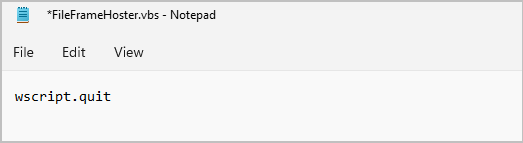
Name the file FileFrameHoster.vbs
Right click on FileFrameHoster.vbs and select Edit, then enter wscript.quit
Save the file.
The error should no longer pop up.
I'm curious, if you paste %appdata% into File Explorer and press enter, do you have a FileFrameHoster folder?
' cx='32' cy='32' r='32' /%3E%3Ctext x='50%25' y='55%25' dominant-baseline='middle' text-anchor='middle' fill='%23FFF' %3EA%3C/text%3E%3C/svg%3E)
