how do i remove a script file

Anonymous
2022-03-29T05:44:16+00:00

how do i remove a script file that pop up this morning, tried looking for it don't see it anywhere

Windows for home | Windows 10 | Security and privacy

Locked Question. This question was migrated from the Microsoft Support Community. You can vote on whether it's helpful, but you can't add comments or replies or follow the question.

0 comments No comments
{count} votes

9 answers

Sort by: Most helpful
  1. Anonymous
    2022-03-29T06:07:01+00:00

    Hi andy, to fix the error, first download Autoruns:

    https://docs.microsoft.com/en-us/sysinternals/downloads/autoruns

    • Unzip autoruns64.exe, then right click and run as administrator.
    • In the Quick Filter box enter fileframehoster.vbs
    • Right click on any entry found and Delete

    Let me know if this resolves the issue when you next sign in to your account.

    7 people found this answer helpful.
    0 comments No comments
  2. Anonymous
    2022-03-29T06:30:44+00:00

    hi there nothing showing in any of the section

    1 person found this answer helpful.
    0 comments No comments
  3. Anonymous
    2022-03-29T06:40:28+00:00

    OK, enter wscript into the Quick Filter box.

    For any entry found, left click on it, then look towards the bottom pane and it should show the file path.

    If it references fileframehoster.vbs, right click the entry and delete.

    If there's still nothing found, go in the Autoruns menu to File > Save and save an autoruns log. Share the log on OneDrive or any file sharing service, and post a link to the file.

    ***EDIT: Open File Explorer and paste into the address bar shell:startup then press enter.

    There will likely be a shortcut here that points to the removed vbs file. If you double click on it, it should throw the fileframehoster.vbs error.

    Delete this file.

    1 person found this answer helpful.
    0 comments No comments
  4. Anonymous
    2022-03-29T09:34:43+00:00

    sorry dont to upload a file here other image nothing there

    0 comments No comments
  5. Anonymous
    2022-03-29T09:58:27+00:00

    If there were any entries, they wouldn't show because you have Windows entries hidden in Autoruns.

    It needs to be set as in the picture with both buttons not pressed:

    Image

    What about the other instructions regarding the shell:startup folder?

    There's no sensitive information in an Autoruns log if you are concerned about sharing a log.

    The other way to solve the problem is to hide the issue. Open File Explorer and open the shell:startup folder as described in my previous post.

    In the View tab up top, make sure there's a check mark in File name extensions

    Right click in some space in the folder and select New > Text Document

    Name the file FileFrameHoster.vbs

    Right click on FileFrameHoster.vbs and select Edit, then enter wscript.quit

    Save the file.

    The error should no longer pop up.
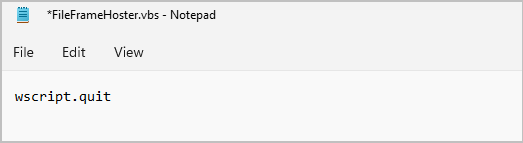
    Image

    I'm curious, if you paste %appdata% into File Explorer and press enter, do you have a FileFrameHoster folder?

    0 comments No comments
