Azure
A cloud computing platform and infrastructure for building, deploying and managing applications and services through a worldwide network of Microsoft-managed datacenters.

This browser is no longer supported.
Upgrade to Microsoft Edge to take advantage of the latest features, security updates, and technical support.
' cx='32' cy='32' r='32' /%3E%3Ctext x='50%25' y='55%25' dominant-baseline='middle' text-anchor='middle' fill='%23FFF' %3EMM%3C/text%3E%3C/svg%3E)
Hi all,
we are currently using Azure AD B2c to manage our users and we added a custom user attribute called "Marketing Emails" in the format of 'CheckboxMultiselect'.
On the registration page, it is shown as a checkbox, with a boolean value is being stored. This works perfectly and as expected.
To edit the user profile, we implemented a new user flow as recommended by the documentation, enabled localization so that we can see and edit the 'profile edit page'. Under the 'Page layout' of the 'profile edit page' on the same user flow, we added the "Marketing Emails" attribute to be shown for editing. We set it up as optional, no verification required and as 'CheckboxMultiselect' as the user input. When we run the 'edit profile' user flow, login and then want to change the custom attribute, we are presented with just text saying 'Marketing Emails' without any checkbox or any options. If we switch it from 'CheckboxMultiselect' in the user input type to 'Text', we get a text box that we can edit and is prefilled with the value from the user settings.
Example of the 'CheckboxMultiselect' user input type on the edit profile page:
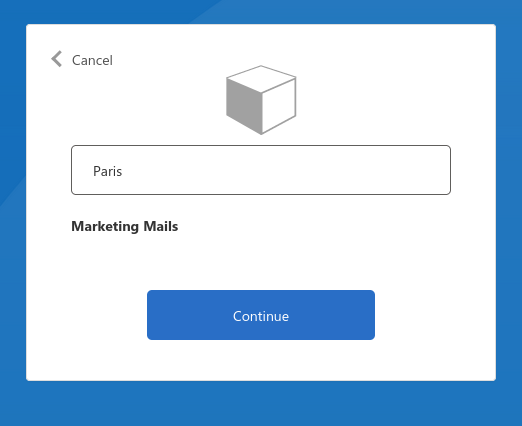
So the question is, is there a way for the checkbox to appear on the profile edit page? None of the options work as expected.
A cloud computing platform and infrastructure for building, deploying and managing applications and services through a worldwide network of Microsoft-managed datacenters.
A cloud-based identity and access management service for securing user authentication and resource access

' cx='32' cy='32' r='32' /%3E%3Ctext x='50%25' y='55%25' dominant-baseline='middle' text-anchor='middle' fill='%23FFF' %3EA%3C/text%3E%3C/svg%3E)
Hi @Maros, Matej , do you still require assistance with this question? If not please mark the appropriate answer as "Verified."
Thank you,
James

This still seems to be the same issue!
Hi @Maros, Matej , I couldn't find any documents that showed how to add a check box. However, I think that this can be done with Javascript. I'm going to reach out to the document author to verify but if you wanted to experiment with that document please do! I'll keep you updated.
Best,
James