Defender not disabled with third party av - still passiv mode

Anonymous
2024-11-21T22:17:13+00:00

Hello everyone,

We are currently testing Windows 11 in our company (23H2).

We are using BitDefender Endpoint Security Tools for endpoint protection

Under Windows 10 22H2, the "Get-MPComputerStatus" command shows us a "False" for the AMRunningMode value.

I expect this to be the case, as another AV solution is installed.

There is also no MsMpEng.exe running and the Microsoft Defender Antivirus service is set to Manual and is not running.

So far so good - that's what I expect.

Under Windows 11 23H2 the whole thing looks like this

Get-MPComputerStatus shows a "Passive Mode" for the value "AMRunningMode".

MsMpEng.exe is still running and the associated service is also running.

I see lots of accesses from MS Defender in the Process Monitor.

Here MS writes what the different modes in AMRunning mode mean.

https://learn.microsoft.com/en-us/defender-endpoint/microsoft-defender-antivirus-windows
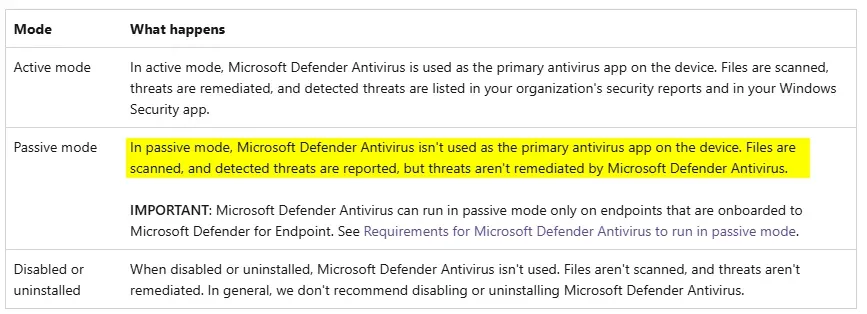
It doesn't make sense to me that an AV continues to access the data in read-only mode even though it is actually deactivated (as it says in the Security Center), but that's another topic.

I was just very surprised that it runs in passive mode at all, as MS explains the requirements for this here.

https://learn.microsoft.com/en-us/defender-endpoint/microsoft-defender-antivirus-compatibility

Here MS writes that the Defender is actually deactivated if Win 11 is operated with a third party AV and Smart App Control is deactivated. We have deactivated Smart App Control via RegKey and third party AV is installed and correctly detected in the Security Center.
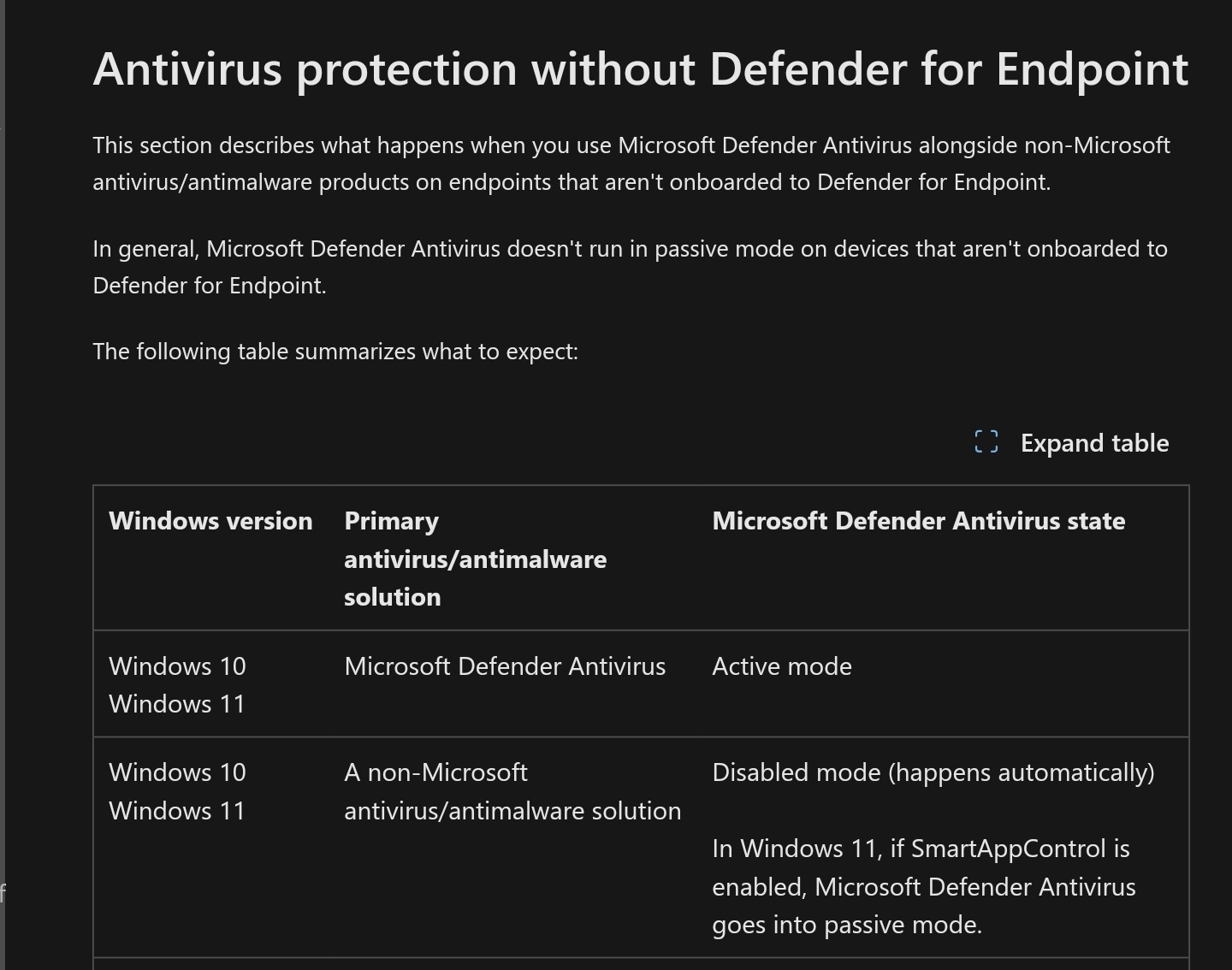
And on the same page, MS writes the following further down
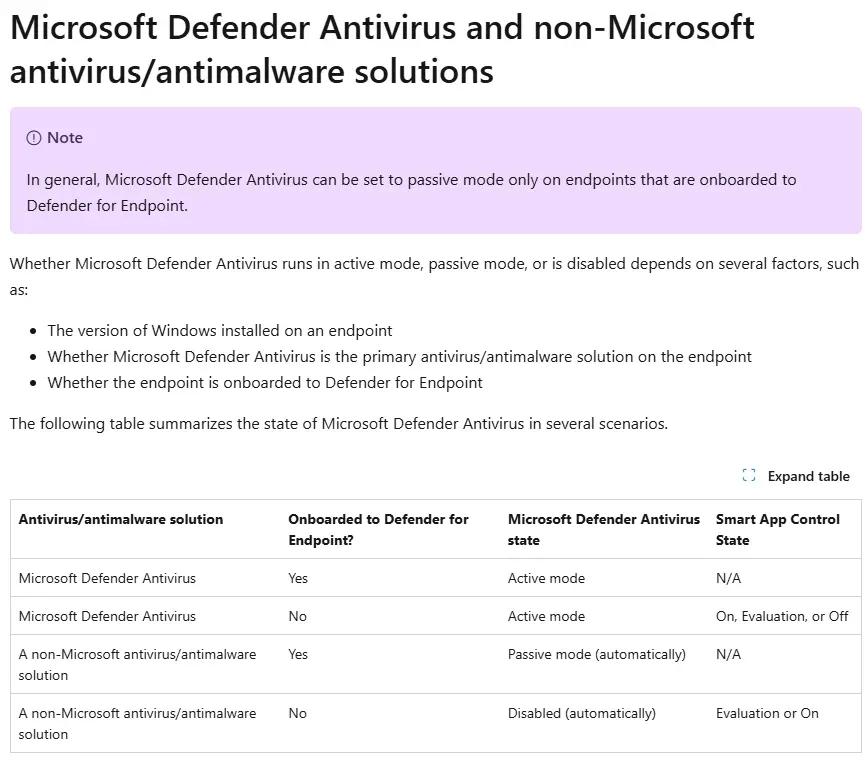
Defender is deactivated if you install a third party AV and do not use Defender for Endpoint.

If I am correctly informed, Defender for Endpoint is a paid cloud solution from MS that is already included in certain plans. We don't use that.

Can anyone explain to me why the Defender service is still running and the AMRunning mode is not set to "false" or "disabled" but to "passive mode"?

The gpo for disabling Defender is not working in windows 11 anymore. Microsoft has removed this.

I'm getting desperate right now.

Thank you very much.

Regards,

Windows for home | Windows 11 | Security and privacy

Locked Question. This question was migrated from the Microsoft Support Community. You can vote on whether it's helpful, but you can't add comments or replies or follow the question.

0 comments No comments

8 answers

Sort by: Most helpful
  1. Anonymous
    2024-11-22T10:22:44+00:00

    Problem fixed

    the problem is that we disabled the SmartAppControl in the regedit.

    It looks like this does not trigger the Defender to shutdown.

    We disabled the SmartAppControl on a second device in the Security Center and the Defender shutdwon immediately.

    Does anyone know, if there is a GPO or something like that to control the SmartAppControl? I think if we manually disable the SmartAppContorl in the gui some info is send to the defender and this information is missing if we just set the reg key.

    Was this answer helpful?

    1 person found this answer helpful.
    0 comments No comments
  2. Anonymous
    2024-11-22T07:37:41+00:00

    Hi Rob,

    i do understand that there are maybe situations where it is necessary that the defender run in the passive mode.

    But the MS documents are clearly for my understanding. The documents are updated in 2024, so they are definitly not old documents.

    If we use MS Defender Antivirus and use a third party AV the defender should be disabled (not passive mode, disable mode).

    If we enroll the device with Defender for endpoint it would be on passive mode. But we definitily not use defender for endpoint.

    That is described here very detailed https://learn.microsoft.com/en-us/defender-endpoint/microsoft-defender-antivirus-compatibility

    This document is updated on 17.10.2024 and applied to MS Defender Antivirus

    And on the same document is the following information

    passive mode is working only on client which are onboareded to defender for endpoint.

    We dont use defender for endpoint. On the client is Win 11 23H2 installed and BitDefender Endpoint Security Tools as endpoint protection.

    Bit defender is recognized in the security center as AV and Defender shows "MS Defender Antivirus is disabled".

    But the Defender Status with the command Get-MPComputerStatus shows always passive mode and i can see in the process monitor a lot of action that is generated by MS Defender Antivirus.

    For me it is definitely a bug because MS communicate a different behavior on their documentation.

    So it would be great if someone of MS can explain this behavior :)

    Was this answer helpful?

    1 person found this answer helpful.
    0 comments No comments
  3. Ramesh 180.1K Reputation points Volunteer Moderator
    2024-11-22T08:13:55+00:00

    Based on my experience, in Windows 11, the Defender engine (msmpeng.exe) continues running even after you install a third-party antivirus. Some users mentioned that it's due to the Smart App Control setting.

    Why is Antimalware Service Executable running with third-party - Microsoft Community: https://answers.microsoft.com/en-us/windows/forum/windows_11-wintop_update/why-is-antimalware-service-executable-running-with/2129e80a-412a-4125-8407-0fda0c672ac5?messageId=a048b04f-8582-4b2a-8c06-ab02ad494ac3

    Maybe it applies in your case. Or it could be that another module of Defender (not necessarily Smart App Control) is still running, although the real-time protection is snoozed and the periodic scanning option is turned off.

    Was this answer helpful?

    0 comments No comments
  4. Deleted

    This answer has been deleted due to a violation of our Code of Conduct. The answer was manually reported or identified through automated detection before action was taken. Please refer to our Code of Conduct for more information.


    Comments have been turned off. Learn more

  5. Rob Koch 26,055 Reputation points Volunteer Moderator
    2024-11-21T23:54:40+00:00

    I see several slightly conflicting documents that even base on date don't seem to supersede each other correctly, but I suspect the key reasons for the need to keep the device in Passive mode of some sort is that fact that attackers have learned how to disable Microsoft Defender completely using some of the same techniques you appear to be using to try and disable it to use Bitdefender.

    I think the document you may want to see though is the following, since it seems to more accurately represent the types of activity you're seeing, specifically the description provided in the large paragraph further down the document.

    Antivirus solution compatibility with Defender for Endpoint - Microsoft Defender for Endpoint | Microsoft Learn

    I know this document seems to indicate this applies to onboarding for Microsoft Defender for Endpoint, but the fact that it's discussing when a device is protected by a non-Microsoft anti-malware client in that paragraph, makes me believe this is the correct type of operation with any 3rd-party antimalware client and not just the MS Endpoint solution other portions seem to describe.

    The key thing I always remember is that the entire reason even the earliest versions of Windows Defender that simply performed antispyware protection had these abilities was if the installed primary security app somehow failed to operate, in which case Defender was expected to switch into operation and take its place. If you think in those terms, this form of background Passive mode with little other than core system monitoring taking place makes complete sense.

    Rob

    Was this answer helpful?

    0 comments No comments
