Audio Device Missing from Output Selection in Windows 11

Anonymous
2024-11-25T16:12:01+00:00

Hi everyone,

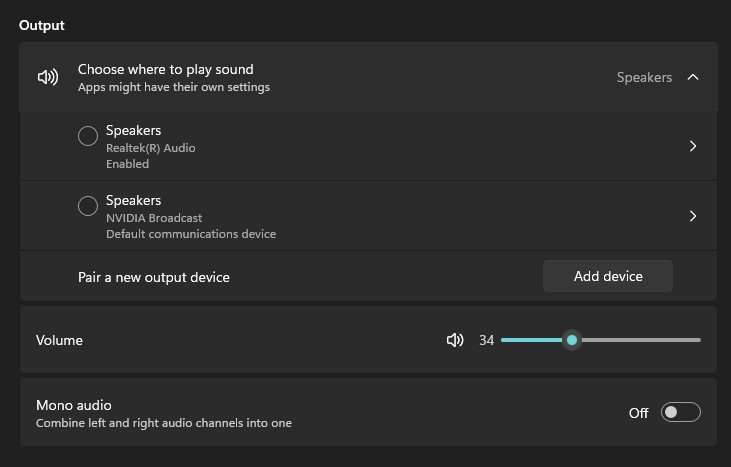
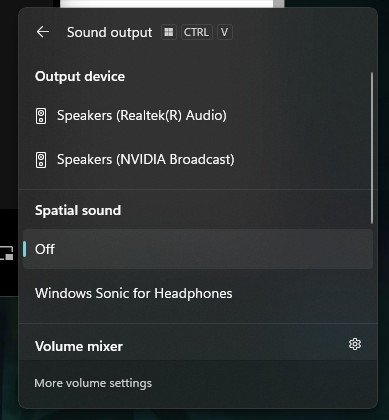
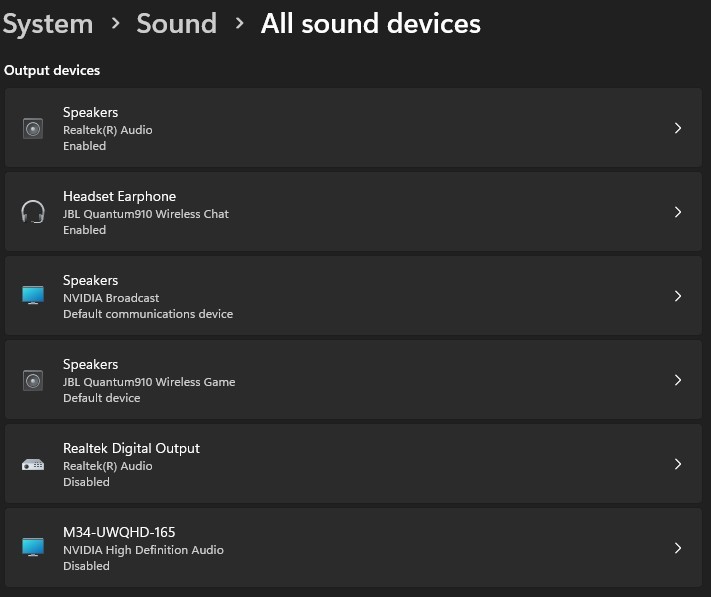
After installing the update Windows 11, version 24H2, I’m encountering an issue with my audio devices in Windows 11. A specific output device is visible under System > Sound > All sound devices, but it does not appear in the list of available outputs to select as my playback device. It's a gaming headset JBL 910 Quantum.

Here’s what I’ve tried so far:

  1. Verified that the device is enabled in All sound devices.
  2. Checked the More sound settings and confirmed it’s not listed in the Playback tab.
  3. Restarted the Windows Audio service (this worked before, but not this time).
  4. Reinstalled the driver, both through Windows Update and manually from the manufacturer’s website.
  5. Reset the audio settings via Advanced sound options > Reset.
  6. Verified that my system is fully updated through Windows Update.
  7. Tried using the Troubleshooter, but it didn’t identify any issues.

None of these steps resolved the problem. The device in question works fine on other systems, so it doesn’t appear to be a hardware issue.

Does anyone have any ideas or solutions? Any help would be greatly appreciated!

Thanks in advance!
EDIT:

It seems to be an issue with the windows update itself. Upon checking the device properties, all the affected devices show the following error in the Events tab:

Device settings for {{key device specific}} were not migrated from the previous OS installation due to partial or ambiguous device match.

EDIT 2 (10/12/2024):
Microsoft released a Driver update for JBL HID downloadable from the Updates > Advanced Options > Optional Updates: not solving the issue.

EDIT 3 (17/12/2024):
The issue is with JBL Quantum Sphere app, removing the app makes the device appear again in within the output devices. I had a long chat with JBL support, and they confirmed thousands of contacts about this specific issue, and that the resolution is on Mircorosft side. Once Quantum Sphere is installed, Windows 11 24H2 identifies the device as a Spatial Sound effect rather than a device itself, making it disappear from the list.

Windows for home | Windows 11 | Devices and drivers

Locked Question. This question was migrated from the Microsoft Support Community. You can vote on whether it's helpful, but you can't add comments or replies or follow the question.

0 comments No comments
{count} votes
Answer accepted by question author
  1. Anonymous
    2025-01-22T05:34:34+00:00

    i have a fix finally :) works 100%

    You can fix JBL headset that has disappeared in windows 10/11 by doing the following (make sure you've got the latest version of Quantum installed first):

    1- Open device manager and navigate to "sound, video and game controllers"

    2- Right-click any JBL device, click uninstall and also tick "try to remove drivers"

    3- repeat under the "audio inputs and outputs"

    4- click "action - scan for hardware changes"

    this should reset all of the JBL drivers without affecting your Quantum software settings, and put the devices back on the list for selection. If it hasn't worked (usually windows 10) - restart the pc then it should.

    SIDE NOTE - after the restart, if your quantum app is dark (greyed out, not allowing you to click on it) just use task manager to force close it and wala that is it. It will all be back to normal again. i hope this helps others lord knows it helped me :)

    26 people found this answer helpful.
    0 comments No comments

22 additional answers

Sort by: Most helpful
  1. Anonymous
    2024-11-26T15:58:04+00:00

    I have the same problem

    8 people found this answer helpful.
    0 comments No comments
  2. Anonymous
    2024-11-29T12:14:31+00:00

    same problem, same headset

    4 people found this answer helpful.
    0 comments No comments
  3. Anonymous
    2024-12-02T07:43:49+00:00

    Hi Welcome to Microsoft community. I understand your frustration with the audio device issue after installing the Windows 11, version 24H2 update. It's certainly inconvenient when your gaming headset, the JBL 910 Quantum, does not appear in the playback device selection, especially after you've already tried multiple troubleshooting steps. You've already taken several effective measures, such as verifying device settings, restarting the Windows Audio service, reinstalling drivers, and using the built-in troubleshooter. It's clear that you've put in a lot of effort to resolve this issue. Additionally, it’s worth noting that many users have reported similar problems since the update, which suggests that it may be a broader issue affecting multiple systems.To further assist you, I recommend using the Feedback Hub to report this problem. Here’s how you can do that:Open the Feedback Hub: You can find it by searching for "Feedback Hub" in the Start menu.Report a Problem:Click on Report a problem.Provide a detailed description of your issue, including the steps you've already taken to try to resolve it.Include any relevant information about your system and the JBL 910 Quantum headset.Submit Feedback: This feedback goes directly to the Windows development team, helping them recognize and prioritize this issue for future updates.By submitting your feedback, you not only help yourself but also contribute to the community. The more users report similar issues, the more likely it is that the development team will prioritize a fix in a subsequent update. Your insights can greatly assist in identifying patterns and potential solutions.I truly empathize with your situation, and I appreciate your patience as Microsoft works to resolve these issues. If you have any further questions or need assistance with the Feedback Hub, please feel free to ask. I'm here to help you navigate this process and find a resolution. Thank you for your understanding! Best regardsDerrick Qian | Microsoft Community Support Specialist

    1 person found this answer helpful.
    0 comments No comments
  4. Anonymous
    2024-12-03T22:38:21+00:00

    I'm also have the same issue with my Jabra bluetooth headset. Was working fine on the Dell XPS Windows 10. I have been upgraded to a HP laptop with windows 11 and in the last two days I can no longer find the output for them, even though the headphones are connected as it shows under the bluetooth that it is connected.

    1 person found this answer helpful.
    0 comments No comments