I am trying to pull the Process metrics using Win32_PerfRawData_PerfProc_Process as documented at https://learn.microsoft.com/en-us/previous-versions/aa394323(v=vs.85)
From the document, VirtualBytes states
Current size, in bytes, of the virtual address space that the process is using. Use of virtual address space does not necessarily imply corresponding use of either disk or main memory pages.
and PrivateBytes
Current number of bytes this process has allocated that cannot be shared with other processes.
I am trying to retrieve following data and compare with resource monitor output.
- "VirtualBytes"
- "VirtualBytesPeak"
- "WorkingSet"
- "PoolNonpagedBytes"
- "PoolPagedBytes"
- "PrivateBytes"
- "PageFileBytes"
- "PageFaultsPerSec"
I have consider retrieving data for powershell as example and it was running on PID=17820 (Refer to screenshot, the first row in resource monitor is powershell.exe)
The Memory related values from Win32_PerfRawData_PerfProc_Process does not match with resource monitor.
Python code to retrieve information using Win32_PerfRawData_PerfProc_Process and win32com.client
from win32com.client import Dispatch
import pythoncom

server = Dispatch("WbemScripting.SWbemLocator", pythoncom.CoInitialize())
__wmi = server.ConnectServer("localhost", "root\\cimv2")

wql = f"SELECT * FROM Win32_PerfRawData_PerfProc_Process where IDProcess=17820"

raw = __wmi.ExecQuery(wql)

for item in raw:
    print(f"Process Name: {item.Name}, Process ID: {item.IDProcess}")
    print("===== Units in Kb =======")
    for name in ("VirtualBytes", "VirtualBytesPeak",
        "WorkingSet", "PoolNonpagedBytes", "PoolPagedBytes","PrivateBytes",
        "PageFileBytes","PageFaultsPerSec"
    ):
        print(name, int(getattr(item, name, None))/1024)
Python output:
===== Units in Kb =======
VirtualBytes 2152357168.0
VirtualBytesPeak 2152369180.0
WorkingSet 68968.0
PoolNonpagedBytes 29.078125
PoolPagedBytes 466.671875
PrivateBytes 74920.0
PageFileBytes 74920.0
PageFaultsPerSec 107.1767578125
- I am enclosing the screenshot of the script output as well as resource monitor.
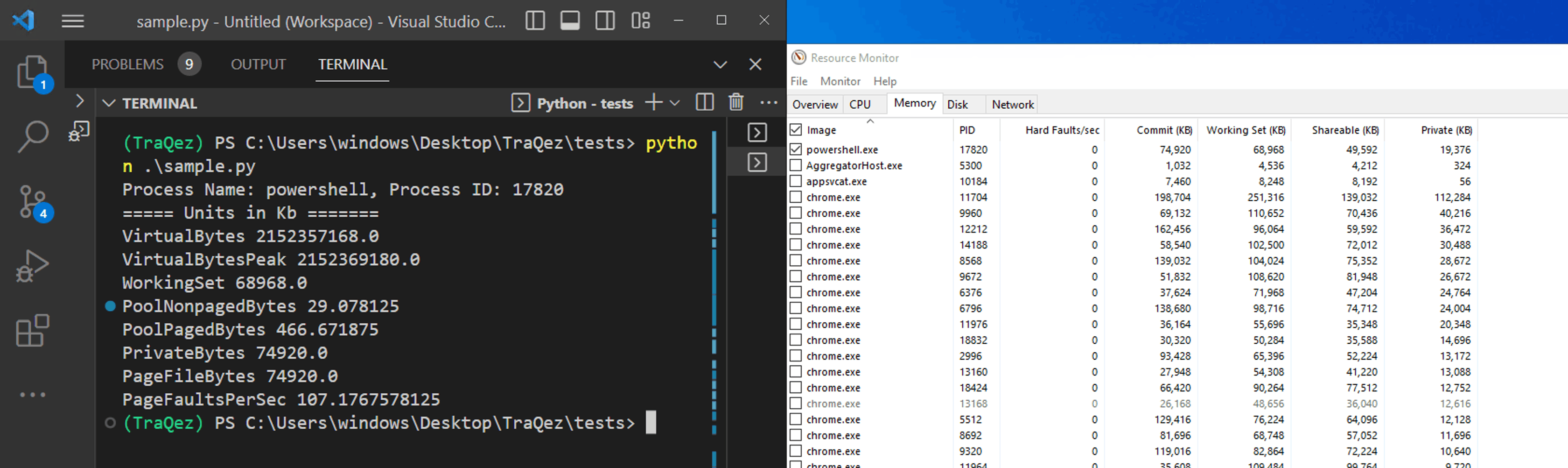
- Except WorkingSet Nothing matched (Working set matches with Working (Kb) in resource monitoring.)
-
PrivateBytes from the Win32_PerfRawData_PerfProc_Process DID NOT MATCH with Private (kb) in resource monitor. Can anyone explain why is that ?. Is PrivateBytes really map to Private(kb) in resource monitor. If not then how to compute Private(kb) that matches with resource monitoring.
- VirtualBytes is literally in TB very very large. Why is that so. (When I used psutil, it
vms matched with Commit Kb in resource monitor)
psutil output for same PID 17820.
>>> import psutil
>>> psutil.Process(17820).memory_info()
pmem(rss=70438912, vms=76718080, num_page_faults=109749, peak_wset=148389888, wset=70438912, peak_paged_pool=489968, paged_pool=477872, peak_nonpaged_pool=41288, nonpaged_pool=29776, pagefile=76718080, peak_pagefile=134217728, private=76718080)
>>>
I Guess vms from psutil output matches with Commit Kb in resource Monitor.
The question is how to map the output related to memory Win32_PerfRawData_PerfProc_Process to Commit Kb in resource monitor. Am I missing something or need to do some additional math to find commit kb.?
I tried below logic, but still it did not work.
Commit Memory = VirtualBytes - (VirtualBytesPeak - PrivateBytes)
- Similarly, how to find out the Shared Memory value which is shown in resource Monitor. This has something to do with Page, Pagefiles, hence I pulled even those information, however I am unable to find Shared Memory with those data points.
I tried below logic, but did not work with perf data. (It works with resource Monitor, if resource monitor Private memory value is considered. if perf raw data considered, its not matching)
Shared Page File Bytes = Page File Bytes - Private Bytes
Can anyone help me out on this. Conceptually I guess I am missing something.
The other data points like page info, pool info, working set, peak values from Win32_PerfRawData_PerfProc_Process match with the psutil output (observe both the outputs from above) except Virtual Memory
Refer to above description, I enclosed python code. Right now trying to compare results from Win32_PerfRawData_PerfProc_Process and Resource Monitor.
' cx='32' cy='32' r='32' /%3E%3Ctext x='50%25' y='55%25' dominant-baseline='middle' text-anchor='middle' fill='%23FFF' %3EA%3C/text%3E%3C/svg%3E)

