My Windows 11 system has been in normal use for nearly two years, but today, I suddenly found that my txt file cannot be opened normally with Notepad. Once opened, an error message like the first picture below will appear. It Says I have a dll file error.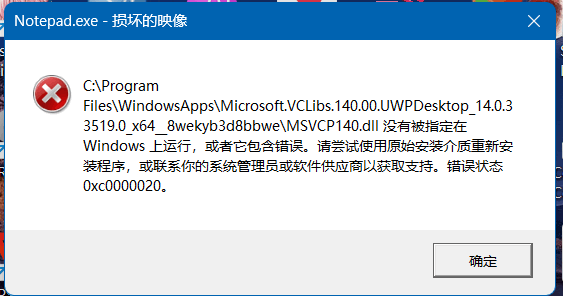
So I first ran the "sfc /scannow" command in the terminal and detected that some areas could not be repaired. Then I found out that those areas could be repaired by running the "dism /online /cleanup-image /restorehealth" command. Then I waited for a long time. , after repairing it, I ran "sfc /scannow" and there was no error message. Then I tried to open Notepad, but the above error still appeared. Then I was very confused. Is it a problem with the software itself? So I ran the "Get-AppxPackage Microsoft.WindowsJournal | Remove-AppxPackage" command to uninstall the Notepad software, and then re-downloaded it from the Microsoft Store. After the download was completed, the above error message still appeared. Then I downloaded the dll checking tool and tried to check whether there was a problem with the dll. I found that there was a problem with the following library.

Then I repaired the above software again and found that it still didn't work.
So I tried uninstalling and reinstalling, but it still didn’t work.
I tried downloading everything I might need, as shown below, but it still didn't work and the error still occurred.
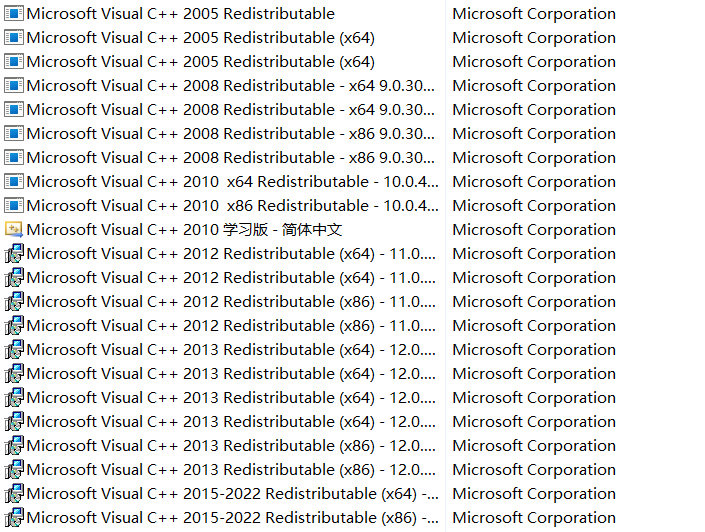
So I tried to use the latest feature of Windows 11 "Reinstall" (the one below)

After reinstalling, I excitedly opened Notepad, but an error still occurred, the same error as above.
I'm a little sad because I've spent a day trying to figure this out.
After that, I took a closer look at his path, which is the file "C:\Program Files\WindowsApps\Microsoft.VCLibs.140.00.UWPDesktop_14.0.33519.0_x64__8wekyb3d8bbwe\MSVCP140.dll". I think I deleted him directly, but the system prompted me that I didn't have permission. (And there seems to be a problem with the input board of this community. I can't paste some content into the text box with Ctrl+V. I don't know why. I can copy and paste normally)
Me I'm very confused. I don't know why this problem occurs? At the same time, the "Photos" software on my computer (which comes with Windows 11) cannot be opened normally. As soon as I open it, the photo box will pop up, which is all white, just like below
Then there was a problem with my edge browser. It couldn't open certain PDF files normally. Those files were blank after opening. I don't know why. I can open and display them normally with Google Chrome.
By the way, I suspect that the reason for all this is because I accidentally deleted some files in the C drive the day before yesterday. Because my C drive has started to turn red, I used Lenovo’s own cleaning tool to delete the files in the C drive. Some large text files that don't look important, and some video files that don't look important, and here's what my computer looks like today. Oh my God, I could still use it yesterday!😭😭😭
Well, a lot of questions came up today, thank God for adding some fun to my life!
' cx='32' cy='32' r='32' /%3E%3Ctext x='50%25' y='55%25' dominant-baseline='middle' text-anchor='middle' fill='%23FFF' %3EA%3C/text%3E%3C/svg%3E)
