I am heaving one virus in PowerShell and sometimes PowerShell is opening by itself, without ME opening it.
The virus is so sophisticated that also Microsoft Defender when I scan with PC Manager is able to detect it, but Microsoft Defender is not able to delete it. The PowerShell virus is like this. Look at the screenshot of GridinSoft Anti-Malware that I attached to You because GridinSoft Anti-Malware is also able to detect the virus but not able to delete it. GridinSoft Anti-Malware says you have to reboot your Computer then we will delete the virus but, after the reboot and one new scan with GridinSoft Anti-Malware that is supported by one antivirus and Computers security in Israel. After the reboot and one new scan with GridinSoft Anti-Malware the PowerShell virus is still there. Nor GridinSoft Anti-Malware nor Microsoft Defender is able to delete this PowerShell virus. They only can detect it try to delete but, they cannot delete it. The exact name and where the virus is you have in the screenshot of GridinSoft Anti-Malware.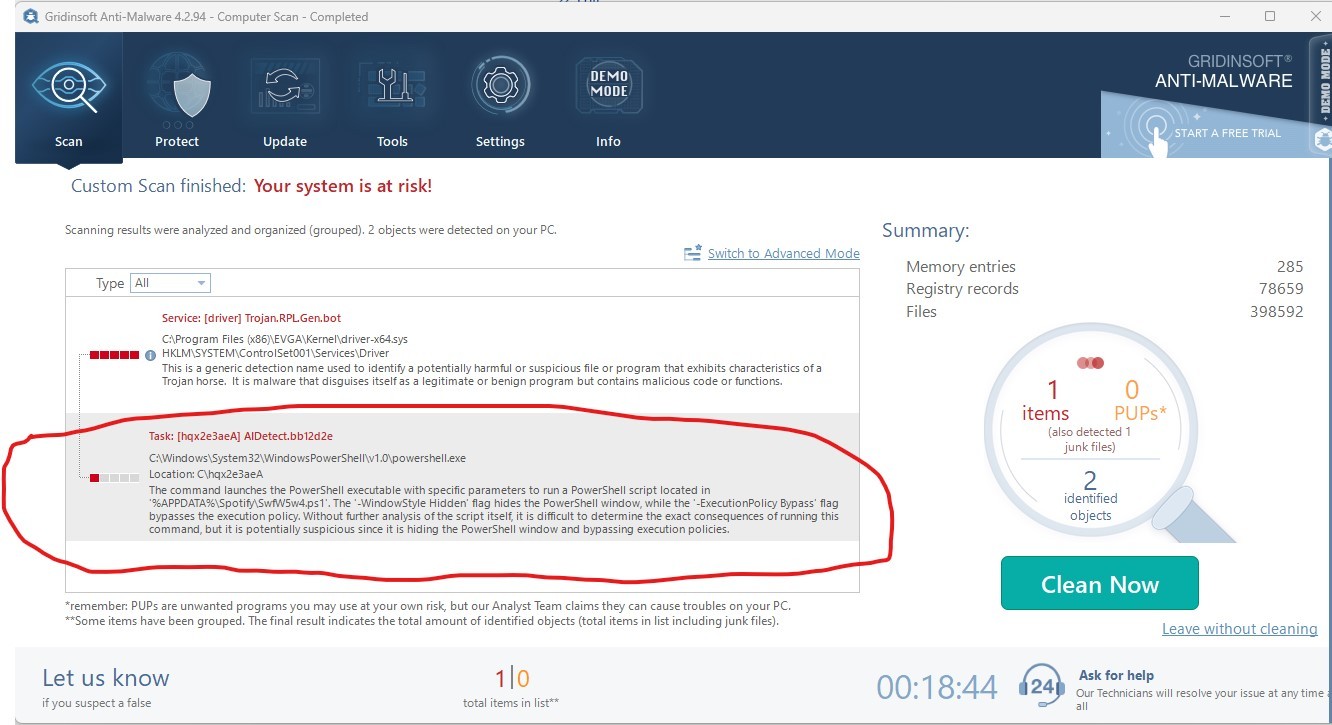
' cx='32' cy='32' r='32' /%3E%3Ctext x='50%25' y='55%25' dominant-baseline='middle' text-anchor='middle' fill='%23FFF' %3EA%3C/text%3E%3C/svg%3E)

' cx='32' cy='32' r='32' /%3E%3Ctext x='50%25' y='55%25' dominant-baseline='middle' text-anchor='middle' fill='%23FFF' %3EDB%3C/text%3E%3C/svg%3E)