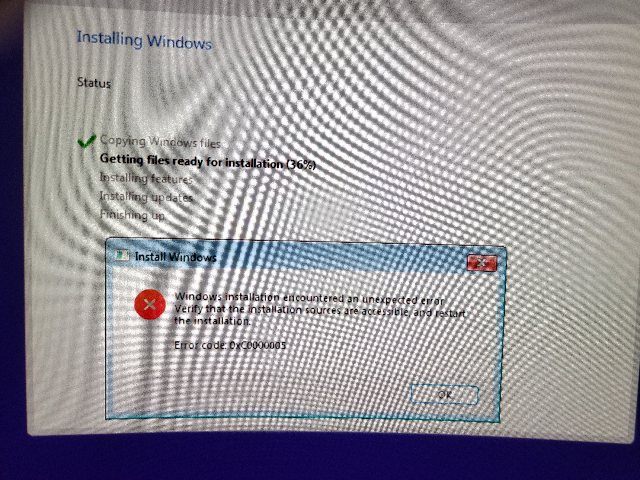
Unable to install windows 11 error code 0xc0000005

Anonymous
2023-08-22T22:08:30+00:00

I've gotten nothing but errors trying to install windows 11 on this new pc

Asus z790-p wifi bios 1220 latest available today

2x 16gb trident z5 ddr5 6400

Power 1150w psu platinum

Zotac rtx 4090 trinity edition gpu

I9-13900k intel cpu

2x 2tb Samsung 980 pro nvme's Gen 4

Samsung neo g8 32" 240hz monitor

Logitech g604 mouse

Razer black widow ultimate keyboard

Ethernet connected 2.5gb port motherboard with cat 8 cable connected to asus ax11000 wifi 6e router connected also 10gb port on the router

I've reformatted the drives repartitioned many times, I've try install on both mvme same error. 2 different USB flash drives done with the windows 11 media creation tool same error. Removed 1 ddr ram try both or each one separately

always get same 0xc0000005 error during the windows getting files ready during installation.

Also booted to a safe mode and did memory testing 3x always pass no problems found. Used Samsung magician software and tested both nmve and no problems found.

Some times on reboot just get a dark screen wont even get to the logo/system bios start up.

Desperate need assist to get a working pc again thanks

Windows for home | Windows 11 | Install and upgrade

Locked Question. This question was migrated from the Microsoft Support Community. You can vote on whether it's helpful, but you can't add comments or replies or follow the question.

0 comments No comments
{count} votes

7 answers

Sort by: Most helpful
  1. Anonymous
    2023-09-29T04:26:20+00:00

    I have the exact same issue. I've RMAed my motherboard and am on my 3rd board but the error is still there. Tried multiple RAM sticks, multiple SSDs. I had microcenter check my PC as well but they couldn't identify anything other than the motherboard I RMAed.

    I'm frustrated beyond measure at this point. Can you help me install windows so I can use my PC again?

    7 people found this answer helpful.
    0 comments No comments
  2. Anonymous
    2023-11-03T00:32:17+00:00

    I am not sure i am being helpful but i have the same situation when using the media creation tool for windows 11, error 0xc0000005 at 3% of the process however i can install windows 10 with no issues.

    Going as far as troubleshooting cpu and mobo is kind of out of scope here.

    If windows 10 works there is no hardware issue except TPM chip which i have enabled.

    Tried windows 10, if that works than don't look further it is a windows 11 issue, maybe comparability with hardware but it is for sure win 11.

    So am now installing after installing win 10 from desktop running the bootable usb i create and it is installed fine.

    Now what is the difference? What?

    Doesn't make sense to me other than maybe you need to run diskpart and clean your disk.

    Sorry for not providing a lot but that was my only way to windows 11, this is on Lenovo T15 with i5 and 16GB ram.

    Luis

    9 people found this answer helpful.
    0 comments No comments
