Azure Databricks
An Apache Spark-based analytics platform optimized for Azure.
This browser is no longer supported.
Upgrade to Microsoft Edge to take advantage of the latest features, security updates, and technical support.

We need to ultimately limit the user to access databases and tables in the data tab.
By default what are the restrictions on dbfs folder? Do all users have access to them by default?
I have one workspace that I am seeing users are able to see the database under the data tab. Table access control is disabled in admin console
On the other workspace the users are NOT able to see the database under the data tab. Table access control is disabled in admin console
I am a bit confused on how the permissions work when table access control is disabled in admin console. Does it take access away from all folder in DBFS or just Filestore and user folder.
I have followed several links like but some basics are still not very clear.
https://docs.databricks.com/data/tables.html
https://docs.databricks.com/administration-guide/access-control/table-acl.html
https://learn.microsoft.com/en-us/azure/databricks/security/access-control/cluster-acl
https://learn.microsoft.com/en-us/azure/databricks/administration-guide/access-control/table-acl
Would really appreciate some help on this.
I have asked somewhat similar question in another post of mine and didnt get any answers on that.
Here is the link to my other post and if you can address that also, it be nice.

Hello @Sarah C Benjamin ,
Thanks for the question and using MS Q&A platform.
By default, all users have access to all data stored in a cluster’s managed tables unless table access control is enabled for that cluster. Once table access control is enabled, users can set permissions for data objects on that cluster.
Table access control lets you programmatically grant and revoke access to your data using the Azure Databricks view-based access control model.
Table Access control feature is only available in High Concurrency mode and needs to be turned on so that users can limit access to their database objects (tables, views, functions, etc.) created on the shared cluster. In case of ADLS, we recommend restricting access using the AAD Credential Passthrough feature instead of Table Access Controls.

Does it take access away from all folder in DBFS or just File store and user folder?
Table access control lets you control access to securable objects like catalogs, databases, tables, views, and functions.
For more details, refer to Enable table access control for your workspace and Data object privileges.
Hope this helps. Do let us know if you any further queries.
---------------------------------------------------------------------------
Please "Accept the answer" if the information helped you. This will help us and others in the community as well.
Hello @Sarah C Benjamin ,
Just checking in to see if the above answer helped. If this answers your query, do click Accept Answer and Up-Vote for the same. And, if you have any further query do let us know.
Hello @Sarah C Benjamin ,
Following up to see if the above suggestion was helpful. And, if you have any further query do let us know.
Take care & stay safe!
---------------------------------------------------------------------------
Please "Accept the answer" if the information helped you. This will help us and others in the community as well.
Hi Pradeepcheekatla-msft, sorry I went through these documentations before putting this post but they aren't very clear. So no your answer didn't help much.
Here is what I have.
1) I have a user1 with Allow cluster creation is disabled.
2) I have Table access control enabled under access control of Admin Console.
3) I have a standard 'DemoCluster', under permission settings for Demo cluster, I have User1 as Can Attach to Permissions.
4) Under Data tab, I have a database called 'Customer data' and Demo cluster is on.. I have created test.csv files there.. Which I can see but user1 cant see the database 'Customer data' even.
What am I missing here?
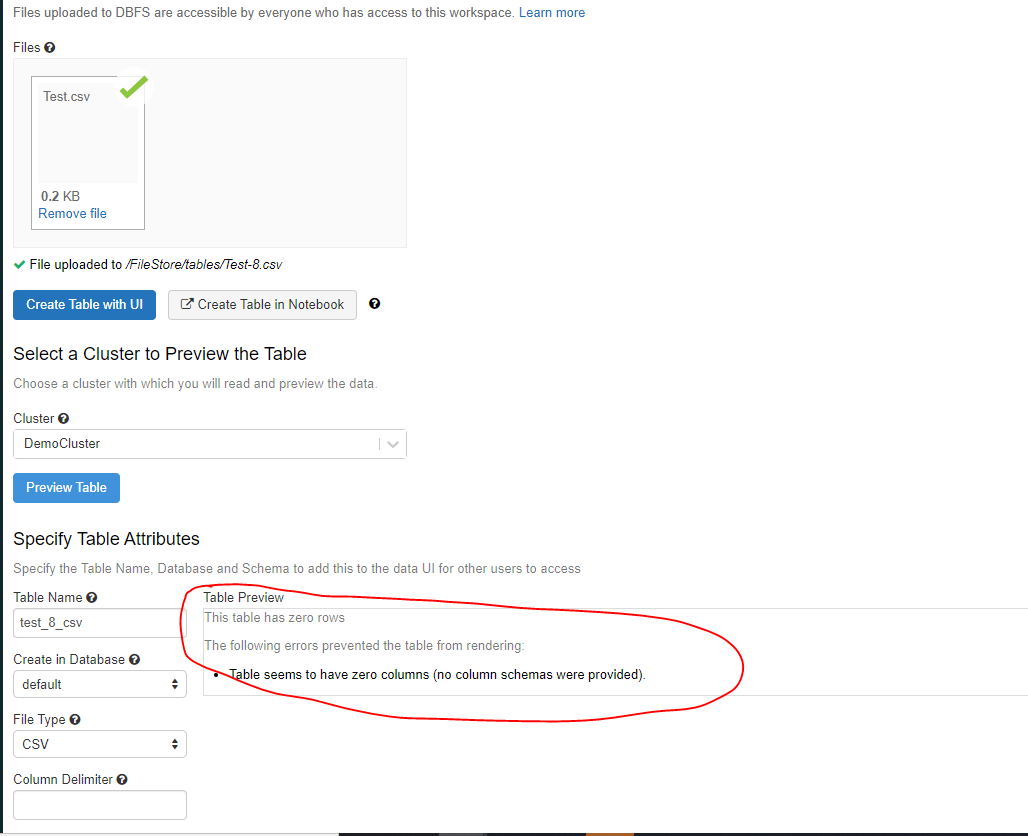
Also, why do I keep getting this message Table seems to have zero columns when its a 0.2 kb file. Its doing that with larger files too. Can data not be loaded to tables using standard clusters?
Hello @Sarah C Benjamin ,
Unfortunately, I could not repro the issue from my end.
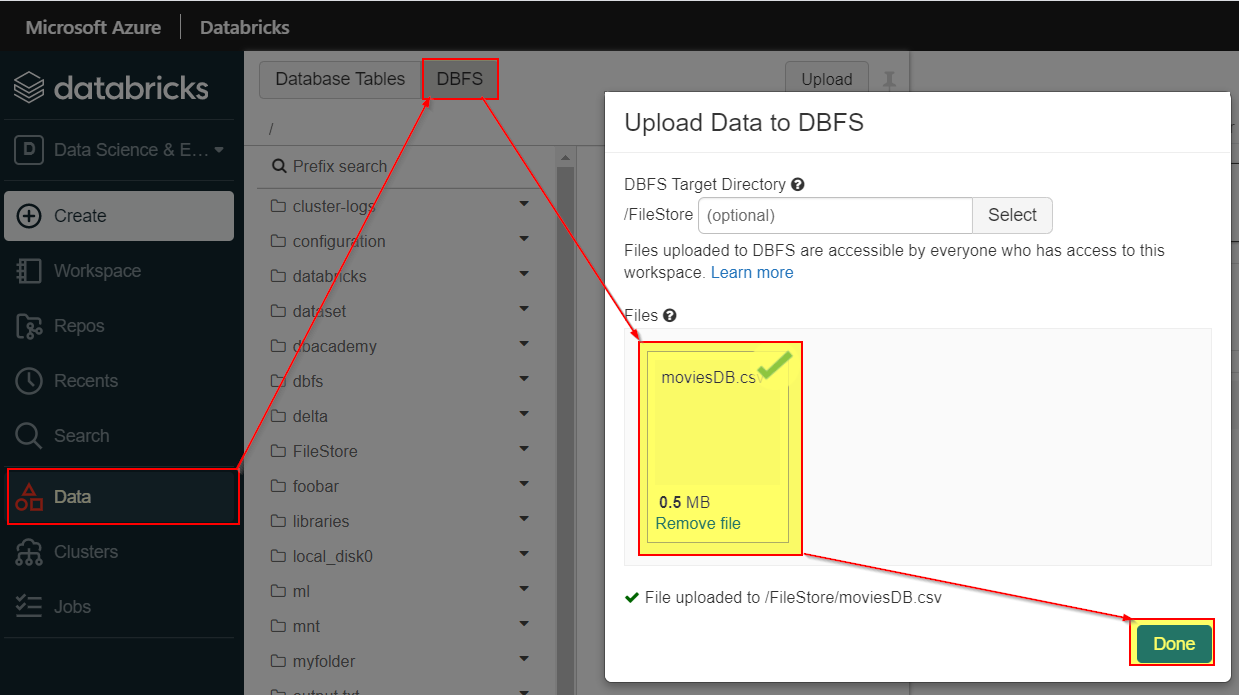
If I upload Data to DBFS, it directly upload to the /FileStore/ folder. It does not gives me option to create a table via UI.
This issue looks strange. For a deeper investigation and immediate assistance on this issue, if you have a support plan you may file a support ticket.

Hi @PRADEEPCHEEKATLA , @Sarah C Benjamin ,
Would say I'm facing the same concern as Sarah.
Does it take access away from all folder in DBFS or just File store and user folder?
We have multiple databases for different Clients. So one client should not see other clients data (No even know about existence of other client Databases) This is why we need Table ACLs.
The problem is that once we enable Table ACLs in a cluster, all our users loose all instructions/commands on DBFS locations. Including any access to mount point on external Storage (my case ADLS). I understand the need to secure tables DBFS locations, but it seems too restrictive to not allow any file operation on DBFS on any location.
Is there a workaround this restrictions? how would you suggest to have file access?
When Disabled ACLS (Standard Cluster)

When Enabled ACLS (High Concurrency Cluster)

Hope this adds more light into Sarah's concern.
Regards,
Emiliano
Hello @Emiliano Llera Do Campo ,
Since this thread is too old, I would recommend creating a new thread on the same forum with as much details about your issue as possible. That would make sure that your issue has better visibility in the community.