Community Center | Not monitored
Tag not monitored by Microsoft.

This browser is no longer supported.
Upgrade to Microsoft Edge to take advantage of the latest features, security updates, and technical support.
' cx='32' cy='32' r='32' /%3E%3Ctext x='50%25' y='55%25' dominant-baseline='middle' text-anchor='middle' fill='%23FFF' %3EJL%3C/text%3E%3C/svg%3E)
Hi guys,
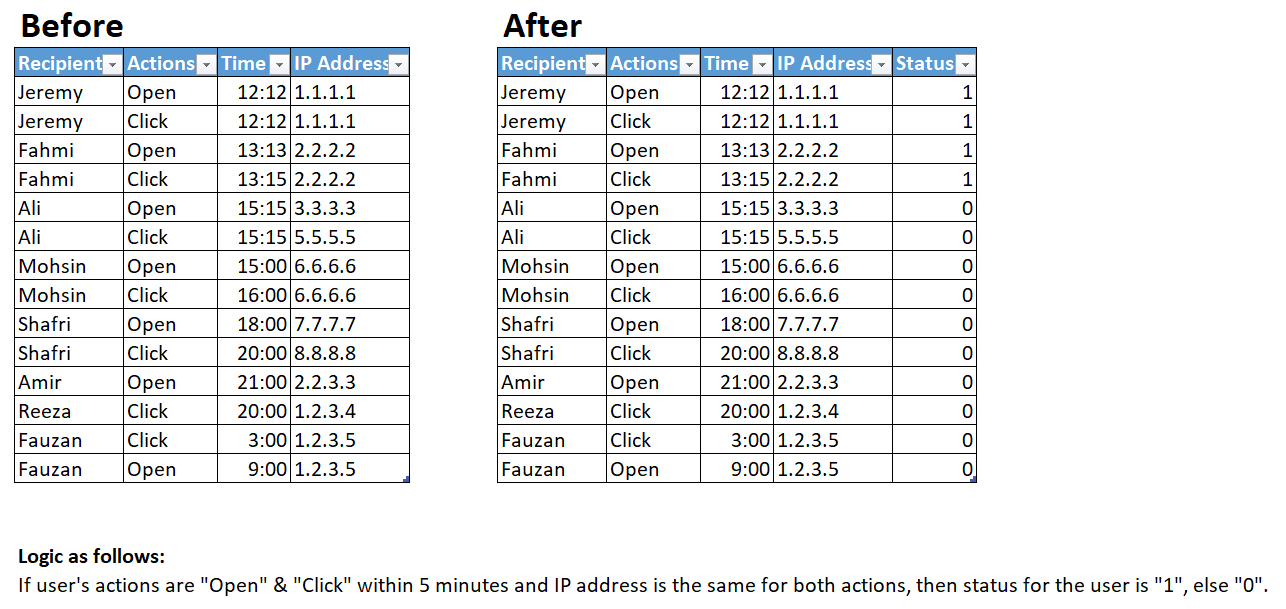
I would like to compare the rows of my dataset using power query. The logic is as follows:
Appreciate if anyone can help me with the logic.
You may refer the dataset "before" & "after" as attached.

Hi @Anonymous . Couple of questions:
To avoid any issue especially with the [Time] values could you upload & share (i.e. with OneDrive) a representative sample? Thanks
EDIT Why is Moshin's [Status] = 0?
Hi @Lz._ ,
Thanks a lot for replying.
For the [Time], we take it as the same day - 28/05/21. The example of the time format will be 05/28/21 17:00. There are instances where we might have different dates (e.g. 25/05/21 to 28/05/21). In Mohsin's case, the status is "0" as it is an hour apart.
@Anonymous . No representative sample => One will have to create dummy data :-((
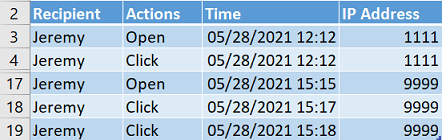
Can we get the expected [Status] for:
Hey man, I am so sorry about that.
For the data set you provided, the expected [Status] would be "1" for all of them. The breakdown as follows:
If Line #17 [IP Address] were to be "8888" or [Time] were to be "05/28/2021 15:10", then Line #17 [Status] will be "0".
@Anonymous
Still not sure. What I understand is you want to measure if <= 5 minutes between Open Time AND 1st Click Time (+ same IP Address), correct?
@Lz._ It doesn't have to be the 1st click time. It can happen throughout the whole list but as long as the conditions below are met, those line will have [Status] = "1".
Conditions:
@Anonymous . IMHO there's something wrong in term of logic
OK for same [IP Address] but...
If you don't always take the 1st (earliest) Click Time following an Open action how can you accurately measure the <= 5 minutes given that you earlier said that your records are ordered most of the time (most doesn't = all :)
Can we agree to measure the <= 5 mins between Open Time & Earliest Click Time following that Open?
@Lz._ sure, we can. I believe it makes sense too to measure the time <5 mins between Open Time & Earliest Click thereafter.
Hey @Anonymous
Final version is available here. I shortened and improved function AddRecipientStatus in term of perf.
Put comments in the different querie's code => hopefully they answer your question
Power Query M documentation is available here. If you want pointers for learning purpose let me know
Thanks a lot for the help, will definitely go through the documentation.
I am a bit confused with the following:
CaseOpen = (actionTime as datetime) as number =>
if Table.IsEmpty(
Table.SelectRows(TableOfClicks, each
([Time] >= actionTime) and
([Time] <= actionTime + #duration(0,0,5,0))
)
) then 0 else 1
If I am understanding it correctly, does it mean if table is not empty, then refer to TableOfClicks, pass the line items which with the [Time] to determine whether [Status] is "1" or "0"?
No, re-read my Comments in the function (& next to the AddedStatus step)
When the table is empty or not the function ends and the result (0 or 1) is returned to the caller (the AddedStatus step). To make it more clear, you can re-write the function i.e. as follow:
CaseOpen = (actionTime as datetime) as number =>
    let
        SelectRowsMeetingTheCriterias = Table.SelectRows(TableOfClicks, each
            ([Time] >= actionTime) and
            ([Time] <= actionTime + #duration(0,0,5,0))
        ),
        Result = if Table.IsEmpty(SelectRowsMeetingTheCriterias) then 0 else 1
    in
        Result,
That helps! One last question, what does the actionTime refers to?
(feel free to UpVote all replies that help :)
Could you check this first version:
and let me know what doesn't work as expected
@Lz._ for the results, all are good except for Line #20 for the RecipientStatus for Jeremy, the [Status] should be "0" as there is no [Actions] of "Click" followed after the "Open" with the same [IP Address].
I have added more records but unable to save them. It is shown as "Viewing" only. I have attached an image of them below, truly sorry for the inconvenience caused. The idea is that some users might share the same [IP Address] due to the similar ISP used.

Re. all are good except for Line #20 for the RecipientStatus for Jeremy, the [Status] should be "0" as there is no [Actions] of "Click" followed after the "Open" with the same [IP Address]
Below are Jeremy's records. If you stick to what you say above I'm completly lost:

The [Time] have to be <5 mins apart between the "Click" & "Open" with the same [IP Address]. If the [Time] are >5 mins apart, then it is "0".
For Line #20, there is only 1 [Action] which is "Open" but there is no "Click" within the next 5 mins thereafter, hence it should be "0".
@Anonymous
That's what I was afraid to read/understand. This makes things extremely difficult to manage and I'm not sure I'm skilled enough to tackle such challenge. I will think about it and come back to you in any case
Quick question: when you get your records, do you have a column with a unique ID for each record?
@Lz._
Really appreciate very much for everything here.
The only unique ID will be the email of the users (which are denoted as [Recipient] in this case).
@Anonymous . Could you play with this version and check?
Notes:
@Lz._
Thanks for the help. The others are correct except for the ones below, they should have have a [Status] of "1".


Hey @Anonymous
Explain me why rows 10-13 should get a 1 please? I might have pushed the cursor too high but before changing anything I have to understand this
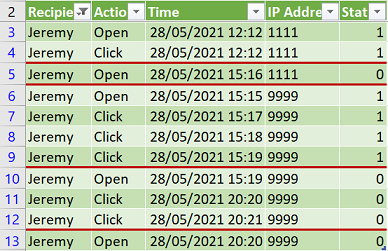
What I've implemented so far, and that's what the picture shows with the square blocks is:
When an OPEN is found then look for a CLICK (following that OPEN) within the 5 minutes. And I do this EACH time I find an OPEN (by RECIPIENT and IP)
Regarding ADAM (your 3rd pic.) I don't see why he should get a 1 for OPEN on 5/28/21 00:00 as this a single record (no CLICK afterwards) with IP 2222
@Lz._
For the 3rd pic, I have removed them after posted but not sure why it is not deleted in the comment section, my apologies for that.
Can I take it that for each OPEN is found regardless of where it is located at in the list, it will always look for CLICK right after? If yes, does it go through the whole list?
Re. Can I take it that for each OPEN is found regardless of where it is located at in the list, it will always look for CLICK right after? If yes, does it go through the whole list?
If my understanding of your good English (I'm not native) is right the answer would be Yes. Would be as you say CLICK right after (can be understood as 1st row after the OPEN) and that's not exactly what I doing. I look at all CLICKs after each OPEN (and before the next OPEN) and if one of those CLICKs is within 5 mins after the OPEN time => 1 otherwise 0
That's exactly what my above picture (re. Jeremy) shows. Now, be concious this has a cost (computation/query refresh time)
Using back the latest picture above, for line #13 (Jeremy), the [Status] is "0" as it does not refer back to the previous ones (i.e. line #11 & #12)?
After each OPEN, it only looks for the next available CLICK(s) before a new OPEN?
For the example below, is this the expected outcome?

Using back the latest picture above, for line #13 (Jeremy), the [Status] is "0" as it does not refer back to the previous ones (i.e. line #11 & #12)?
Correct, that's what I implemented
For the example below, is this the expected outcome?

Yes (that's what I implemented). The 1st record is an OPEN and there's no CLICK before the next OPEN => [Status] = 0
I'm under the impression you're hesitating on something...
In our current situation, Jeremy might OPEN the emails multiple times, and CLICK the link thereafter. Is it possible if we include all of these OPEN as "1"?
As long as the [IP Address] is the same, [Time] <5 min between any OPEN & any CLICK, we take all the OPEN and CLICK as "1".

As long as the [IP Address] is the same, [Time] <5 min between any OPEN & any CLICK, we take all the OPEN and CLICK as "1"
This makes things much easier but this isn't what you asked earlier... Is this your last word before I go look at it?
I am very sorry about how I phrased them as I am not a English native speaker.
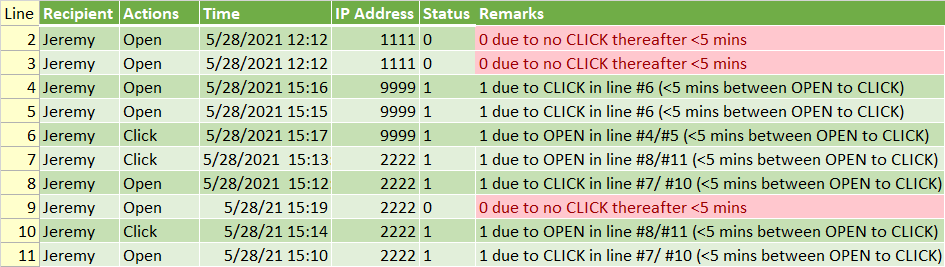
As long as the [Recipient] has the same [IP Address], any OPEN & any CLICK (one after another: OPEN -> CLICK) are within 5 mins, the [Status] is "1".
Expected outcome for [Status]:

1 for 15:16 why not when I refer to what you earlier said where it wasn't a question of time as long as one any Click was whithin 5 minutes of any Open
And now you expect 0 for 15:19 and that doesn't follow the above logic. I asked you to explain the logic, not to give me the expected result. So please take IP 2222 only and add a comment next to each row where you explain why it's 0 or 1. Take your time please - I have an appointment anyway...
Hi @Anonymous
Your remarks definitively helped => Implemented the corresponding logic. I did a few checks against my TestTable and this seems good to me. Double check and confirm please. If a [Status] isn't good, same as yesterday give me a remark explaining why (the [ROW] column has been temporarily added for that)
Note that this version doesn't reorder the records as in the source table to facilitate your checks. I'll do the cleanup and reorder if result is OK on your side
Hey, the logic works great! Is it possible for you to walk me through on the "AddRecipientStatus" function and how you incorporated it to the query "RecipientStatus" please?