Yes, there are many of these types of posts here. But I tried most of the methods shown there but just failed.
I accidentally installed the wrong Windows ISO when trying to do a repair upgrade and now I can't keep my apps (kind of an inconvenience but I just wanted to do a repair upgrade with all my stuff intact). I sheepishly downloaded the English International ISO, not knowing that the default system language was en-US.
I naturally tried these commands in WinRE:
DISM /image:D:\ /Set-UILang:en-GB
This threw up an error:
Could not set UI Language Fallback
Could not set up install fallback
So I tried using this command
DISM /Image:D:\ /Set-UILangFallback:en-GB
which throws the same error.
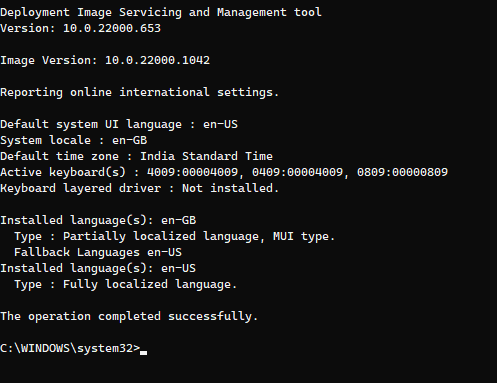
This is what I got when I used DISM /Online /get-intl
I have changed everything in the settings to en-GB as shown, I just can't change the default System UI language to en-GB
Also I didn't try out the ways which involved in tweaking the registry as I wanna try to get around this problem without touching the registry
Any suggestions on what I should do?
' cx='32' cy='32' r='32' /%3E%3Ctext x='50%25' y='55%25' dominant-baseline='middle' text-anchor='middle' fill='%23FFF' %3EA%3C/text%3E%3C/svg%3E)

' cx='32' cy='32' r='32' /%3E%3Ctext x='50%25' y='55%25' dominant-baseline='middle' text-anchor='middle' fill='%23FFF' %3ETL%3C/text%3E%3C/svg%3E)