Change Windows Default System UI Language (solutions from other posts didn't work)

Anonymous
2022-10-25T13:18:22+00:00

Yes, there are many of these types of posts here. But I tried most of the methods shown there but just failed.

I accidentally installed the wrong Windows ISO when trying to do a repair upgrade and now I can't keep my apps (kind of an inconvenience but I just wanted to do a repair upgrade with all my stuff intact). I sheepishly downloaded the English International ISO, not knowing that the default system language was en-US.

I naturally tried these commands in WinRE:

DISM /image:D:\ /Set-UILang:en-GB

This threw up an error:

Could not set UI Language Fallback

Could not set up install fallback

So I tried using this command

DISM /Image:D:\ /Set-UILangFallback:en-GB

which throws the same error.
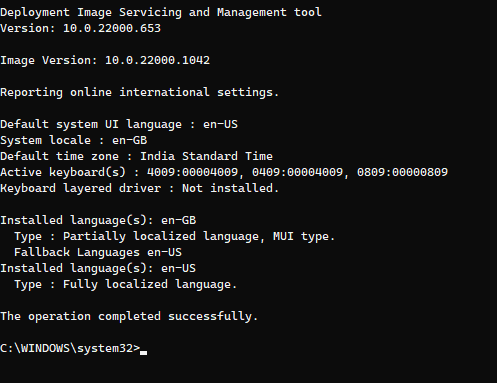
This is what I got when I used DISM /Online /get-intl

I have changed everything in the settings to en-GB as shown, I just can't change the default System UI language to en-GB

Also I didn't try out the ways which involved in tweaking the registry as I wanna try to get around this problem without touching the registry

Any suggestions on what I should do?

Windows for home | Windows 11 | Install and upgrade

Locked Question. This question was migrated from the Microsoft Support Community. You can vote on whether it's helpful, but you can't add comments or replies or follow the question.

0 comments No comments
{count} votes
Answer accepted by question author
  1. Time Lady 38,755 Reputation points Independent Advisor
    2022-10-25T16:14:51+00:00

    0809 is English-GB. So you may need to change the Install language to this.

    Have you checked the option to sync the language settings to all users?

    Region>Click the admin tab & choose ‘copy settings’.

    Other suggestions here:

    https://answers.microsoft.com/en-us/windows/for...

    It’s for Windows 10 but the information is still valid.

    5 people found this answer helpful.
    0 comments No comments
Answer accepted by question author
  1. Time Lady 38,755 Reputation points Independent Advisor
    2022-10-25T16:28:02+00:00

    That would change Default to En-US.

    Have you downloaded the en-gb language pack from the Microsoft App Store?

    As always there’s a risk so I would recommend backing up the registry first or even creating a disk image beforehand. However I had a similar problem - my PC had En-US as the language & even after changing the language to En-GB I couldn’t run an in-place repair & keep my apps & programs, this fixed the problem for me & I changed both default & installLanguage entry.

    3 people found this answer helpful.
    0 comments No comments

9 additional answers

Sort by: Most helpful
  1. Anonymous
    2022-10-25T16:38:14+00:00

    So should I set both InstallLanguage and Default to 0809?

    Also, I think I do have en-GB installed, as it appears as an installed language when I give DISM /Online /get-intl (as you can see in the attached picture), and I saw it in Settings as well (I installed en-GB through settings as an add-on)

    1 person found this answer helpful.
    0 comments No comments
  2. Time Lady 38,755 Reputation points Independent Advisor
    2022-10-25T16:43:20+00:00

    Yes or you can first try the suggestions on the link I posted.

    1 person found this answer helpful.
    0 comments No comments
  3. Anonymous
    2022-10-25T16:47:36+00:00

    Well it seems like I have already tried the other ones, so here goes nothing!

    I will inform you once it is successful

    0 comments No comments
