My photo workstation grinds to a halt on a regular basis. It doesn't crash; it just becomes unusably slow. Often it's not even possible to launch the task master or restart (other than via the power switch).
The symptom seems to be that memory (64Gb) is completely filled with Cached items. Individual process commits only total a few Gb (say, 10% of total). The rest is Memory Mapped files on the Standby or Modified list according to SysInternals RamMap. Performance is fine until the Cached entries completely fill physical RAM.
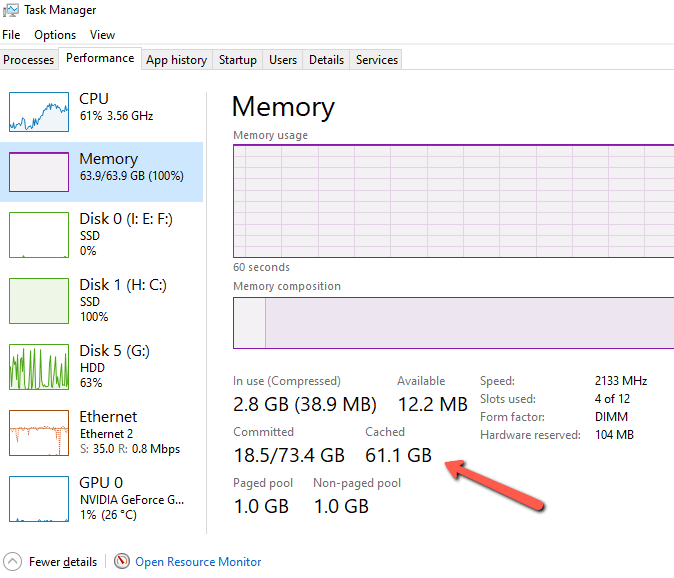
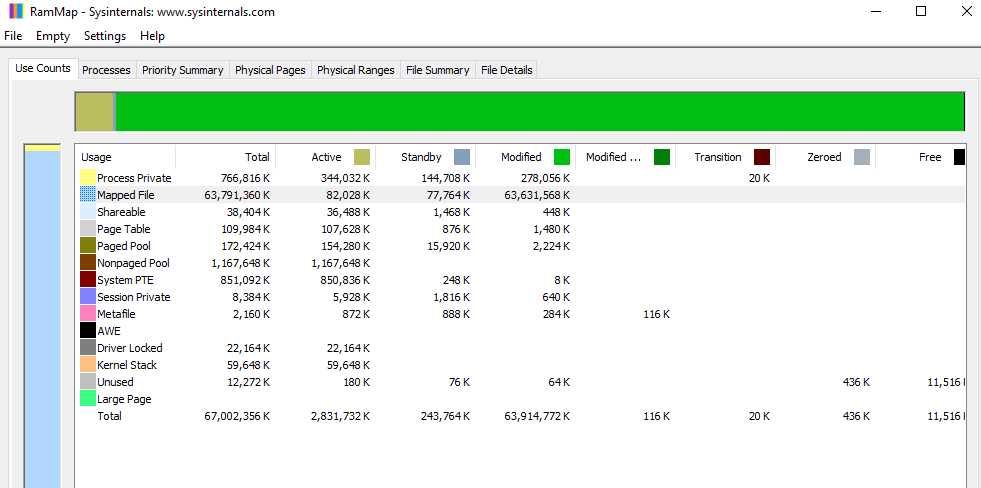
The file lists in RamMap don't reveal any particular culprit. The files associated with named processes seem to total a lot less than the Cached amount. This happens faster when big applications (Lightroom) are running, but eventually seems to happen no matter what I use.
I've tried changing virtual memory settings from off to auto to huge. A large pagefile seems to help buffer the problem but just delays the inevitable. I've also checked that drivers, BIOS, and Windows are up to date.
Now here's the Catch-22: I finally decided to reinstall Windows. An upgrade installation (leaving apps/files in place) can't be done if you boot from USB media; you have to start the installer from the running OS. But it seems that the Win installer itself is subject to this memory problem. I started the process yesterday, and it got through the preliminaries OK. But after 14 hours, the progress report had only reached 11%. I could just wait a week, but I doubt it would finish.
So, is there any workaround here, other than the nuclear option of a clean reinstall and rebuilding everything from backup?
The machine is an older workstation (dual Xeon v3) but well provisioned (64Gb, 2Tb SSD half full, Storage Space array with 3x4Tb HD, GTX 1650 Super).
' cx='32' cy='32' r='32' /%3E%3Ctext x='50%25' y='55%25' dominant-baseline='middle' text-anchor='middle' fill='%23FFF' %3EA%3C/text%3E%3C/svg%3E)

' cx='32' cy='32' r='32' /%3E%3Ctext x='50%25' y='55%25' dominant-baseline='middle' text-anchor='middle' fill='%23FFF' %3END%3C/text%3E%3C/svg%3E)