Developer technologies | .NET | Xamarin
A Microsoft framework for building cross-platform mobile apps using .NET and C# with native performance and user interfaces.
This browser is no longer supported.
Upgrade to Microsoft Edge to take advantage of the latest features, security updates, and technical support.
' cx='32' cy='32' r='32' /%3E%3Ctext x='50%25' y='55%25' dominant-baseline='middle' text-anchor='middle' fill='%23FFF' %3ENS%3C/text%3E%3C/svg%3E)
I am looking to use tabbed navigation for my app. I want the primary UI to be created using XML (even if it is an external xml file or files that I access using an include tag or somehow manually inflate) and preferably AndroidX. I have found stuff about Action Bars & Toolbars, but they do not seem to specify the tab code or UI using xml. Is it possible to create these things using xml, or do I need to do the whole UI in codebehind? I looked at the following page:
https://learn.microsoft.com/en-us/xamarin/android/user-interface/layouts/tab-layout/with-action-bar
This page was great for creating the tabs, codebehind & events, but I would prefer to add the content for each individual tab (which would probably be similar to the code for what a page would look like) using xml. Should I do this by setting the Visibility of one of several FrameLayout(s), Grid(s), or LinearLayout(s)? Is there a more standard way?
A Microsoft framework for building cross-platform mobile apps using .NET and C# with native performance and user interfaces.
' cx='32' cy='32' r='32' /%3E%3Ctext x='50%25' y='55%25' dominant-baseline='middle' text-anchor='middle' fill='%23FFF' %3EJ%3C/text%3E%3C/svg%3E)
Hello,
Welcome to our Microsoft Q&A platform!
but I would prefer to add the content for each individual tab
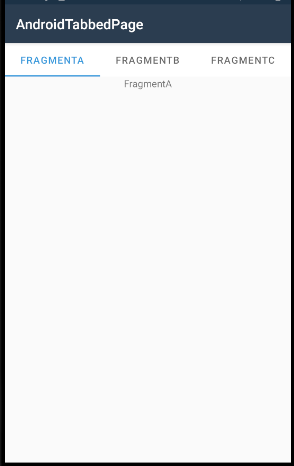
Try to combine TabLayout with ViewPager to achieve the tabbed navigation, and use Fragment as the content of each individual tab.
   <LinearLayout ...
       android:orientation="vertical"
       android:layout_width="match_parent"
       android:layout_height="match_parent">
       <com.google.android.material.tabs.TabLayout
           android:id="@+id/tabLayout"
           android:layout_width="match_parent"
           android:layout_height="wrap_content"/>
       <androidx.viewpager.widget.ViewPager
           android:id="@+id/pager"
           android:layout_width="match_parent"
           android:layout_height="wrap_content"/>
   </LinearLayout>
Create a custom adapter for the ViewPager to populate the data. You could inflate the layout.xml for the fragment. Here is the sample code, please check it.
   public class MainActivity : AppCompatActivity
   {
       TabLayout tabLayout;
       ViewPager pager;
       protected override void OnCreate(Bundle savedInstanceState)
       {
           base.OnCreate(savedInstanceState);
           Xamarin.Essentials.Platform.Init(this, savedInstanceState);
           SetContentView(Resource.Layout.activity_main);

           tabLayout = FindViewById<TabLayout>(Resource.Id.tabLayout);
           pager = FindViewById<ViewPager>(Resource.Id.pager);

           PagerAdapter adapter = new PagerAdapter(this.SupportFragmentManager);

           adapter.AddFragment(new FragmentA(), "FragmentA");
           adapter.AddFragment(new FragmentB(), "FragmentB");
           adapter.AddFragment(new FragmentC(), "FragmentC");

           pager.Adapter = adapter;
           adapter.NotifyDataSetChanged();
           tabLayout.SetupWithViewPager(pager);
       }
   }

   //custom adapter
   public class PagerAdapter : FragmentStatePagerAdapter
   {
       public List<AndroidX.Fragment.App.Fragment> fragments = new List<AndroidX.Fragment.App.Fragment>();
       public List<string> fragmentTitles = new List<string>();
       public PagerAdapter(AndroidX.Fragment.App.FragmentManager fm) : base(fm)
       {
       }
       public void AddFragment(AndroidX.Fragment.App.Fragment fragment, string title)
       {
           fragments.Add(fragment);
           fragmentTitles.Add(title);
       }
       public override int Count => fragments.Count;
       public override AndroidX.Fragment.App.Fragment GetItem(int position)
       {
           return fragments[position];
       }
       public override ICharSequence GetPageTitleFormatted(int position)
       {
           return new Java.Lang.String(fragmentTitles[position]);
       }
   }

   //custom fragment
   public class FragmentA : AndroidX.Fragment.App.Fragment
   {
       public override View OnCreateView(LayoutInflater inflater, ViewGroup container, Bundle savedInstanceState)
       {
           return inflater.Inflate(Resource.Layout.fragment_a_layout, container, false);
       }
   }
The screenshot:
Related doc: https://learn.microsoft.com/en-us/xamarin/android/user-interface/controls/view-pager/viewpager-and-views
Best Regards,
Jarvan Zhang
If the response is helpful, please click "Accept Answer" and upvote it.
Note: Please follow the steps in our documentation to enable e-mail notifications if you want to receive the related email notification for this thread.
I am very confused. It looks like your code is mostly codebehind (I was hoping for xml). I am also somewhat new to Fragment in general. Is there a way to design the tab UI with xml? Thanks.
Hi, njsokalski. In Android, we cannot include a xml view in the Activity layout directly, it needs to be done through fragments. The above code does consume the xml way. Each tab corresponds with a fragment, the view of the fragment is designed through the inflate command.
return inflater.Inflate(Resource.Layout.fragment_a_layout, container, false);
The code of Activity class and Adapter is used to populate the data for each tab.