Outlook for Mac - Automatic language detection - spelling check on multiple languages

Anonymous
2016-03-14T10:44:50+00:00

Hi,

I use outlook for mac 2016 with a subscription for office 365.

I write emails on different languages, switching constantly during the day from one language to another, depending on my client's language (english, spanish, french or portuguese). 

On outlook for PC, it isn't a problem.

On outlook for mac, the feature is gone after the last upgrade 15.20: outlook considers english as my only language, doesn't detect anymore the other languages, and considers all my typing on, say, spanish, incorrect. And even automatically corrects some of my typing making misspells. I have to re-read all my mails checking for mistakes (made by outlook) and "corrections" wrongly introduced by the app.

How can it be? Can you fix it? Does someone have the same problem and maybe some fix? Thanks in advance.

Outlook | MacOS | Legacy Outlook for Mac | For business

Locked Question. This question was migrated from the Microsoft Support Community. You can vote on whether it's helpful, but you can't add comments or replies or follow the question.

0 comments No comments
{count} votes
Answer accepted by question author
  1. Anonymous
    2016-11-18T19:53:06+00:00

    Hello everyone,

    On behalf of the team, we wanted to first thank you all for your feedback. As many of you have reported, when we switched over to using the new editor for Outlook 2016, we lost the ability to detect languages automatically.

    We’ve heard you loud and clear, and we’ve recently released the fix for this feature in our latest update version 15.28.0 (Build 16111501) released on 11/15.

    • Use Help > Check for Updates from any of the Office 2016 apps to get the latest build.
    • If for some reason you can’t update via Help, you can manually download and install the new build from this article.

    If you are an Office Insider, you might have noticed that this feature is turned on in version 15.29.*. Please note that some Insiders have had trouble seeing this feature and this will be resolved in upcoming 15.29 build next week.

    Lastly, after updating, you may notice that enabling this feature has a different workflow from the previous mail editor.

    To turn on automatic language detection, follow the steps below:

    1. Close Outlook if you have it open.
    2. Open System Preferences and click the Language & Regionicon.

    3. In the Language & Region dialog box, add your preferred languages.
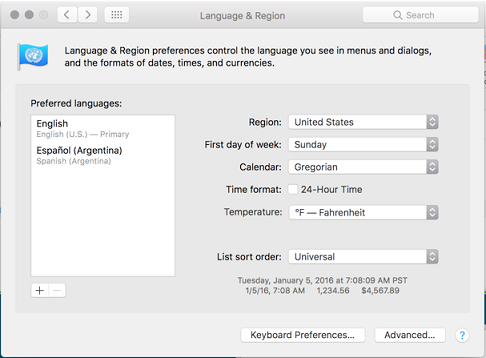
    ![](https://learn-attachment.microsoft.com/api/attachments/130f6031-801a-4b8f-ad3d-a6019a5f127c?platform=QnA) 4. Open Outlook and start a new email. Then go to Edit > Language > Language… to open the Language dialog box.
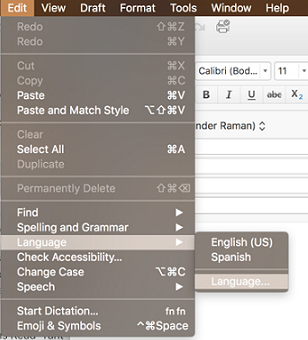
    ![](https://learn-attachment.microsoft.com/api/attachments/bff6a533-746d-492d-aceb-b57cc20340c8?platform=QnA) 5. In the Language dialog, check the box next to “Detect language automatically” and click OK.

    6. Compose a new email and language will be automatically detected. Note: You’ll need to type in the full sentence for the language detection to work, such as ending the sentence with a punctuation mark or start the next paragraph.

    We really appreciate your patience as we rolled this out. We love reading your feedback and how you use our products.

    Thanks,

    Sunder

    PM Manager | Outlook for Mac

    39 people found this answer helpful.
    0 comments No comments
Answer accepted by question author
  1. Anonymous
    2017-09-15T13:06:40+00:00

    Andy, it seems MS Office for Mac (or the Mac itself) does not recognize all "dialects" of a language.

    I need to use English and Spanish and it was not working for me. Since I live in Nicaragua I was trying to use the Spanish (Nicaragua) variation (Not that this dictionary is particularly different from regular Spanish).

    Any way, someone suggested I use another variant, so I tried with Spanish (Latin America) and Spanish (no last name), with the same result: it did not work.

    Then I tried with Spanish (Spain) and with this one, it worked.

    I hope this help you.

    2 people found this answer helpful.
    0 comments No comments

158 additional answers

Sort by: Most helpful
  1. Anonymous
    2016-03-15T05:35:04+00:00
    1 person found this answer helpful.
    0 comments No comments
  2. Anonymous
    2016-03-15T08:36:24+00:00

    Arched,

    I know perfectly where to provide feedback, and sure I already did. But what I would like here is an answer. A concrete answer. This is not helpful.

    0 comments No comments
  3. Anonymous
    2016-03-15T18:55:24+00:00

    The previous builds were using the OS spellchecker and supported automatic language detection.
    Now you have to select the language through the Edit > Language menu :-\
    A significant step back as far as I am concerned.
    There is also no easy way to assign shortcuts to different languages. I really really hate that change.
    It's probably related to the fact that the app now uses a new text editor.
     Corentin

    0 comments No comments