


CBS registry key missing after failed update - Windows 2016 Server

SeekingTruth 191 Reputation points
2021-07-08T09:12:43.213+00:00

I had a failed Windows update on a Windows 2016 Server. Now every time I run the Windows update it say there are no update.

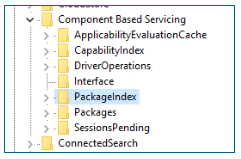
After doing some research I found that a number of registry keys are missing from "Component Based Servicing". These are the keys available on the server at the moment.

112973-image.png

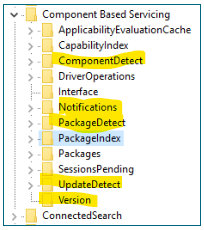
Comparing this to another server which is working I can see the the keys ComponentDetect, Notifications, PackageDetect, UpdateDetect and Version are missing.

112962-image.png

This explains why the server can not display and Roles or Features as well as not finding any updates.

I would like to add these reg keys by importing from a operational server which is at the same patch level and install software as this faulty one. Unfortunately it doesn't let me as I don't have the correct permissions. It will not even allow me to change the permission for the administrator.

Can anyone assist? I really don't want to rebuild the server which is a DC.

Thanks

Windows for business | Windows Client for IT Pros | Directory services | Active Directory
Windows for business | Windows Server | User experience | Other
{count} votes

6 answers

Sort by: Most helpful
  1. SeekingTruth 191 Reputation points
    2021-07-16T04:39:51.247+00:00

    Sorry for the delay in getting back.
    So far I have had no success in fixing this problem. I believe it is to far gone and I may need to rebuild it. It looks as though the issue arose from a failed update; server restarted during update process while the updates were being applied. That is only part of the update process ran. Not a clever thing to do.

    I am in several minds as to ..

    1. Attempt to restore the server from a backup and allow it to resync with the other DC or
    2. Rebuild the server as @Anonymous suggested
    3. System Recovery from the console.

    Cheers


Your answer

Answers can be marked as 'Accepted' by the question author and 'Recommended' by moderators, which helps users know the answer solved the author's problem.