hi s166014,
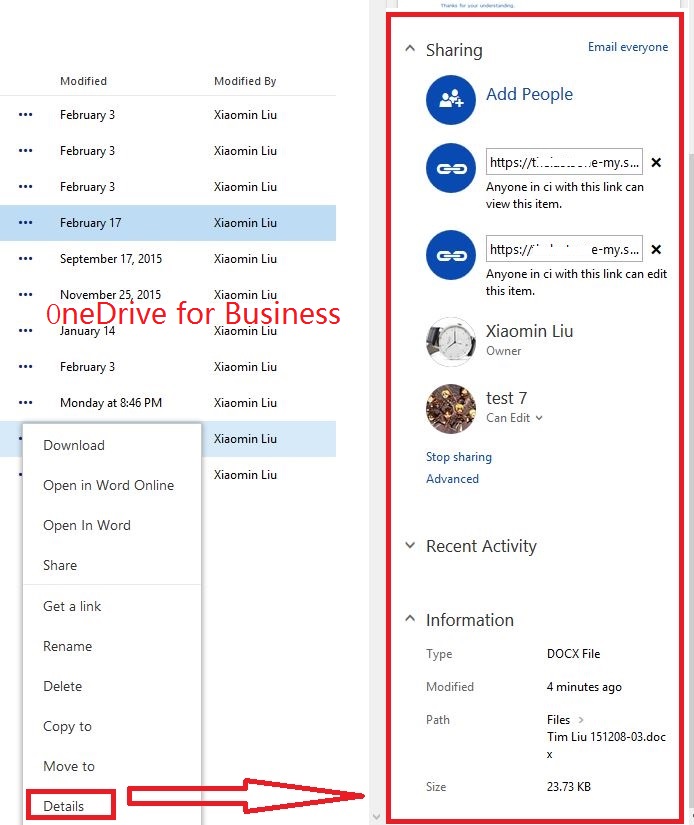
we cannot add comments in onedrive for business as the operation in consumer onedrive. the details section in onedrive for business only include sharing, recent activity, information.
in this case, we suggest you submit your requirement viauservoice. your good suggestions will help us improve our products.
thanks for your understanding.
the comments in sharepoint online is added when we check in a document. after we enable the check out feature for onedrive for business document library, we can add a comment about the change to the document when we check in it, and then we can view the comments
via click "…">version history.

to enable the version history, click return to classic onedrive at the left bottom of the page>setting gear>show ribbon (ribbon on)>library tab>library settings>versioning settings>choose
yes for require documents to be checked out before they can be edited>click ok.
best regards,
tim
' cx='32' cy='32' r='32' /%3E%3Ctext x='50%25' y='55%25' dominant-baseline='middle' text-anchor='middle' fill='%23FFF' %3EA%3C/text%3E%3C/svg%3E)
