Microsoft 365 and Office | Access | For home | Windows
A family of Microsoft relational database management systems designed for ease of use.

This browser is no longer supported.
Upgrade to Microsoft Edge to take advantage of the latest features, security updates, and technical support.
' cx='32' cy='32' r='32' /%3E%3Ctext x='50%25' y='55%25' dominant-baseline='middle' text-anchor='middle' fill='%23FFF' %3EA%3C/text%3E%3C/svg%3E)
Hi, I would like some help. I am using Access 2007 and as I have just started to create some databases for home use. The above is a screenshot of a Form I have created, in the background (as tabs) I show the 2 Tables I need help with.
I am trying to have it so I can run a query on one or more ingredients to return all recipes with this information.
At the moment I have 1 column of ingredients in the "Ingredient Listing" table and the same for the units of measure in the "Unit of Measure Listing" table. I think this should stay this way.
I have some basic queries set up, to pull information from my "Recipes" table which holds all the information. I have 15 separate columns to hold the unit of measure information and another 15 to hold the ingredient information. I am willing to have 15 identical/duplicate columns in the tables holding this information (instead of one), but there must be a better way.
Also I have tried to use information I have found to solve this problem, but I am unable to get what I think is the best and easiest solution to work. I found this "set Fieldb = fielda" and have tried to put it in an Expression Builder (with my database details) in the tables to duplicate information from 1 column to 15, no success.
If there is a way to query an ingredient without inputting its name under each (15) column, in separate rows I would be very interested. With the number of ingredients there are in a recipe, there is not enough rows in a query for me to do this.
I have attached this particular screenshot so you can see that some recipes show an ingredient more than once (generally with different units of measure). Also not all ingredients such as salt and pepper have a unit of measure to be recorded.
I feel like it is pointless to continue entering hundreds or thousands of recipes into this database until I can search for want I want properly. Any help with this would be greatly appreciated.
Locked Question. This question was migrated from the Microsoft Support Community. You can vote on whether it's helpful, but you can't add comments or replies or follow the question.
' cx='32' cy='32' r='32' /%3E%3Ctext x='50%25' y='55%25' dominant-baseline='middle' text-anchor='middle' fill='%23FFF' %3ES%3C/text%3E%3C/svg%3E)
First, a Compound key is tow or more FIELDS in a table that are used to make a Primary Key. A unique index is used to enforce uniqueness on a combination of fields without making those fields a PK. So lets give an example. You have a order system. So you have a order details table that records the items ordered in that order. The ProductID would not be unique in that table since different orders may include the same product. So the combination of OrderID and ProductID could be unique. So to prevent the data entry person from entering multiple line items for the same product you would create a unique index on the combination of the 2 fields. However you might still want to use a surrogate key to make it easier create joins with that table.
There is always some combination of fields that make a record unique, but using that combination as a primary key can be very cumbersome to create relationships.
Second, a surrogate key is a system generated key like an autonumber. Using a fieldname of suroogatekey makes no sense and was probably done just for illustration.
Third, I'd have to see the context about the quote; 'Surrogate keys avoid choosing a natural key that might be incorrect.'. But it is possible to select a compound key that is not unique. Going back to my example, lets say Products are further identified by size. So you would need the size to make it unique.
Fourth, every table should have a primary key. How else are you able to identify which record is being referred to in a related table. That is the purpose of keys. Access identifies the primary key in a table by using the key symbol.
Finally, the problem with a surrogate key is that, while it ensures uniqueness in a record it doesn't prevent duplication. Lets say you have a customer table. If you use a surrogate key the data entry person could enter a customer multiple times unless there is some check to make sure that doesn't happen.
Ken, I did what you said. I think I did it right. I also think this was from my testing. Don't know if I did it right but I entered information in the 'tblRecipeIngredients' overwriting what (I thought) was not meant to be there, for the records with no/incorrect 'riRecipeID'. Anyway I fixed the join, thanks.
If I change anything after it has been entered or saved, is it going to stuff up like this again?
I then had 2 Enter Parameter Value messageboxes come up when I tried to open 'tblRecipeIngredients', the first stated 'tblMeasurements.mMeasurementID', the second stated 'tblMeasurements.mMeasurement'. With some persistent searching I eventually found where these fields had unnecessarily been added in and deleted them, all fixed.
Gina good question actually. I have been thinking of renaming my Folders table to Source, so I can include Book Name, People and other places I have obtained recipes from. The reason for this database originally was because I have 4 cooking folders with recipes (under many categories) and techniques, but each folder has its own index, even though it is one set. It kind of gets annoying when you have to look at several indexes to find what you what. Also the recipe may be hard to find as it may be named something you may not think of when looking for it in the index, but if you know some ingredients then through the database it should be quick and easy to find what you are looking for. Also if you had an ingredient you needed/wanted to use up in a hurry, you would be able to search that ingredient and get recipe suggestions for it.
Just to answer a possible future question regarding my tables. I have a CardNumbers table as in at least one category there are recipes with multiple cards which have the same number. So I was thinking of something like 4-1,4-2,4-3 if 3 cards in the 4th recipe in that category (with separate recipes on each, say for a Christmas lunch). I figured I might not really need a separate table for this and could just enter it straight into a field on a table/form, but I just thought for consistent data entry it was best to do it this way.
I hope having special characters in my data is okay and won't cause any issues. Such as 1/2,1/4 quantities for example?
I have changed it a bit more, this is now the current look. 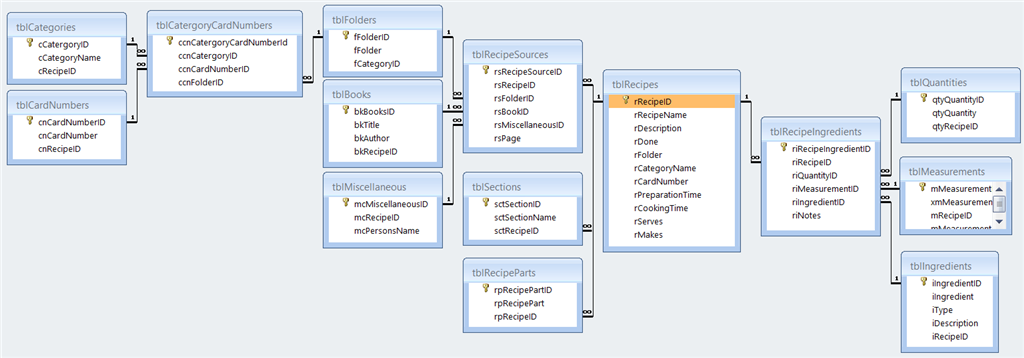
Scottgem, you confirmed a few things I was thinking also thanks for the explanations.
If I change anything after it has been entered or saved, is it going to stuff up like this again?
Only if the data violates referential integrity. Provided that you don't change the values in any of the foreign key columns so that they don't have matches in existing rows in the referenced tables, and the combination of values in the columns does not violate any multi-column unique indexes, then you should have no problems. If you try to enter values which violate referential integrity or an index, then the row will be rejected, which is exactly what you'd want.
The tables to the left of tblRecipes, all but the first three why do they have Recipe ID in them? They are related to the Recipe table by virtue of their other relations so there really is no need for that field to be there.
Ken, sounds good. So, what about the Cascades? (as asked about previously)
Also I asked previously regarding possible locking of form formats?
Just realised I had a field in the measurement table I was working on in my screenshot. There is now only the 1 ID field and the 1 Measurement field. Sorry about that, just thought I would explain for anyone that noticed.
Gina. Funny you asked regarding the 'RecipeID' in most of my tables, I was wondering the same thing. I guess I thought of it as more of a safety measure field while I am figuring it all out. I have now fixed it (Deleted it from non first level tables). As I was doing this I think I understood that only the join linked fields need to be referenced in each table and not that of the central/main table join.
I know I am going to have to figure out at some point how I am going to work with my Sections & Parts tables. I am thinking to add my Section field into my subform, so I can simply select the section eg. 'For The Vinaigrette' next to all of its ingredients within its main recipe.
As for the Parts which I will have for Related Recipes such as an ingredient of the Pie Recipe is the Crust which is recorded as its own Recipe. I am not sure I have wrapped my head around how to do this correctly. Would you manually enter the RecordID reference for the Crust recipe into the record for the Pie recipe. Can I link it in a way that I can enter a crust description/name as an ingredient for the pie recipe, and it pull all of its recipe details up when needed?
Is there anything else you would suggest I need to do at the table design stage?
I was also wondering in a split form view can you view results from a query instead of the original table (in datasheet view) the form was based upon?