hi jesper,
thanks for your updates.
first, i would explain that, it is an expected behavior that if we create document based on content type, the file will be tagged as version 0.2, or if you do not enabled minor versions, 2.0.
then, please follow the below steps to see if you can have the generic version number available to a content type.
- create the document template.
1.1 create a library > go to library settings > enable major and minor (draft) versions.
1.2 at library settings > information management policy settings > enable labels on the document content type.
1.3 from local word client, create a .dotx and upload it to the library to have label available on the file.
1.4 download the .dotx, and open it using word.
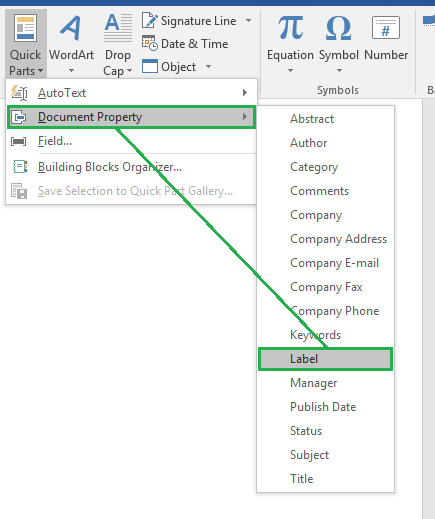
1.5 insert the quick part of label to header or footer.
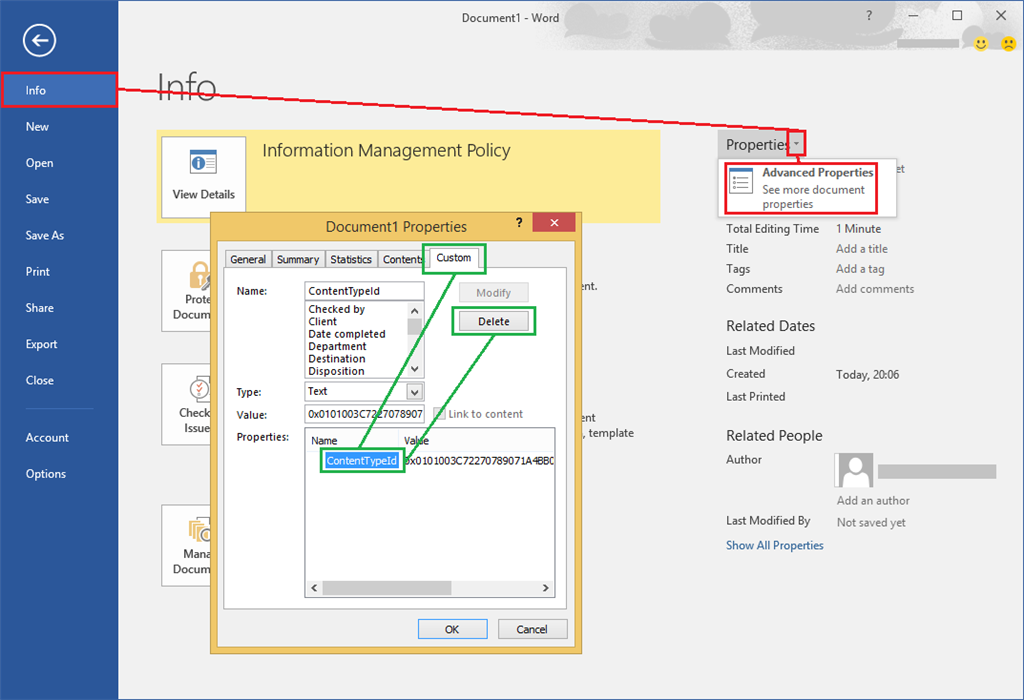
1.6 go to file > info > properties > advanced properties > custom tab > delete the contenttypeid.
1.7 save it as a new .dotx.
- create the site content type.
2.1 go to site settings > site content types > create.
2.2 configure to add a document content type.
2.3 at the new site content settings page, advanced settings > select upload a new document template to upload the new .dotx.
- go to a library you actually work with > enable major and minor (draft) versions, information management policy of label and management of content types.
- add the site content type to the library.
best regards,
rene
' cx='32' cy='32' r='32' /%3E%3Ctext x='50%25' y='55%25' dominant-baseline='middle' text-anchor='middle' fill='%23FFF' %3EA%3C/text%3E%3C/svg%3E)
