Share via

Problems sharing outside my organization

Anonymous
2016-02-05T15:24:38+00:00

so far in my experience, it seems like it is only possible to share office 365 files (excel, word, powerpoint, onenote) with other office 365 account holders in my “organization” (which is a college).  since this is a university account, onedrive for business is being used and a university office 365 account (not my personal microsoft account or regular onedrive which allows me to share with anyone just fine).  i use onenote and excel heavily in my class, and i want to be able to share files with students  (and they very often need to share with each other).  in particular, i use onenote for them to keep electronic lab notebooks, which works really well when i can successfully share the notebooks with them.  i have two students from another nearby college in my class this semester (we have an agreement among several local colleges that allows students to take classes at other colleges in the agreement), and i can't share onenote or excel (or any office 365 program) files with them.  is there some way to add them to my organization’s network so i can share files with them?    or is there a way to share outside of my organization that i am missing?   i know i can share more widely with my personal microsoft account, but i would prefer to be able to use my college office 365 account for all my teaching and research related work.

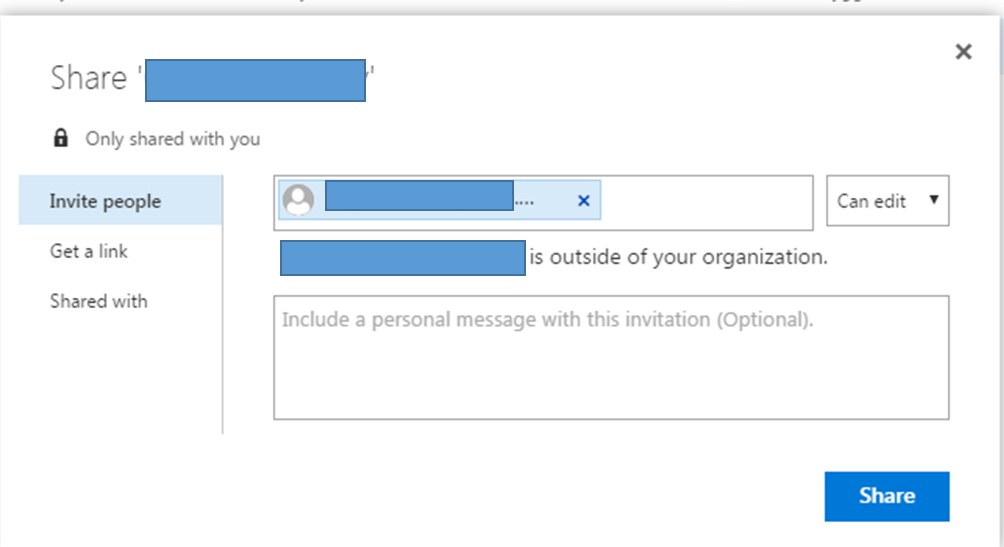
 when i put a student's email address from the other college in to invite them to share, it says they are outside the organization and even if i go ahead and send it anyway, they are not able to get in.  i have also found this is true with students who have an email within my college before they activate their college office 365 account.  once they activate their college office 365 account, then i can share with them easily.  the students from the other college activated their college office 365 account, but i still can't share with them.  i don't see anywhere to change the options to allow me to share outside of my college.  is there somewhere that i can change the settings so that i can share outside of my college?
 

and i also found this when i tried to check permissions within onenote:
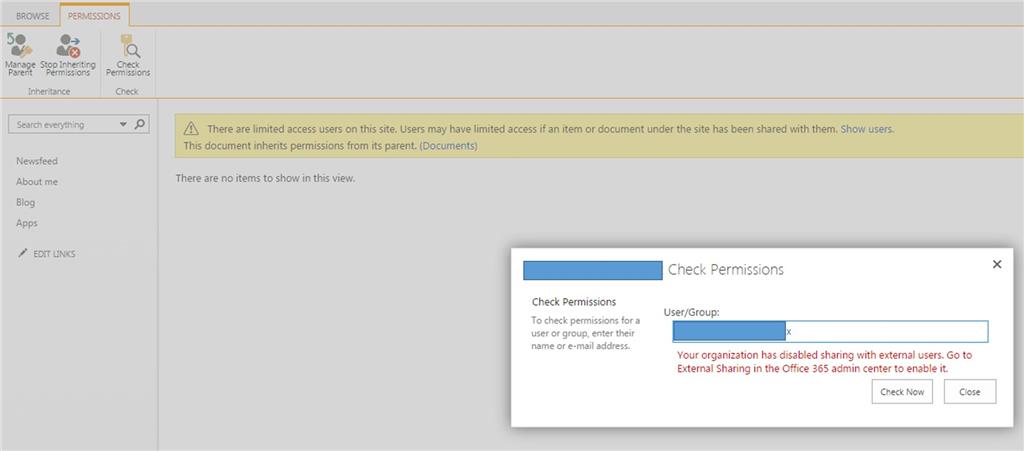
  

my college’s office 365 admin tried for a few hours to change the permissions to allow me to share outside of my college, but he could not get it to work.  he said “ there is no way we can add this to our office 365 account”.  this really limits my use of the onenote notebooks as lab notebooks.  please make it possible for me to share outside of my college network without me having to use my personal microsoft account for work purposes.

Microsoft 365 and Office

A comprehensive suite of productivity tools and cloud services that enhance collaboration, communication, and efficiency. Combining classic Office apps with advanced Microsoft 365 features, it supports both personal and business needs

Locked Question. This question was migrated from the Microsoft Support Community. You can vote on whether it's helpful, but you can't add comments or replies or follow the question.

0 comments No comments

3 answers

Sort by: Most helpful
  1. Anonymous
    2016-02-05T16:36:05+00:00

    Finer Points:

    1. There are 2 types of external sharing - Your admin will decide which is best for the school
      1. Users need authentication - Most secure and requires some hoop jumping. The great thing about it is that Microsoft handles the authentication for you. Read the next paragraph to learn more.
      2. Users DON'T need authentication - Least secure and speaks for itself but there are no hoops to jump through. Users will receive an invite with a link that ANYONE can use to access data

    Users Need Authentication:

    1. User will get an email with a link to the site
    2. If the email address you used to send the invite is ALREADY associated with a Microsoft account then they are good to go!
      1. They can simply log in to the site by entering the password they already use with Microsoft for the email address you used to send them the invite
      2. If their email address ends in @hotmail.com or @outlook.com then their email address should already be associated with a Microsoft account by default.
    3. If the email address you used to send the invite is not associated with a Microsoft account then the user has 2 choices
      1. Associate their current email address with a Microsoft account (the same email you used to send the invite)
      2. Create a Microsoft account association with a new Microsoft email - This may require you to send a new invite to their newly created address
    4. FYI - For anyone who needs to associate their current address with a Microsoft account...the authentication is a 2 part process
      1. Part 1: They will need to fill in their name, address, phone number and date of birth etc.
      2. Part 2: They will receive an email verification from Microsoft which will require them to click a link - This proves they aren't a robot.

    I hope this helps and please mark this as an answer if it addresses your needs! 

    Good Luck!

    Was this answer helpful?

    1 person found this answer helpful.
    0 comments No comments
  2. Anonymous
    2016-02-09T10:21:07+00:00

    I haven't heard back from my admin yet either way (I forwarded on the suggestions).  I will update here if I do hear something back from him.

    Was this answer helpful?

    0 comments No comments
  3. Anonymous
    2016-02-09T02:25:35+00:00

    Hi Marney,

    Any update is appreciated.

    Thanks,

    Iris

    Was this answer helpful?

    0 comments No comments