Share via

Cannot edit excel survey!

Anonymous
2016-02-04T17:59:52+00:00

Hey community!

I have office 365 using it for our work, I have created a survey in which I have entered alot of detail, but now I am unable to edit the survey!

I see online I should be able to click 'Survey' and then edit survey,..

However the only option I have is 'New survey'??

Any help please!  Can I edit my survey??

Microsoft 365 and Office

A comprehensive suite of productivity tools and cloud services that enhance collaboration, communication, and efficiency. Combining classic Office apps with advanced Microsoft 365 features, it supports both personal and business needs

Locked Question. This question was migrated from the Microsoft Support Community. You can vote on whether it's helpful, but you can't add comments or replies or follow the question.

0 comments No comments

7 answers

Sort by: Most helpful
  1. Anonymous
    2016-02-04T20:12:27+00:00

    hi chris,

    to edit an excel survey, you should open it in excel online then click edit survey under the survey drop down.
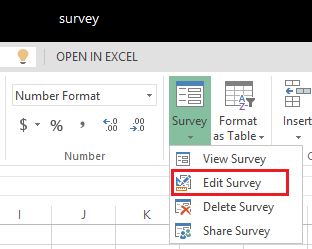
    surveys in excel, hosted online

    if it does not work on your side, please share the following information with us for our further troubleshooting.

    1. where did you create the survey? in a sharepoint library or your onedrive for business library?
    2. a screenshot about “the only option i have is 'new survey'”.

    to insert a screenshot, click on use rich formatting to create your post. on the edit page, select insert/edit media icon to upload a screenshot.

    thanks,

    ran

    Was this answer helpful?

    9 people found this answer helpful.
    0 comments No comments
  2. Anonymous
    2016-02-05T05:18:04+00:00

    Hi Chris,

    Could you please try the following steps to see the outcome?

    1. Go to your OneDrive for Business library and select New -> Excel Survey.
    2. Enter the survey name -> Create. (Can you see the prompt to let you edit survey?)
    3. Enter the description and questions for your survey.
    4. Click Save and View -> Close.
    5. Check whether you can see other options under the Survey drop down.

    If the issue still exists, please confirm the following information for our further investigation.

    1. Does the issue happen in other SharePoint libraries?
    2. Please try a different browser to see the outcome.
    3. If you are in the OneDrive for Business new experience, could you please try to return to classic OneDrive to see if it works?
    4. You mentioned the issue also occur to other users in your organization. Please confirm.

    Thanks for your patience and cooperation.

    Regards,

    Ran

    Was this answer helpful?

    0 comments No comments
  3. Anonymous
    2016-02-05T00:27:35+00:00

    I sent information and yes I clicked new and then excel survey!

    Was this answer helpful?

    0 comments No comments
  4. Anonymous
    2016-02-04T21:12:34+00:00

    Hi Chris,

    How did you create the Excel survey? Did you click New on the library page then select Excel Survey? Generally, if it is an Excel workbook, the option under Survey will only be New Survey. Please create a new test survey to see the outcome.

    If the issue persists, I’d like to collect your tenant information. To protect your privacy, I have sent you a private message. Please access it via the link below:

    https://community.office365.com/en-us/user/conversations

    Thanks,

    Ran

    Was this answer helpful?

    0 comments No comments
  5. Anonymous
    2016-02-04T20:47:58+00:00

    using onedrive to create excel s![](http://fud.community.services.support.microsoft.com/Fud/FileDownloadHandler.ashx?fid=a800c04c-62cf-4aab-b9fb-b048aa967915)urvey , inside one drive i open my excel document online, when i click survey this is all i see...

    Was this answer helpful?

    0 comments No comments