How To Add Document Title To Custom Header In Excel 2016

Anonymous
2016-04-15T04:44:22+00:00

In my Excel worksheets I have always set the Title in the document properties and then added that document property in a custom header.

In Excel 2016 I can't find a way to do this.

I would prefer not to hard code the header because if the document title is changed, I want that to be reflected in the heading.

Microsoft 365 and Office
A comprehensive suite of productivity tools and cloud services that enhance collaboration, communication, and efficiency. Combining classic Office apps with advanced Microsoft 365 features, it supports both personal and business needs

Locked Question. This question was migrated from the Microsoft Support Community. You can vote on whether it's helpful, but you can't add comments or replies or follow the question.

0 comments No comments
{count} votes
Answer accepted by question author
  1. Anonymous
    2016-04-15T09:07:50+00:00

    hi tony,

    if you mean the page header, it’s not feasible to add a header that will automatically update based on the document titles. the property that can automatically update is listed in the custom header dialog (to go to this dialog, click page layout> print title> header/footer> custom header).
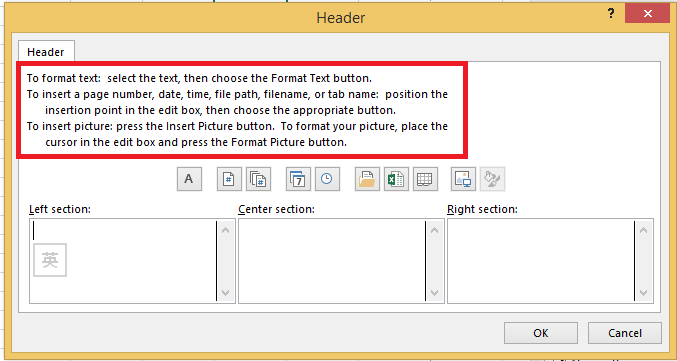
     

    however, we can insert our document title manually (it won’t automatically update):

    1.open the excel file and click view> page layout.

    2.click add header and click design> header.

    3.in the drop-down menu, you will see a header style similar to “page1, your document title”.

    4.you may need to update you document title in the header when you change it in the document properties.

    meanwhile, i’d like to invite you to submit this idea at our uservoice. many great features came directly from our customers. your understanding is highly appreciated.

    regards,

    fraser

    3 people found this answer helpful.
    0 comments No comments

1 additional answer

Sort by: Most helpful
  1. Anonymous
    2016-04-15T09:22:41+00:00

    Thanks Fraser for a rapid and accurate response.

    It answers my question, but means that in future I will have to effectively hard code the header text instead of using the document properties as I have in the past.

    Having only recently upgraded to Office 365 I am not sure if the header/footer formatting is part of a template, but if they are then it would definitely be helpful if you could configure these to update automagically when a new workbook was created based on that template.

    Thanks again.

    1 person found this answer helpful.
    0 comments No comments