Microsoft 365 and Office | Install, redeem, activate | For home | Other
Processes in Microsoft 365 for setting up Office apps, redeeming product keys, and activating licenses.

This browser is no longer supported.
Upgrade to Microsoft Edge to take advantage of the latest features, security updates, and technical support.
' cx='32' cy='32' r='32' /%3E%3Ctext x='50%25' y='55%25' dominant-baseline='middle' text-anchor='middle' fill='%23FFF' %3EA%3C/text%3E%3C/svg%3E)
I am running a Windows 10 laptop with Office 365 Home.
This question is about Publisher. I want all of the formatting marks (tabs, spaces, etc.) to show, not just the paragraph mark. (I have the paragraph mark button in the paragraph section of the Home tab checked.)
Instructions on the Microsoft Office Support website say to:
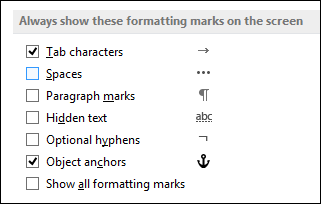
Several problems here: First, when I click on the File Tab, then Options, there is no "Display" option.
So I checked out these available options and found that there is a "Display" option category available under "Advanced", but no where else.
However, there is no "Always show these formatting marks on the screen" available under "Display!"
How can I get the formatting marks to display? I have been using Publisher for over 20 years, and have always had the all of format marks showing and I want them back! Publisher doesn't look right without them & it messes me all up!
I have Word set up to display all the marks as in the above instructions, why isn't Publisher the same?
Can someone please help me?
Locked Question. This question was migrated from the Microsoft Support Community. You can vote on whether it's helpful, but you can't add comments or replies or follow the question.

Publisher doesn't offer detailed control over which formatting marks are displayed. The ¶ button on the Home tab of the ribbon toggles the display of spaces, tabs, optional hyphens, manual line breaks, paragraph marks and end-off-cell markers, all at once.
Publisher doesn't offer detailed control over which formatting marks are displayed. The ¶ button on the Home tab of the ribbon toggles the display of spaces, tabs, optional hyphens, manual line breaks, paragraph marks and end-off-cell markers, all at once.
As I stated, I have already clicked on the ¶ button. If what you posted is correct why am I just seeing the paragraph marks and not ALL the formatting marks as you listed above?
Why does https://support.office.com/en-us/article/show-or-hide-formatting-marks-c2d8a607-5646-4165-8b08-bd68f9d172a0 say that the instructions I quoted above "Applies To: Word 2016 Publisher 2016 Word 2013 Publisher 2013 Word 2010 Publisher 2010 Word 2007 Publisher 2007"?
Formatting marks are used way more in desktop publishing than word processing! It's ridiculous that they are available in Word and not Publisher!
I'm afraid I don't know why you don't see all the formatting marks.
You could submit a suggestion to Microsoft at https://publisher.uservoice.com/
Go back and read the page more closely and you will see some fine print:
"Note: Publisher uses some formatting marks."
Bottom line is that this is yet another example of where some functionality in Word is not also provided with Publisher. Sorry.
DavidF
Why does Microsoft keep "fixing" that which is not broken?? I have depended on the formatting marks in Publisher for more than 20 years!
Why is it that Microsoft feels it's OK to outright LIE on your so-called support website?
You know, during these past 20+ years people have told me over & over again that Publisher is garbage & that I should use something else. I have always defended Publisher, saying that I knew it well, liked it and that it always did the job for me.
Well, if I said any of that now, I would be lying... Publisher has become garbage pure & simple. It's no longer worth my time or the space on my computer. Every time I have asked Support for help on something that I was always able to do that I no longer can, I get the same basic answer: "Oh, well, gee, the Support site is wrong. Windows 10/Word/Publisher/Excel/etc. doesn't/can't/won't do that any more. You prefer the better features & functionality of the previous versions? Too bad! So sad! You are a captive audience, there is nothing you can do about it and there is nothing we will do about it, so just deal with it."
Same thing when Windows 10 corrupted my computer. I could no longer access the start menu and I kept being logged off whenever I tried. Support gave a list of things to try, none of which worked. The last solution was to do a refresh. I was fed, and unfortunately believed, the lie that my personal files & settings and any apps I got from the store would be maintained. Over a month later and I am still trying to get the computer back to the way it was before the Windows 10 refresh screwed it up on me! I could be wrong, but I swear the formatting marks were available before I had to reinstall Office 365! I have had numerous issues with Word & Excel since the refresh too. (Note, I had to reinstall Office 365 even though "support" said it would still be there!)
Looks like I am now in the market for a new desktop publisher. I might as well just ditch Office 365 Home and cancel my subscription all together because the only reason I chose it when I upgraded was because of Publisher.
Every interaction I have had with Microsoft lately, from the destruction of my computer by Windows 10 and now this and other **** with Office has proved to me that it is time to get away from Windows and join the Apple crowd. I wish I could sue to get back the vast amount of time & money I have lost in the past month or two because of Microsoft's so-called fixes & updates.
I am sick to death of dealing with it. Customer "support" indeed. (End of rant.)