Microsoft Teams | Development
Building, integrating, or customizing apps and workflows within Microsoft Teams using developer tools and APIs

This browser is no longer supported.
Upgrade to Microsoft Edge to take advantage of the latest features, security updates, and technical support.
' cx='32' cy='32' r='32' /%3E%3Ctext x='50%25' y='55%25' dominant-baseline='middle' text-anchor='middle' fill='%23FFF' %3EDA%3C/text%3E%3C/svg%3E)
Please help. I am struggling to have my app show up in the list of apps available for adding as a Tab. I felt I have gone through documentation and followed the guidance. But whatever I do it is never available to add. A snippet of my manifest below:
"accentColor": "#FFFFFF",
"bots": [],
"composeExtensions": [],
"configurableTabs": [
{
"configurationUrl": "https://test-dxpweb-appservice.azurewebsites.net/shell.html?shell=msx-teams-shell&authPopup=true",
"canUpdateConfiguration": true,
"scopes": [
"team",
"groupchat"
],
"context": [
"channelTab"
]
}
],
"staticTabs": [
{
"entityId": "index",
"name": "Personal Tab",
"contentUrl": "https://test-dxpweb-appservice.azurewebsites.net/shell.html?shell=msx-teams-shell&authPopup=true",
"websiteUrl": "https://test-dxpweb-appservice.azurewebsites.net/shell.html?shell=msx-teams-shell&authPopup=true",
"scopes": [
"personal"
]
}
],
' cx='32' cy='32' r='32' /%3E%3Ctext x='50%25' y='55%25' dominant-baseline='middle' text-anchor='middle' fill='%23FFF' %3EHH%3C/text%3E%3C/svg%3E)
Hello,
I tried with same snippet and I am able to get the option in Teams

When clicked on +, I am able to see your app in list and able to add it.
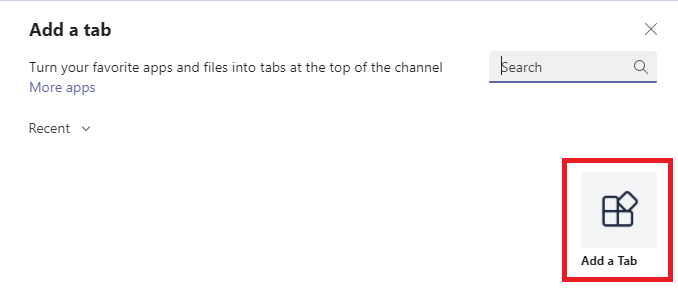
and I can see the app in "more added apps menu(...)" as well
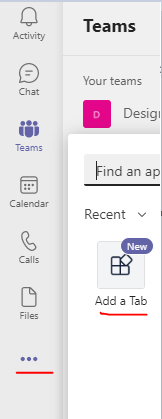
I have added validDomains in my manifest
"validDomains": [
    "test-dxpweb-appservice.azurewebsites.net"
  ]
By the way this should not be the factor causing this issue.
To be exact, can you share what is your manifest version?
Are you facing this issue on Teams web client or Teams desktop?
Thanks
Hunaid
I might be a little novice to this whole thing. Currently I am sideloading this app as it is not in my store. When I add the custom app, do I need to select "Add to Team" everytime? Or once I install it once, it should be in the list of apps when i click "+". I am able to add to a team if I upload the custom app everytime.
Have you tried adding your app from Teams Admin center directly?
Please go through this docs if not yet seen: Upload your app in Microsoft Teams and Enable custom Teams apps
Hey,
Let us know if the issue still persists.
Thanks
@Dave Allen
If the response is helpful, please click "Accept Answer" and upvote it. You can share your feedback via Microsoft Teams Developer Feedback link. Click here to escalate.
I think we can close this now. I understand now the steps required to sideload a custom app.