hi eric,
as cliff mentioned, we mainly focus on office 365 for business online services. however, there is a method to make xml files be opened in excel by default.
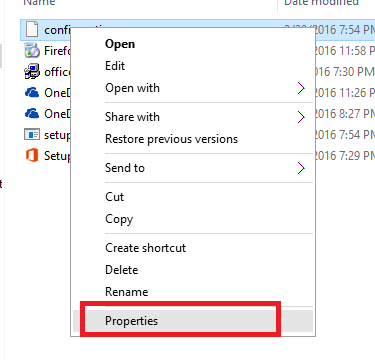
- right click on the xml file > properties.
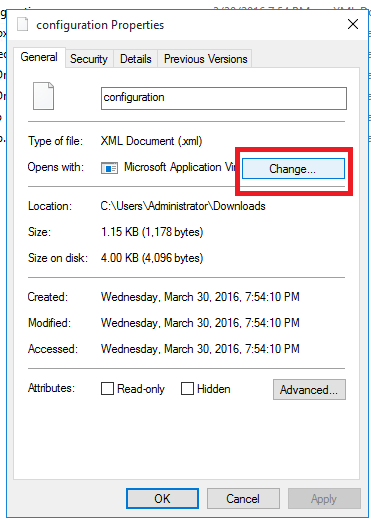
- click ‘change’.
- click on ‘more apps/ more options’ > look for another app on this pc.
- in the window that opens, browse [excel].
usually, for windows 8.1/10, the microsoft office location is
c:\program files (x86) \microsoft office\root\office16 for 32-bit office 2016.
c:\program files\microsoft office\root\office16 for 64 -bit office 2016.
if it doesn’t work for you, as suggested, please post on our technet forum-excel it pro discussionsfor expert help.
thanks,
neha
' cx='32' cy='32' r='32' /%3E%3Ctext x='50%25' y='55%25' dominant-baseline='middle' text-anchor='middle' fill='%23FFF' %3EA%3C/text%3E%3C/svg%3E)
