I'm trying to display real time down to milliseconds and excel doesn't seem to want to recognize and handle it consistently.
I have tried to create a custom formatted value "hh:mm:ss.000" and i have data that is displayed correctly in the data table, at least in the table view. However, excel doesn't seem to actually see it in this format and i end up with two major problems.
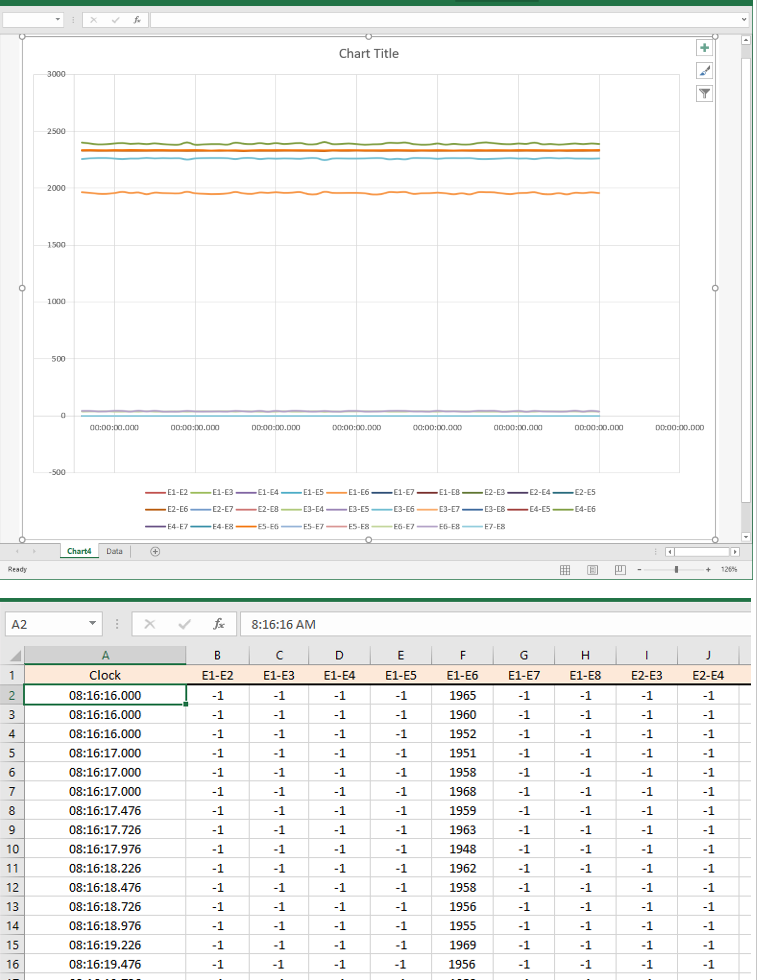
- When i chart the data with the real clock time as the x-axis, the axis will not display the same value as in the data table. I've tried selecting the chart axis and formatting it as "same as source" and I've tried manually telling it to use the exact
same custom format the data is displayed as. In both cases the wrong values or no value is displayed.
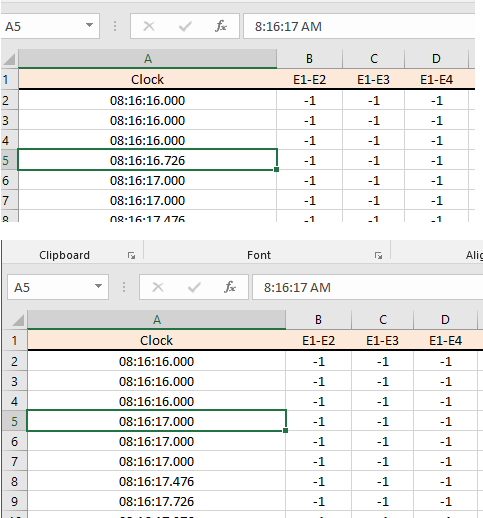
- The 2nd problem is in the data table itself. if i select the a cell in the clock time column, then select the data in the data entry bar at top of table, then leave the cell without editing anything I lose my millisecond decimals. Apparently excel is
treating the data in the data entry bar as yet a 3rd format, it's not the format i made and it's not in the raw decimal format, it's in some truncated rounded AM/PM date time format. In this case, it's not just a display variance but an actual data value change.
I've sent an example of this to MS Office help and they have had no solution and recommend i try the community. Hopefully someone has run into this and found a workable solution.
Thanks
' cx='32' cy='32' r='32' /%3E%3Ctext x='50%25' y='55%25' dominant-baseline='middle' text-anchor='middle' fill='%23FFF' %3EA%3C/text%3E%3C/svg%3E)
