Azure Data Explorer
An Azure data analytics service for real-time analysis on large volumes of data streaming from sources including applications, websites, and internet of things devices.
This browser is no longer supported.
Upgrade to Microsoft Edge to take advantage of the latest features, security updates, and technical support.
' cx='32' cy='32' r='32' /%3E%3Ctext x='50%25' y='55%25' dominant-baseline='middle' text-anchor='middle' fill='%23FFF' %3EOY%3C/text%3E%3C/svg%3E)
I have parametrised linked service for Azure Data Explorer. The json looks like this:
{
    "properties": {
        "type": "AzureDataExplorer",
        "parameters": {
            "AzureDataExplorerClusterUrl": {
                "type": "String",
                "defaultValue": ""
            },
            "AzureDataExplorerDatabaseName": {
                "type": "String",
                "defaultValue": ""
            }
        },
        "annotations": [],
        "typeProperties": {
            "endpoint": "@{linkedService().AzureDataExplorerClusterUrl}",
            "database": "@{linkedService().AzureDataExplorerDatabaseName}"
        }
    }
}
This works good with copy activity block and parameters input looks ok:
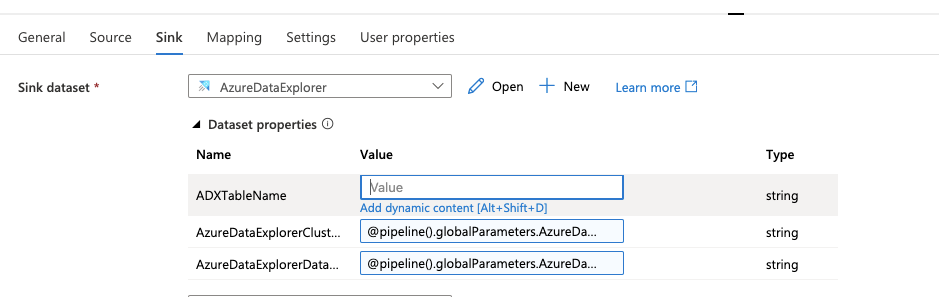
But when Azure Data Explorer Command block is used, there is not inputs for these parameters:
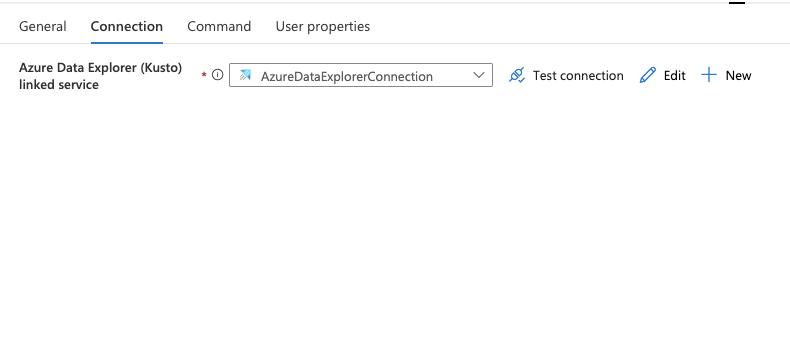
So the command will be executed always with defaults values of these parameters. This looks like a bug.
An Azure data analytics service for real-time analysis on large volumes of data streaming from sources including applications, websites, and internet of things devices.
An Azure service for ingesting, preparing, and transforming data at scale.

Hi @Oleh Yermokhin ,
Welcome to Microsoft Q&A Platform. Thank you for posting your query here.
It looks like your dataset is parameterized, not linked service.
In Copy activity image all the parameters what you mentioned are actually coming from your dataset, not from linked service. Also, it seems that json which you shared is actually from your dataset.
Could you please share your linked service screenshot and json? you can navigate to Managementhub menu and under linked services you can spot your linked service.
Please Note, Azure Data explorer linked service cannot be parameterize at this moment.
Hi @Oleh Yermokhin ,
Did you get chance to check my above comment and share requested details?
Hi @ShaikMaheer-MSFT !
Sorry for the delay.
You are right that in the copy activity this parameters are from the dataset. I made another screenshot from the dataset where you can see that in the dataset there are
parameters from linked service.
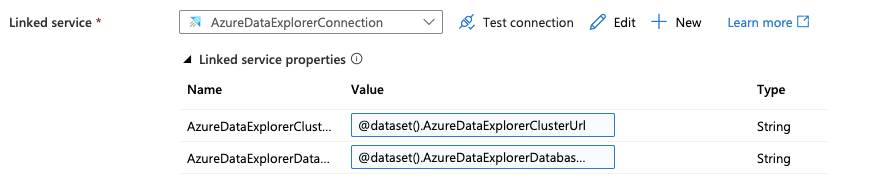
Please find json below:
{
    "properties": {
        "type": "AzureDataExplorer",
        "parameters": {
            "AzureDataExplorerClusterUrl": {
                "type": "String",
                "defaultValue": "xxxx"
            },
            "AzureDataExplorerDatabaseName": {
                "type": "String",
                "defaultValue": "xxx"
            }
        },
        "annotations": [],
        "typeProperties": {
            "endpoint": "@{linkedService().AzureDataExplorerClusterUrl}",
            "database": "@{linkedService().AzureDataExplorerDatabaseName}"
        }
    }
}
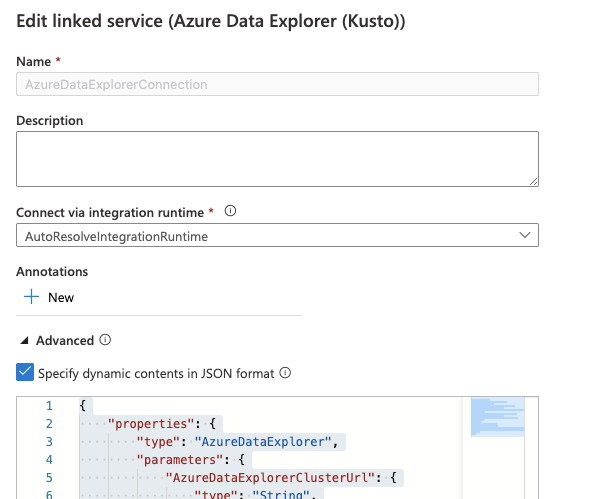
Answer accepted by question author

Have you tried providing parameters in the Command section?
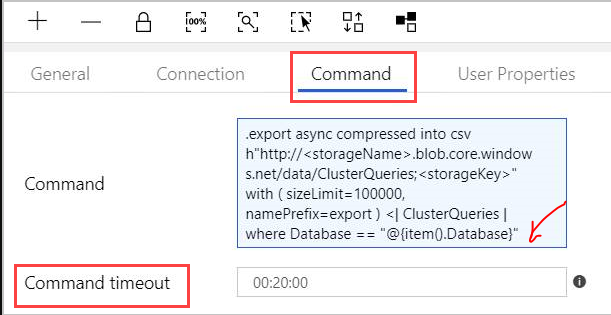
Reference - https://learn.microsoft.com/en-us/azure/data-explorer/data-factory-command-activity
----------
Please don't forget to Accept Answer and Up-vote if the response helped -- Vaibhav
Hi anonymous userChaudhari!
Thank you a lot for your answer! I know that there is a possibility to provide a database name in the command section, but I did not know that you can also provide a cluster url.
'I also have found following solution that I'm testing currently - https://sonamagrawal.medium.com/connect-azure-data-explorer-using-a-dynamic-selection-of-database-from-azure-data-factory-c686125107b2