SQL Server | Other
Additional SQL Server features and topics not covered by specific categories
This browser is no longer supported.
Upgrade to Microsoft Edge to take advantage of the latest features, security updates, and technical support.
' cx='32' cy='32' r='32' /%3E%3Ctext x='50%25' y='55%25' dominant-baseline='middle' text-anchor='middle' fill='%23FFF' %3EA%3C/text%3E%3C/svg%3E)
I have an windows box with 4 standlone instance installed. All are set with a dynamic port. SQL Browser is running. A python app running from a Linux machine is not connecting to SQL unless we provide port number in connection string.
Do we need to provide port number in the connection string to connect from Linux?
Thank you.
ACDBA
Additional SQL Server features and topics not covered by specific categories

Hi @ACDBA ,
Yes. You can also change the four standalone instances from dynamic port to fixed port number. You can change this from SSCM as below screenshot. Please restart the SQL server instance to make this change effect.
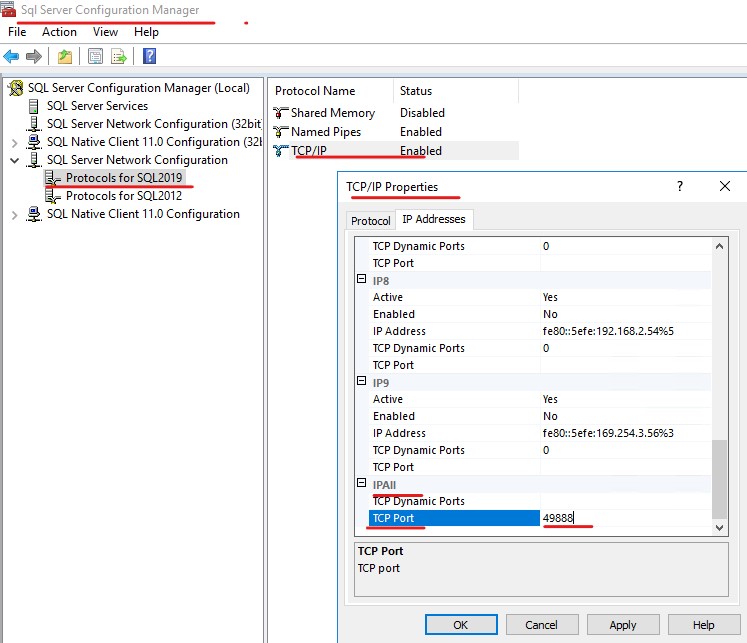
If the response is helpful, please click "Accept Answer" and upvote it, as this could help other community members looking for similar queries.
Unfortunately, some other apps will get affected if we change it to static port.
Hi @ACDBA ,
Please check if the blog Connecting to a Microsoft SQL Server database from Python under Ubuntu could help you.

You need to provide port number or instance name. Keep in mind that you need to do one of:
connString = "Server=SERVER\\INSTANCE;..."
connString = r"Server=SERVER\INSTANCE;..."
That is, either double the backslash, or prefix with r to make it a raw string. Else Python will intercept the backslash.
Thank you for the reply. The connection string already holds 'r'..But it didn't help.