Sorry, we don't know what you're expecting and what you're getting. You can post screen shots using the Insert image tool:
PowerPoint doesn't update linked charts
I've found that my PowerPoint does not update linked charts properly. Here's the steps I'm using.
- Copy a chart from a saved Excel file.
- Paste the chart into PowerPoint slide, choose "Keep Source Formatting & Link Data"
- Update the data in Excel and observe that the PowerPoint slide does not update as expected.
- In PowerPoint, click File > Info > Edit links to Files. Turn on the Automatically Update checkbox and try again. Still doesn't work.
Someone suggested running the VBA command ActivePresentation.UpdateLinks. It executes the command but the charts do not update.
Microsoft 365 and Office | PowerPoint | For home | Windows
Locked Question. This question was migrated from the Microsoft Support Community. You can vote on whether it's helpful, but you can't add comments or replies or follow the question.
12 answers
Sort by: Most helpful
-
-
@CmdrKeene 90,546 Reputation points Volunteer Moderator2020-01-30T22:23:24+00:00 There's not much to see. You paste the chart into PowerPoint (it appears). You pick "keep source formatting and link data", but even if you change data in Excel, the chart in PowerPoint doesn't update (it looks like it did upon initially pasting it in).
-
John Korchok 224K Reputation points Volunteer Moderator2020-01-30T22:37:42+00:00 Sorry, I followed your steps and it's working as expected using Version 1912 (Build 12325.20298 Click-to-run). Have you done an Office repair?
-
Anonymous
2020-01-31T05:47:36+00:00 Hi CmdrKeene,
I followed the steps you mentioned to reproduce the issue and I tested on the latest version of monthly channel i.e. Version 2001 (Build 12430.20184), the chart in PowerPoint updates as as excepted when linked chart is updated.
Here’s a small GIF for your reference.
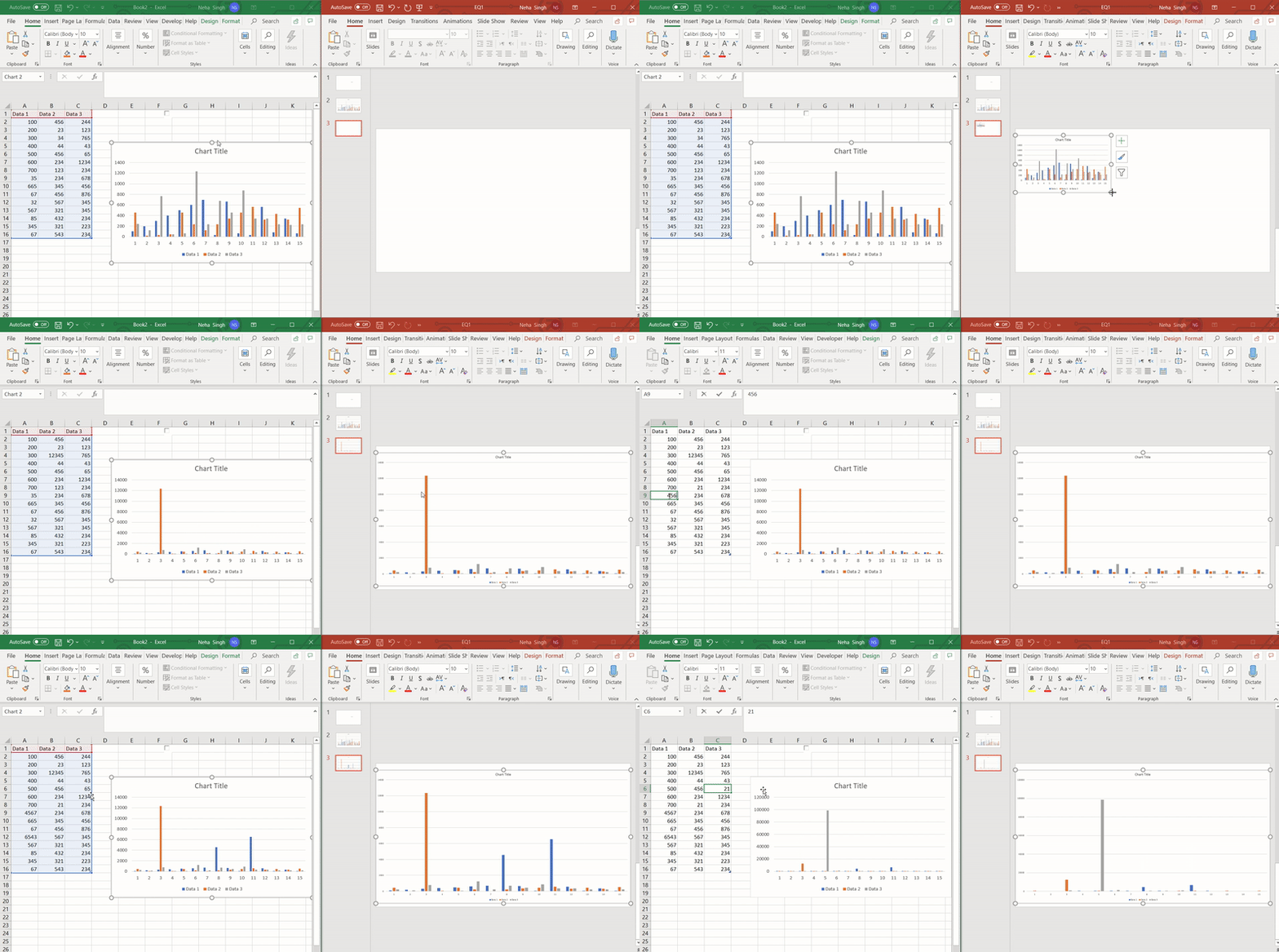
Please make sure your Office 365 desktop applications are fully updated, updating Office may fix the issue. The latest version of Office Monthly Channel is 2001 (Build 12430.20184), similarly for Semi-Annual Channel (Targeted) and Semi-Annual Channel, the version is 1908 (Build 11929.20562). For version information, please see Update history for Office 365 ProPlus (listed by date). To install Office updates, follow the instruction from this article.
If updating didn’t fix the issue, please try Online repair. For this, follow the steps below:
- Click Start, in the search box typeRun.
- In the Run box, type appwiz.cpl and click OK.
- Select **Microsoft Office 365,**click Change>Online Repair>Repair.
After trying the above steps, check if linked chart gets updated in PowerPoint.
If the issue persists, please provide the following information:
- Please provide the screenshot of Office 365 Product Information. To get this screenshot, open Word or Excel on your system, click File>Account, capture the screenshot of all the information mentioned under Product Information.
- For the test purpose, create a new chart in new Excel workbook and paste in PowerPoint, check if it gets updated when data in linked chart is changed.
- Since when are you getting the issue?
Thanks,
Neha

-
@CmdrKeene 90,546 Reputation points Volunteer Moderator2020-01-31T21:53:52+00:00 Thank you both so much for your replies. I was going to record a short clip using Camtasia, but my file had some private info in it. When I went to try reproducing the issue with a new file (like Neha's example above), it worked as expected.
After testing some more, it appears it works initially but won't update again if you close the PowerPoint and reopen it.
I was wondering if where I stored the two files is making a difference. I'm going to explore pairs of files (Excel+PowerPoint) stored locally, OneDrive Business, and SharePoint doc library.
