PowerPoint crashes when running VBA code

Anonymous
2019-03-13T13:58:30+00:00

Hello,

I've got an Excel macros that runs an Excel model several times with different assumptions and copies the resulting charts/tables/text into a powerpoint presentation. 

The macros works fine most of the time however sometimes it freezes or crashes. 

When it freezes, it stops copying shapes/charts etc into powerpoint. It doesn't show any error message. 

When it crashes, PowerPoint just stops working and an error message appears. 

I tried to do some troubleshooting and it appears that the problem is in PowerPoint itself rather than the code. It seems that Powerpoint sometimes just refuses to paste the shape even though it's in the clipboard. I tried adding an additional loop that copies and pastes from the start if pasting takes too long but it only made it crash more often. 

I'd say it freezes 10-20% of the time and crashes 5-10% of the time - not too often but still extremely annoying. I find that rebooting the computer helps a bit but doesn't completely solve the problem. It also appears that the probability of the error  depends on the length of the code - i.e. if it's only a few shapes, it works fine, if it's 400+ shapes, it will crash at some point 

The code is quite standard for this type of task. I added several delays/checks to avoid the "clipboard is empty" problem. 

Case "TableCopy"

Sheets("Internal - to hide").Calculate

Sheets("Internal - to hide").Range(setrng).Copy

Do 

DoEvents

Loop until Not (IsClipboardEmpty) 

pslide.Shapes.Paste

Do '<~~ wait completion of paste operation

    DoEvents

Loop Until pslide.Shapes.Count > shapecount

With pslide.Shapes.Item(pslide.Shapes.Count)

 .Left = Left_start + (Scenarionum - 1) * Left_Increment 'change the number for desired x position

 .Top = Top_start + (Scenarionum - 1) * Top_increment 'change the number for desired y position

'  .LinkFormat.BreakLink

End With

[Moved from  Office/PowerPoint/Windows 10/Office 365 for business]

Microsoft 365 and Office | PowerPoint | For home | Windows

Locked Question. This question was migrated from the Microsoft Support Community. You can vote on whether it's helpful, but you can't add comments or replies or follow the question.

0 comments No comments
{count} votes

7 answers

Sort by: Most helpful
  1. John Korchok 224.4K Reputation points Volunteer Moderator
    2019-03-13T16:23:15+00:00

    Please post the exact text of the error message.

    Since the problem happens with large numbers of objects, it suggests a memory issue or leak. One possible workaround of the top of my head would be to embed the workbook in PowerPoint as an object and program it from there, sidestepping the clipboard entirely.

    1 person found this answer helpful.
    0 comments No comments
  2. Anonymous
    2019-03-13T18:51:37+00:00

    Hi John, 

    Thank you very much for the prompt reply.

    When it freezes than there's no error message - it just stops working. 

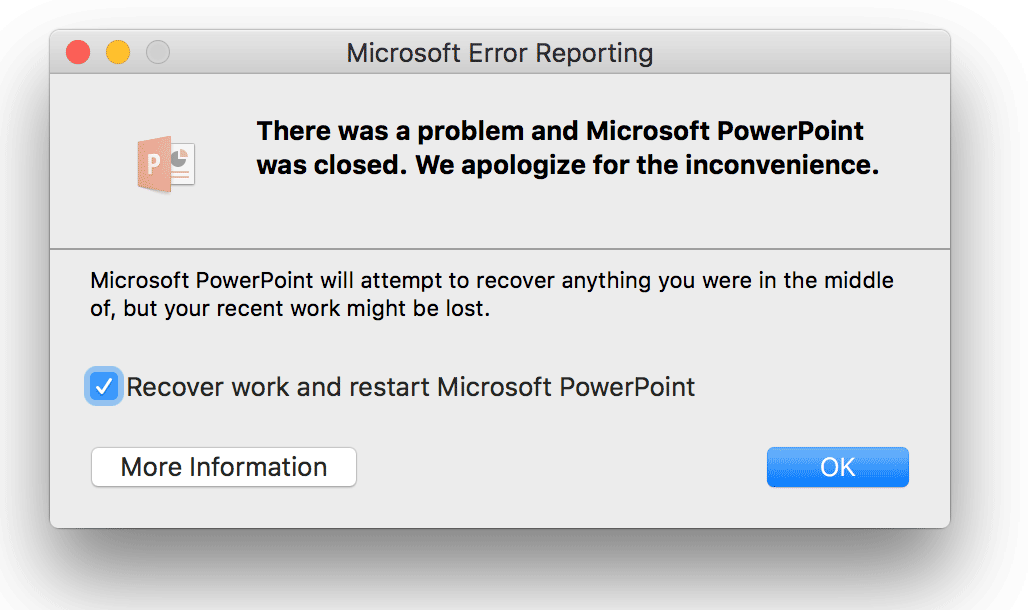
    When it crashes the error message looks like this (only there's no "more information" button): 


    In VBA the error in this case is "runtime error '462' ".

    The macros is currently quite large, it's got functions for copying tables, charts, etc - I'd rather not change too much of it.

    0 comments No comments
  3. John Korchok 224.4K Reputation points Volunteer Moderator
    2019-03-13T19:39:43+00:00

    Runtime error 462 indicates PowerPoint is unavailable as an OLE server. You may be able to find some useful pointers by searching the Internet on that.

    0 comments No comments
  4. Anonymous
    2019-03-14T07:39:22+00:00

    Runtime error 462 indicates PowerPoint is unavailable as an OLE server. You may be able to find some useful pointers by searching the Internet on that.

    Right. That happens because PowerPoint crashes and Excel can no longer control it bcs there is nothing to control. It doesn't explain why PowerPoint crashes in the first place though.

    0 comments No comments
  5. Anonymous
    2019-03-14T13:49:52+00:00

    Just noticed interested behavior - if the macro hangs and I go to the powerpoint clipboard and paste the last shape in the clipboard manually, it carries on and works just fine. I will try adding an additional loop to the macro that will try to paste again if the initial paste operation didn't result in the object appearing on the slide. Let's see if it works.

    0 comments No comments