Hi Mike,
Thank you for the updated information.
Since you mentioned that the problem persists after solving the sync issue, then I tested it again on my side, here are the screenshots of the result:
1.
At first, I closed all the linked Excel files and PowerPoint files. Then I open the PowerPoint file from the OneDrive sync folder, I can see a notice information like the below image:
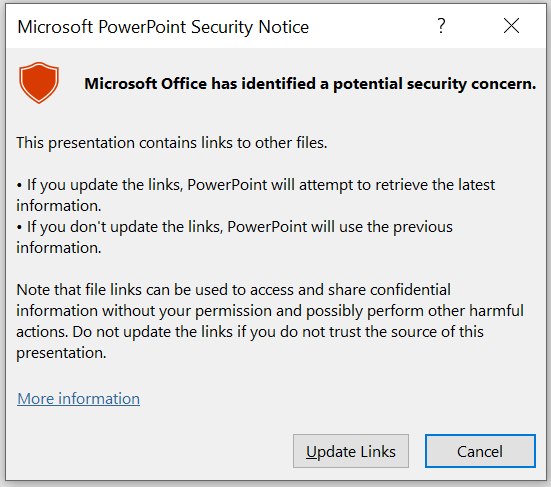
2.
I clicked "Update Links", then I noticed in the lower right corner of the file and PowerPoint was checking the linked Excel files. However,
these linked files won't be opened.


Based on the test results, we can see that when updating the links, PowerPoint will checking the content of links at the backend. And it will take longer to check for these changed links.
Given this situation, it is a strange behavior that PowerPoint opened new versions of linked files on your side. To help you better, could you please provide more details for me?
1.
A screenshot of the name for the new opened Excel file.
2.
The screenshot of the status of the links, please go
File > Info > scroll down to find and click Edit Links to Files under Related Documents section.
3.
If you create a simple PowerPoint file and link fewer charts in it, will the same problem happen?
4.
The screenshot of your Office version(open PowerPoint>File>Account>capture a screenshot of the Product Information column)
Best regards,
Jazlyn
' cx='32' cy='32' r='32' /%3E%3Ctext x='50%25' y='55%25' dominant-baseline='middle' text-anchor='middle' fill='%23FFF' %3EA%3C/text%3E%3C/svg%3E)
