Microsoft 365 and Office | Excel | For home | Windows
A family of Microsoft spreadsheet software with tools for analyzing, charting, and communicating data.

This browser is no longer supported.
Upgrade to Microsoft Edge to take advantage of the latest features, security updates, and technical support.
' cx='32' cy='32' r='32' /%3E%3Ctext x='50%25' y='55%25' dominant-baseline='middle' text-anchor='middle' fill='%23FFF' %3EA%3C/text%3E%3C/svg%3E)
Hi,
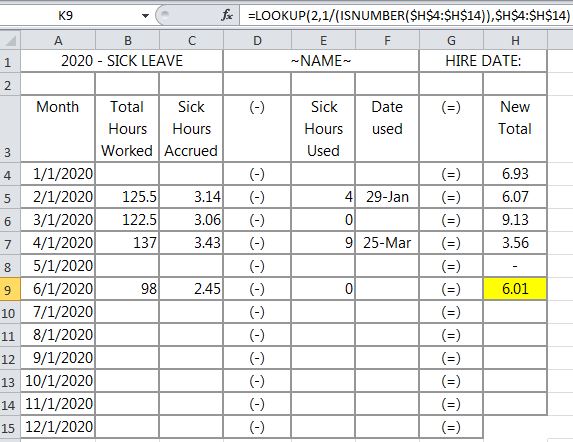
I can't write this correctly. I'd like to highlight the cells in the H column that are a number (ISNUMBER) while matching them with the greatest date (LARGE) in the column A.
I tried:
=AND(ISNUMBER($H4),$A4=LARGE($A$4:$A$15,1))
H4 contains 6.93
A4 contains 1/1/2020 - correctly formatted as date
Conditional formula: =$A4=LARGE($A$4:$A$15,1) works fine, standalone. The value 12/1/2020 highlights.
Conditional formula: =ISNUMBER($H4) highlights the correct values, standalone.
I really need this formula to highlight H9 as it reflects the LARGE date 06/01 and the ISNUMBER cell H9 that has the value 6.01 and the largest date with a number in column H.
I don't know where I'm going wrong. My syntax is bad. I'd appreciate any support I'm given. Thank you.
| 2020 - SICK LEAVE | ~NAME~ | HIRE DATE: | |||||
|---|---|---|---|---|---|---|---|
| Month | Total Hours Worked | Sick Hours Accrued | (-) | Sick Hours Used | Date used | (=) | New Total |
| 1/1/2020 | (-) | (=) | 6.93 | ||||
| 2/1/2020 | 125.5 | 3.14 | (-) | 4 | 29-Jan | (=) | 6.07 |
| 3/1/2020 | 122.5 | 3.06 | (-) | 0 | (=) | 9.13 | |
| 4/1/2020 | 137 | 3.43 | (-) | 9 | 25-Mar | (=) | 3.56 |
| 5/1/2020 | (-) | (=) | - | ||||
| 6/1/2020 | 98 | 2.45 | (-) | 0 | (=) | 6.01 | |
| 7/1/2020 | (-) | (=) | |||||
| 8/1/2020 | (-) | (=) | |||||
| 9/1/2020 | (-) | (=) | |||||
| 10/1/2020 | (-) | (=) | |||||
| 11/1/2020 | (-) | (=) | |||||
| 12/1/2020 | (-) | (=) |
Locked Question. This question was migrated from the Microsoft Support Community. You can vote on whether it's helpful, but you can't add comments or replies or follow the question.
Hello,
Looks like you want to find the last numeric value in column H. You don't need additional criteria to check against Date column, as finding the last numeric value will do the job.
To find the value of the last non-empty cell in a row or column, you can use the LOOKUP() function. This formula is not an array formula and has performance advantages.
If you want to find the last numeric value in column H use this formula:
=LOOKUP(2,1/(ISNUMBER($H$4:$H$14)),$H$4:$H$14)
To highlight it, enter the following conditional Formatting:
=H4=LOOKUP(2,1/(ISNUMBER($H$4:$H$14)),$H$4:$H$14)
Let me know if you find this helpful!
Try a CFR on H4:H99 based on the following formula.
=AND(ISNUMBER($H4), $A4=AGGREGATE(14,7, ($A$4:$A$99)/($H$4:$H$99<>""), 1))
Later versions of Excel could use MAXIFS to find the largest date where column H is not blank. Earlier versions could use INDEX in the method described in MINIF, MAXIF and MODEIF.
Hi Robin,
I will be happy to help you understand the logic behind the above Lookup() function usage.
The LOOKUP function assumes data is sorted,and works based on approximate match. More precisely, a Lookup formula searches for exact match first. If the lookup value is greater than all values in the lookup array, default behavior is to "fall back" to the previous value.
=LOOKUP(2,1/(ISNUMBER($H$4:$H$14)),$H$4:$H$14)
This formula exploits this behavior by creating an array that contains only 1s and errors, then deliberately looking for the value 2, which will never be found.
Because the highest value you can get in your second part of the formula is 1/1=1
You can use any big number that is greater than numbers in your lookup vector, for instance,
=LOOKUP(100000,$H$4:$H$14) This will also results in the last numeric value, because it won't able to find 100000 and "fall back" to the last value.
To read more about the concept of intentionally looking for a value that won't ever appear, read about Big Numbers.
Hope this helps!
Hello,
Looks like you want to find the last numeric value in column H. You don't need additional criteria to check against Date column, as finding the last numeric value will do the job.
To find the value of the last non-empty cell in a row or column, you can use the LOOKUP() function. This formula is not an array formula and has performance advantages.
If you want to find the last numeric value in column H use this formula:
=LOOKUP(2,1/(ISNUMBER($H$4:$H$14)),$H$4:$H$14)
To highlight it, enter the following conditional Formatting:
=H4=LOOKUP(2,1/(ISNUMBER($H$4:$H$14)),$H$4:$H$14)
Let me know if you find this helpful!
Bek,
You are amazing! Thank you so much for your help.
I had to remove the other formulas I'd listed in the conditional formatting box (prioritizing wasn't helping - stopping "if true").
If you can help me one more time:
I only recently earned an Excel Expert cert and am capable of just basic functions, lookups, etc. Your answer is so much better!
Thank you so much! You saved my workbook!
Robin
Hi,
Your reply works as well. You are another amazing Excel champ.
You saved my workbook, as well.
I won't even ask how this formula works.
Thank you so much! Your support is very appreciated :)
Robin