Importing / Linking MS Project Dates into Excel - Recommendations or #REF! Error Resolution Help

Anonymous
2021-06-10T13:00:39+00:00

Software: MS Project Online Desktop Client MSO 16.0.13127.21210 32-bit use

I am trying to import MS Project start / finish dates from a MS project file that is on SharePoint into an excel file and keep the import linked between excel and MS project such that anytime the date changes in MS Project, my excel file dates update accordingly.

The first method I tried was selected and copying a date in the SharePoint MS Project File and doing a Paste Special - Paste Link - "As" text
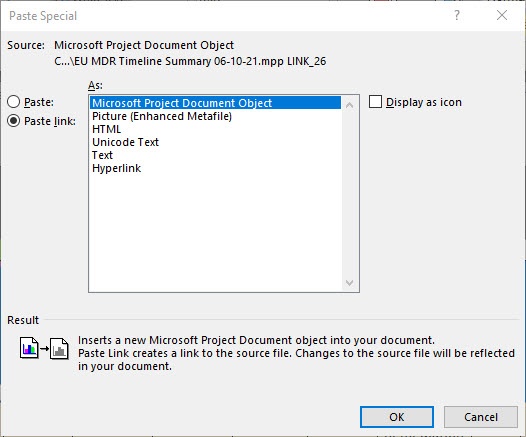
This correctly inserted a date into my excel file using the following syntax:

=MSProject.Project.9|'<>\EUMDR PH-GT Therapy'!'!LINK_26'

The problem is as soon as I close the excel file and try to open it up again, all the dates change to #REF!. It does not seem like excel can keep the connection between the Excel Office 365 file and the SharePoint MS Project file. Is there any recommendations or settings on who to fix this. I completed a test in which I saved the MS Project File to my desktop and made the same Paste line command. This time the syntax looked like the following:

=MSProject.Project.9|'C:\Users\XXXXX\OneDrive - Company Name\Project Name\Product List\Timeline Summary\Archive\Timeline Summary 06-10-21.mpp'!'!LINK_23'

This time when I closed the excel file and re-opened it, it was able to re-establish the dates so it appears the paste link function is having an issue of maintaining a connection between excel and the SharePoint MS project file version. Any suggestions to fix the connection so I would not have to do yet another step to save an off-line version each time I want to insure no dates in my excel file as changed.

Alternatively, I have tried saving the MS Project file as a workbook and using the import wizard and map to export the data to excel. I figured if I could get that to work I could just have my excel file linked to the exported MS project workbook file. The problem with that is the dates are exported as text with a MM/DD/YYYY and TIME and once in excel there is not an easy way I have found to convert that test string into a date that excel recognized correctly.

Microsoft 365 and Office | Project | Other | Windows

Locked Question. This question was migrated from the Microsoft Support Community. You can vote on whether it's helpful, but you can't add comments or replies or follow the question.

0 comments No comments
{count} votes

15 answers

Sort by: Most helpful
  1. John Project 49,695 Reputation points Volunteer Moderator
    2021-07-14T22:16:43+00:00

    Shooter71,

    I'm a little confused, well, actually a lot confused. First, let me clarify something, are you the same as Shooter27 or is that a different person? I've never received an e-mail from a "Shooter71". I corresponded with a Shooter27 and I wrote a custom macro for that user. There apparently was an issue with Shooter27's e-mail system not accepting the file with the macro so we tried a different approach. The last e-mail I got from Shooter27 (6/30/21) saying he would run the macro on Friday (I assume 7/2/21) and I haven't heard anything since.

    The macro you posted above is from a Wiki article I wrote, similar but quite different from the custom macro I wrote for Shoter27?

    See my confusion?

    John

    0 comments No comments
  2. Anonymous
    2021-07-14T22:41:36+00:00

    Hello John

    I am the same person. My Microsoft user name is shooter71 within this forum and the email you used was shooter27. The date export general macro that was first posted is what I started with and by itself it runs as expected and exports dates that I can work with and is functional but not at efficient for long term automatic updates. Therefore you wrote the custom macro I tested the new macro template and had some questions / issues running it so I emailed you on July 5th to see if you could explain why it was not behaving as expected. I have not heard back. In the mean time I am trying to get some better functionality out of the original macro you posted with a slight modification to add the baseline start and baseline finish dates to keep me going in the meantime as I thought adding the baseline dates would be a quick update to the macro you first posted while we worked on getting the new one going. This would at least allow me to continue with some export that I can at least leverage while hopefully getting the new macro figured out.

    Therefore i posted the updates I made to the original macro here trying to add the baseline starts and baseline finish dates that were not working as designed.

    I don’t know why but it seems like we continue to have issues when we are emailing directly outside the forum: In the future I will stick to this forum thread for correspondence as it sounds like you did not get my July 5th email comments on your new macro.

    0 comments No comments
  3. John Project 49,695 Reputation points Volunteer Moderator
    2021-07-15T00:25:53+00:00

    Shooter71,

    It turns out I did get you message dated 7/5/21 but for some reason it was in my junk folder which I rarely check. Now that I see it I'll take a look.

    I really prefer to work via e-mail since we are dealing with specific customization for you.

    John

    1 person found this answer helpful.
    0 comments No comments
  4. John Project 49,695 Reputation points Volunteer Moderator
    2021-07-15T14:00:52+00:00

    To those who may follow this thread.

    The reason Shooter71"s edit to the macro generates an error (type mismatch) is because he added Baseline Start and Baseline Finish to the fields being exported as data type "Date". If a baseline is not set, on any task, the value of those Baseline fields will be the default "NA", which is not a "Date" data type. The best solution is of course to set a baseline but an alternate approach is to declare the BStart() and BFinish() arrays as type "Variant".

    For reference, the macro code posted above is from this Wiki article:

    https://social.technet.microsoft.com/wiki/contents/articles/32126.ms-project-truncated-project-notes-when-viewingexporting.aspx

    John

    1 person found this answer helpful.
    0 comments No comments
  5. Anonymous
    2021-07-15T16:22:34+00:00

    Thanks John!

    0 comments No comments