Microsoft Security | Microsoft Entra | Microsoft Entra ID
A cloud-based identity and access management service for securing user authentication and resource access

This browser is no longer supported.
Upgrade to Microsoft Edge to take advantage of the latest features, security updates, and technical support.
' cx='32' cy='32' r='32' /%3E%3Ctext x='50%25' y='55%25' dominant-baseline='middle' text-anchor='middle' fill='%23FFF' %3ENF%3C/text%3E%3C/svg%3E)
Hello,
In our infrastructure we had an Active Directory which sent user objectGUID to Office365 for authentication but when we did the migration from Active Directory to Azure, we had a problem accessing the ImmutableID through Azure applications (because we need to federate through an external OpenId Provider).
At first we tried to get the ImmutableID with the token but it is not mapped in any claim already existing, so we tried to make our own :
AzureADPreview\New-AzureADPolicy -Definition @('{"ClaimsMappingPolicy":{"Version":1,"IncludeBasicClaimSet":"true", "ClaimsSchema": [{"Source":"user","ID":"ImmutableID","SamlClaimType":"http://schemas.microsoft.com/LiveID/Federation/2008/05/ImmutableID","JwtClaimType":"nameImmutableID"}]}}') -DisplayName "ImmutableIDClaims" -Type "ClaimsMappingPolicy"
Add-AzureADServicePrincipalPolicy -Id <Application ID> -RefObjectId <Policy ID>
After that, we added the claims in the manifest as follows but it seems not to return the value.
{
"name": "nameImmutableID",
"source": "user",
"essential": true,
"additionalProperties": []
}
Do you have an idea why this isn’t working ?
Best regards

Just checking in to see if the below answer helped. If this answers your query, please don’t forget to click "Accept the answer" and Up-Vote for the same, which might be beneficial to other community members reading this thread. And, if you have any further query do let us know.
Thanks,
Hello @Nina Franchaisse ,
Thanks for reaching out.
You can not sent "ImmutableId" element through application claims directly, because this is not supported claim schema entry. Here are list of the Source/ID element pair.
Alternatively, you could leverage anyone of unused "extensionAttribute" copy ImmutableId value manually and sent them in claim as shown below.
Hope this helps.
Example:
Azure AD policy creation:
New-AzureADPolicy -Definition('{"ClaimsMappingPolicy":{"Version":1,"IncludeBasicClaimSet":"true","ClaimsSchema":[{"Source":"user","ID":"extensionAttribute1","SamlClaimType":"http://schemas.microsoft.com/LiveID/Federation/2008/05/ImmutableId"}]}}') -DisplayName ImmutableId -Type "ClaimsMappingPolicy"
Copy ImmutableId
Set-AzureADUserExtension -ObjectId <User_Object_ID> -ExtensionName extensionattribute1 -ExtensionValue BpazOkLGm0iEtljAONPvOQ==
Outcome:
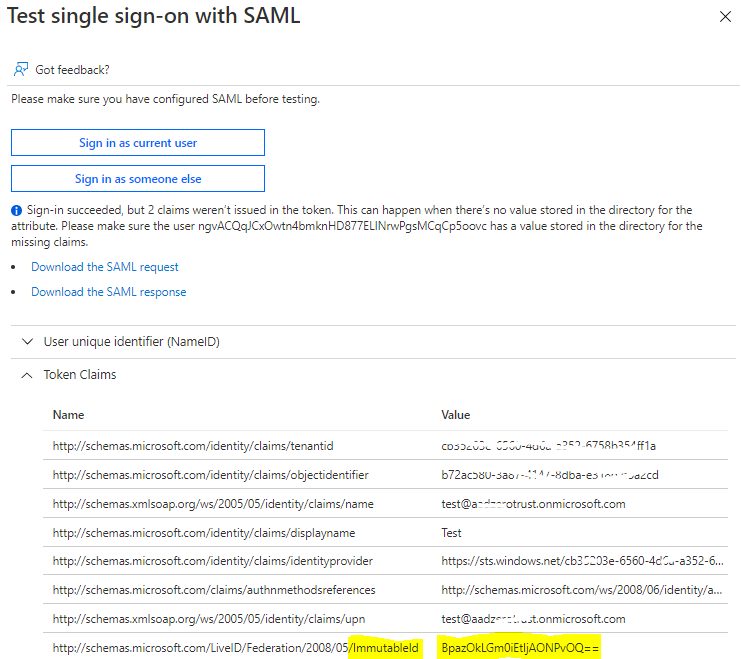
------
Please "Accept the answer" if the information helped you. This will help us and others in the community as well.
Hello Sikumars,
Thank you for your answer, which very much helps me.
Just to complete, it is impossible to use your second command because the user is synchronised from an AD on premise and Azure does not allow a changement from another process than Azure AD Connect.

So we used Azure AD connect to change our attribute and after that it worked as a charme.
As we still create users in our Active Directory, we just need to automate the filling of the extension attribute. Do you know how we can automate using Azure AD Connect ? Knowing that we will have to convert before the objectGUID in bytearray then in base64
Best Regards
Hello @Nina Franchaisse ,
You can create custom sync rule from Azure AD connect server which would convert objectGUID to base64 format and copy Immutable ID to ExtensionAttribute1 as shown below for hybrid users.
Steps to create the rule:
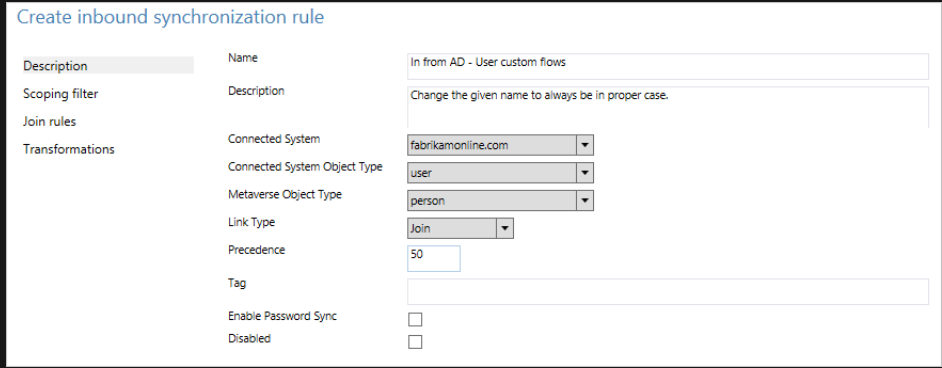
Name: Give the rule a descriptive name.
Description: Give some clarification so someone else can understand what the rule is for.
Connected System: This is the system in which the object can be found. In this case, select Active Directory Connector.
Connected System/Metaverse Object Type: Select User and Person, respectively.
Link Type: Change this value to Join.
Precedence: Provide a value that is unique in the system. A lower numeric value indicates higher precedence (Ex: 50).
Tag: Leave this empty. Only out-of-box rules from Microsoft should have this box populated with a value.
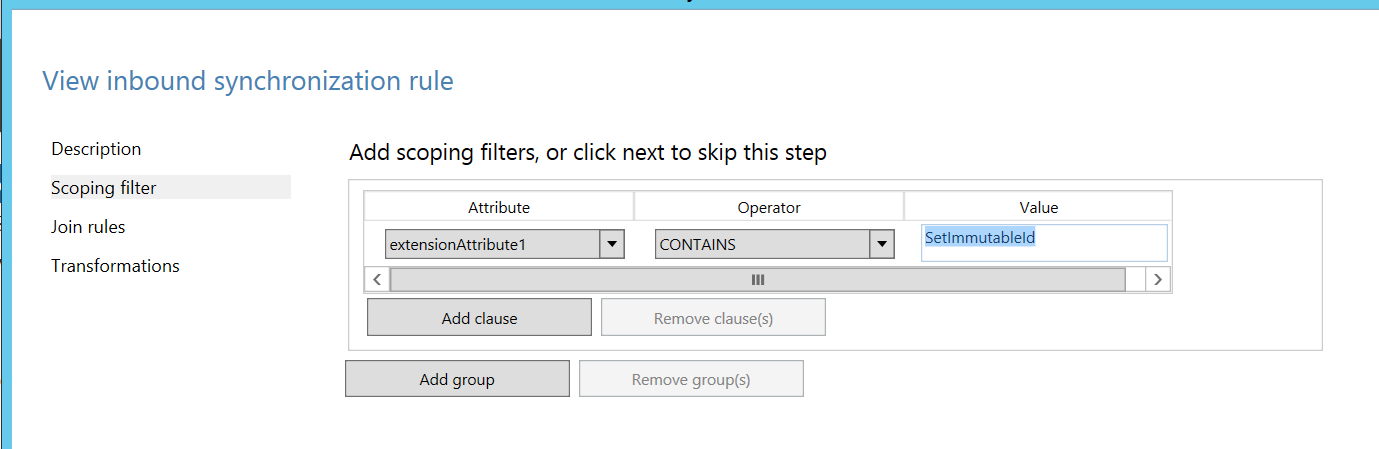
IIF(IsString([objectGUID]),CStr([objectGUID]),ConvertToBase64([objectGUID])). 
Outcome from my lab:
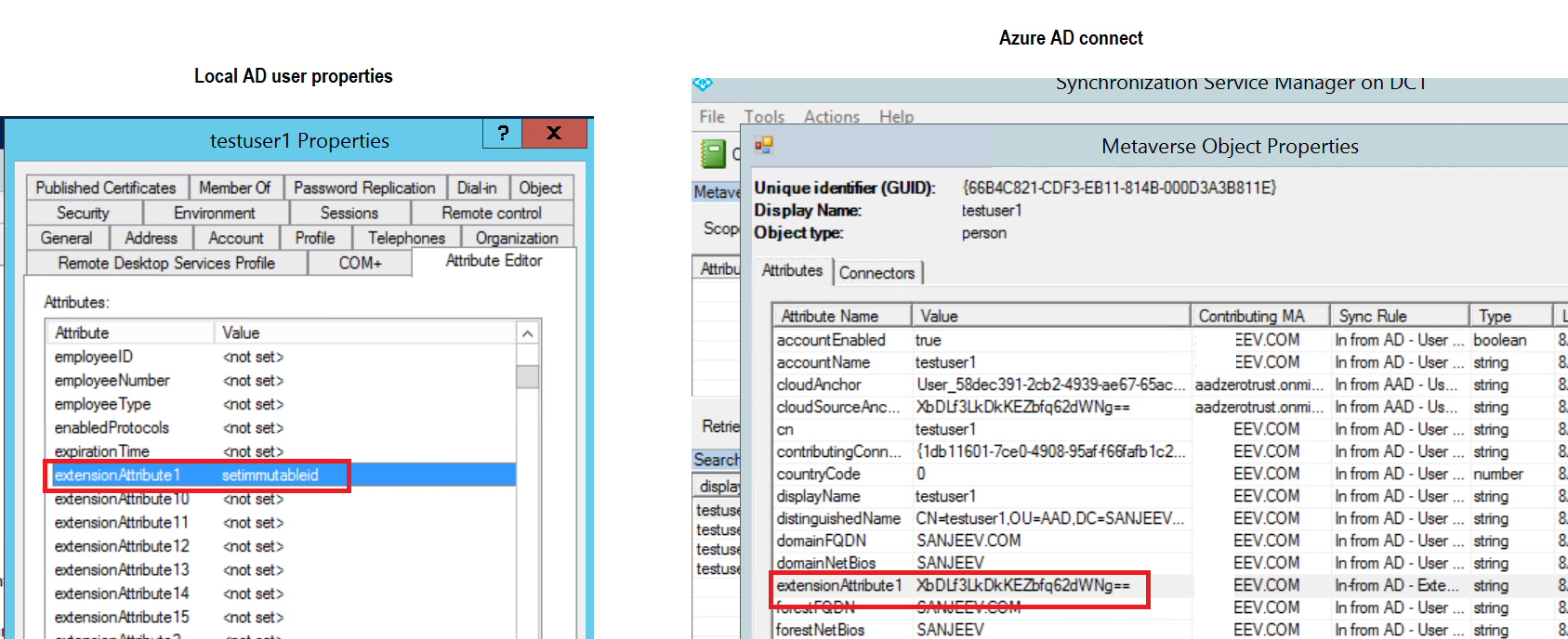
Here is general guidance on Create your first custom rule. Hope this helps.
Please "Accept the answer" if the information helped you. This will help us and others in the community as well.