Dear Amanjeet Gill,
Good day!!
Apologies for the inconvenience caused and please don’t worry, let’s work together on your concern and move towards a resolution path.
I understand your concern and would like to suggest you to go the Subscriptions page of your Office 365 account, and see whether the Microsoft Project purchased subscription is showing:
Open your browser> Access https://portal.office.com > Enter your Office 365 account details> Click on the profile picture at the top right (beside the question mark icon)> View Account> Scroll little down and click on Subscriptions> See whether you are having the Project subscription purchased.
If purchased Project subscription purchased is listed, please check whether you are having “Project Online Desktop” license. If yes, please access your Office 365 account in the InPrivate or Incognito window and try to install the Project app:
Open your Google Chrome> Click on the three dots at the top right> Click on New Incognito window> Access https://portal.office.com > Please follow the steps in this article: Install Project - Microsoft Support
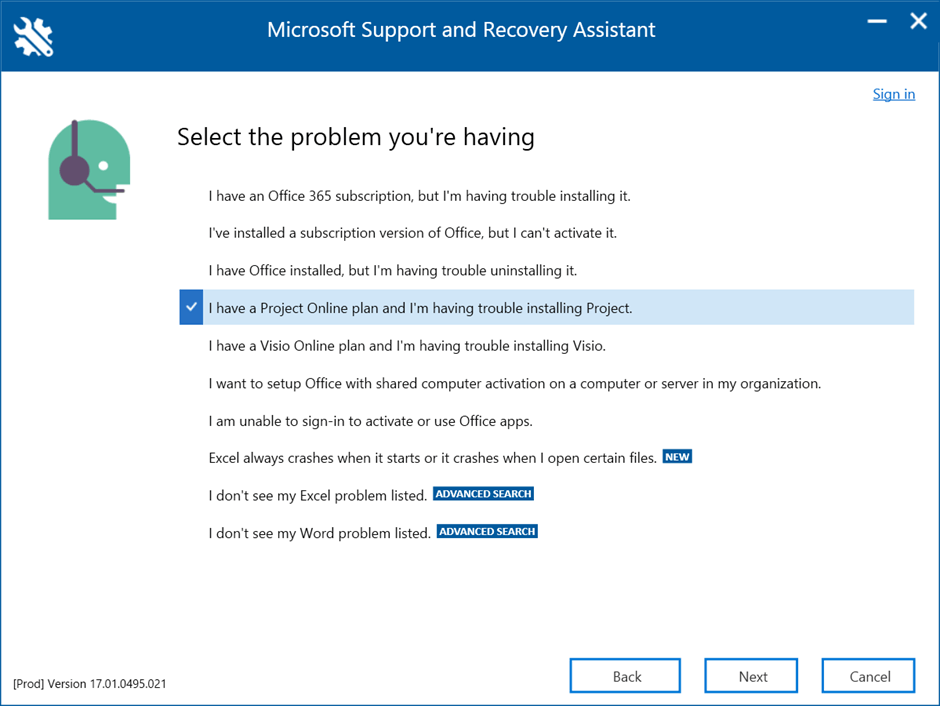
If still the same, please download and install the Microsoft SARA tool and troubleshoot the Project installation issue, reference: About the Microsoft Support and Recovery Assistant - Microsoft Support
If the purchased Project subscription is not listed in your Subscriptions page, please contact the Microsoft Billing phone support team for further assistance. Reference: Get support - Microsoft 365 admin | Microsoft Learn
Appreciate your patience and understanding. Have a great day!!
Best Regards,
Sophia
' cx='32' cy='32' r='32' /%3E%3Ctext x='50%25' y='55%25' dominant-baseline='middle' text-anchor='middle' fill='%23FFF' %3EA%3C/text%3E%3C/svg%3E)

