Microsoft 365 and Office | Loop | Other
A collaborative workspace app in Microsoft 365 designed to help teams co-create, stay organized, and work together in real time across apps and devices.

This browser is no longer supported.
Upgrade to Microsoft Edge to take advantage of the latest features, security updates, and technical support.
' cx='32' cy='32' r='32' /%3E%3Ctext x='50%25' y='55%25' dominant-baseline='middle' text-anchor='middle' fill='%23FFF' %3EA%3C/text%3E%3C/svg%3E)
For some strange reason MS Loop gives me a French interface while I'm Dutch and also understand English.
All my setting are eithe dutch or Englisch, so how do I get rid of this French on my DESKTOP app?
Locked Question. This question was migrated from the Microsoft Support Community. You can vote on whether it's helpful, but you can't add comments or replies or follow the question.
Hello Jacques,
Thank you for posting in Microsoft Community.
Based on the description, there is issue with the language shows in Microsoft Loop desktop application. Let us see on what we can do to help address your concern.
Before we proceed any further, we would like to set your proper expectation that Microsoft Loop is still in public preview and users may experience known and new issues. During this preview, we will need your feedback to help us improve your experience.
To change the language of the Microsoft Loop desktop app, you can follow these steps:
If your preferred language is not available in the drop-down menu, you may need to install the language pack for that language on your computer.
If the above steps does not works, please provide your experience as feedback to our developers. They'd love to hear from you about what's working well, what's not, and any ideas for improvements, including possible new features and functions. Your contribution will help us improve the user experience for you and all users around the world.
During this preview we want to hear from you to help improve your experience – so send us your feedback in the app to help us shape the journey.
In the bottom right corner, select Help> Give feedback.
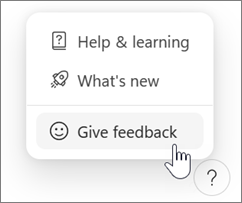
On Android or iOS, tap your profile picture at the top left to find Help and feedback.
Link: Get started with Microsoft Loop - Microsoft Support
Regards,
Prince R
Microsoft Moderator
The language setting you are referring to is not available, see screenshot
Also, there is no feedback option in the Help menu
I am experiencing the same issue.
Advising someone to find the "Settings" option is not a great deal of help when the interface is in French.
I know enough French to muddle through but when I go to Parametres > General...there is no Language option.
Please provide some better solution.
Hello Jacques,
Thanks for the response.
Sorry for the delays, Microsoft loop still in preview and that means there are more features added in the future and also currently expected some issues. We encourage sending feedbacks to our development teams so you voice will be heard.
if no feedback button, try accessing on the web or using mobile.
Regards,
Prince R
Microsoft Moderator