How to maintain Sharepoint URL absolute path instead of relative path?

Anonymous
2024-02-05T11:34:52+00:00

Hope everyone reading is well, my department is migrating to sharepoint from a local server, and we are experiencing some problems with our files and its references.

We have several excel files that have graphs and charts, and we paste those in a powerpoint presentation, until that part everything is fine, the problem comes when we want to edit the links of those charts to another excel file that has the same chart, but with updated information (we keep historical files in order to keep control). When we change it, the absolute path containing the sharepoint URL changes to a relative path as if the document were locally, but still referencing the sharepoint folders, if another user tries to open that file it says it does not exist.

This is a problem when multiple users are working on the same file, we need to be able to keep the sharepoint URL so when other team members want to check or edit the links and files everything is linked through the absolute URL path.

I checked and there is no information online on keeping absolute paths for the files.

Microsoft 365 and Office | PowerPoint | For business | Windows

Locked Question. This question was migrated from the Microsoft Support Community. You can vote on whether it's helpful, but you can't add comments or replies or follow the question.

0 comments No comments
{count} votes

7 answers

Sort by: Most helpful
  1. Anonymous
    2024-02-05T14:19:38+00:00

    Hi Moises,

    Thank you for posting to Microsoft Community. We are glad to assist. We are looking into your situation and we will update the thread shortly.

    Appreciate your patience and understanding and thank for your time and cooperation.

    Sincerely,

    George | Microsoft Community Moderator

    0 comments No comments
  2. Anonymous
    2024-02-05T18:26:18+00:00

    Hi Moises,

    According to your description, I suppose that you paste a linked Excel object into the presentation(Paste> Paste Special> Paste link> Microsoft Excel Chart Object).

    If not, please point it out and provide the steps on how you paste the charts.

    If so, this will create an OLE link, and OLE links are always absolute. To troubleshoot the situation, I would like to collect more information.

    1. For "when we want to edit the links of those charts to another Excel file that has the same chart", could you please provide more details about it? Do you mean some linked charts in the presentation are from Workbook A and some linked charts are from Workbook B?
    2. Could you please record a video about the situation?

    You can use any 3rd party app or use PowerPoint (click the Recording tab> Screen Recording) to record the video. After that, you can upload it to any online drive, like OneDrive, and then post the shared link in your reply.

    1. Please provide your Office version and Product Information

    Click File> Account, please take a full screenshot of the current interface. After that, you can click "Insert Image" to upload the screenshot.

    We look forward to your response. Thanks for your cooperation.

    Sincerely,

    George | Microsoft Community Moderator

    0 comments No comments
  3. Anonymous
    2024-02-07T08:49:21+00:00

    Hi George, hope you are well, thanks for answering,

    To answer your questions, we have some data in a chart in Excel Workbook A, that chart is pasted into a PowerPoint Presentation, then we need to update the chart on the PowerPoint Presentation, so we click on: File -> Info -> Edit links to files -> Change source. So we then navigate through the Sharepoint synched folder to choose Exccel Workbook B as the new source of data, the chart is the same on both excels, so it should update the data and use the sharepoint link as reference.

    But when we do that, it changes it to a local path instead of the Sharepoint URL, so when another person tries to update the chart or access its information, it says its not available, because it is a local path to another persons one drive, the issue is that when we do edit links to files on Excel it always keeps the SharePoint URL, the problem is occuring on PowerPoint.

    video_error_links.mp4

    This is a link to an example of what is happening, so I kindly await your help,

    This is a capture of the edit links to files option so you can see that one is a SharePoint URL and the other ir a local path, we need to always be SharePoint URL,

    Thanks in advance,

    Moises Muniz

    0 comments No comments
  4. Anonymous
    2024-02-12T09:46:54+00:00

    Hello George, hope you are well,

    we are still waiting for your answer as the issue when editing the links is only affecting us, other departments that work with SharePoint can change the links always with SharePoint URL, but for us it always uses a local path, So I truly beg for your help,

    Thanks in advance,

    Moises

    0 comments No comments
  5. Anonymous
    2024-02-26T22:32:26+00:00

    Hi Moises,

    Thanks for posting back and sorry for my late reply.

    I assume you copy and paste the linked chart via Paste Special> Paste link> Excel Worksheet Object, and "Planificacion Financiera" is a SharePoint site name.

    If not, please point it out and let us know.

    If so, to troubleshoot the situation, please try the following steps, then check again.

    1. Please run Excel, click File> Open, select SharePoint, go to the related location and open the Excel workbook.
    2. Please copy and paste the linked chart in the PowerPoint presentation, then click File> Info> Edit Links to Files to check the path. Check if it is a local path or a SharePoint URL.

    If it is a local path, please point it out and let us know.

    If it is a SharePoint URL, I would like to know how you opened the Excel workbook before. Did you go to the SharePoint folder in File Explorer to open the Excel workbook?

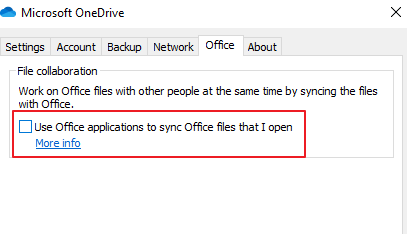
    If so, based on my searches, it is likely due to a hidden OneDrive setting "File collaboration - Use Office applications to sync Office files that I open" as shown below. The option was previously visible in the OneDrive settings dialog, but in the latest OneDrive client, it is hidden and enabled by default. So, to troubleshoot the situation, please try the following steps to check the value of this hidden OneDrive setting.
    Method 1:

    Please try the steps in Garon's reply in this thread. Check whether the current value of "CoAuthEnabledUserSetting" is false or not. If it is false, please set it to "true". After that, please quit and restart OneDrive, then check again.

    Method 2:

    Please press Win + R, type regedit and open Registry Editor. Check if you can see the following registry key: [HKCU\SOFTWARE\Policies\Microsoft\OneDrive] "EnableAllOcsiClients". If you can find it, and its value is 0, please change the value to 1, for example:

    [HKCU\SOFTWARE\Policies\Microsoft\OneDrive] "EnableAllOcsiClients"=dword:00000001

    After that, please quit and restart OneDrive, then check again.

    When you have any updates, please feel free and come back to share them with us.

    Sincerely, 

    George | Microsoft Community Moderator

    0 comments No comments