Microsoft 365 and Office | Microsoft Forms | For business
A web-based tool in Microsoft 365 that enables users to quickly create surveys, quizzes, polls, and feedback forms.

This browser is no longer supported.
Upgrade to Microsoft Edge to take advantage of the latest features, security updates, and technical support.
' cx='32' cy='32' r='32' /%3E%3Ctext x='50%25' y='55%25' dominant-baseline='middle' text-anchor='middle' fill='%23FFF' %3EA%3C/text%3E%3C/svg%3E)
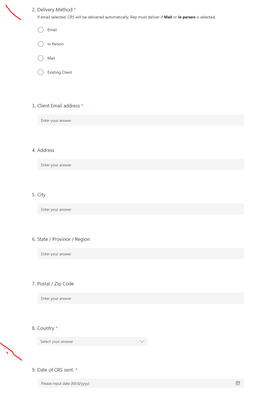
Hi, so I created a Form for people outside the company to fill out with details and so far it's working nicely.
There are however a few things that I would like done but don't see a way to do it.
It doesn't 'save' the data, meaning autocomplete from typed history doesn't work
In #2, I would like e-mail selected by default, but don't see a way to do this
In #9 below, I would like it to show today's date by default, so people don't have to manually enter it.
How do I accomplish the above?
Also, is MS Forms Pro something else now? Dynamics something? I can't find it to buy in the admin portal.
A web-based tool in Microsoft 365 that enables users to quickly create surveys, quizzes, polls, and feedback forms.
Locked Question. This question was migrated from the Microsoft Support Community. You can vote on whether it's helpful, but you can't add comments or replies or follow the question.
Dear reditguy265,
Good day! Thank you for posting to Microsoft Community. We are happy to help you
Forms Pro and Forms are two different services, and you can refer to the following documentation
Transition from Forms Pro | Microsoft Learn.
At the same time, for your three requirements, there is currently no such functionality in Forms, such as setting default answers. Therefore, you may need to use PowerApp to build your Forms to meet your needs. For you to be assisted properly, please reach out to Power Apps Community - Power Platform Community (microsoft.com); I am sure that our experts from that team can address your query effectively and accurately.
.
Thanks for your cooperation.
Sincerely,
Tin | Microsoft Community Moderator