Linking an Excel chart from Excel to PowerPoint doesn't work because the paste link option is greyed out

Anonymous
2024-07-10T17:45:42+00:00

Hi

I am trying link an excel graph to PowerPoint but it's not working because the paste link option is greyed out.

I right click on the excel chart and select copy

then i go to PowerPoint to paste the chart by going to Paste, Paste Special and i get this -
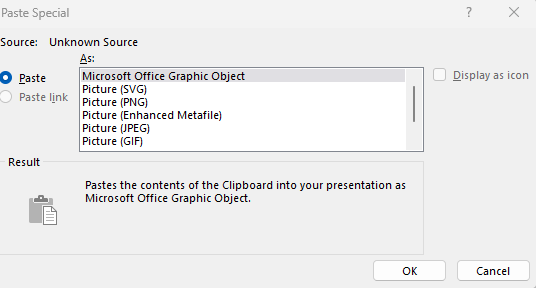
When i go to Info in PowerPoint, there are list of links relating to excel charts in the PowerPoint which I "update now" but this makes no difference - the charts do not update.

When I go to Options in both the Excel and the PowerPoint file and select Advanced, Cut,Copy and Paste section has "show paste options button" ticked.

Please help!
thanks
d

Microsoft 365 and Office | PowerPoint | For business | Windows

Locked Question. This question was migrated from the Microsoft Support Community. You can vote on whether it's helpful, but you can't add comments or replies or follow the question.

0 comments No comments
{count} vote

10 answers

Sort by: Most helpful
  1. Anonymous
    2024-11-05T09:04:02+00:00

    Hi,

    Can you please redirect me to a post about linking an excel chart to a powerpoint, but on mac?

    I only found very old posts where this possibility didn't actually exist.

    Thank you

    0 comments No comments
  2. Steve Rindsberg 99,086 Reputation points MVP Volunteer Moderator
    2024-11-05T16:06:20+00:00

    Has the original Excel file been saved before you do the Copy operation?

    For the longest time there was a bug that allowed you to copy from an unsaved Excel file then Paste Link into PowerPoint, giving you a link that pointed to ..... nothing, since the source file was unsaved.

    Maybe they've finally fixed it! Try saving JUST before you do the Copy | Paste Link

    0 comments No comments
  3. Steve Rindsberg 99,086 Reputation points MVP Volunteer Moderator
    2024-11-05T16:07:07+00:00

    Hi,

    Can you please redirect me to a post about linking an excel chart to a powerpoint, but on mac?

    Afraid not. Linking Excel to PPT isn't possible on Mac, only on Windows.

    0 comments No comments
  4. Anonymous
    2024-11-29T15:59:20+00:00

    Afraid not. Linking Excel to PPT isn't possible on Mac, only on Windows.

    Thank you. I suppose nothing can be done directly in Sharepoint right? Thanks again

    0 comments No comments
  5. Steve Rindsberg 99,086 Reputation points MVP Volunteer Moderator
    2024-11-30T16:40:19+00:00

    Hi,

    Can you please redirect me to a post about linking an excel chart to a powerpoint, but on mac?

    I only found very old posts where this possibility didn't actually exist.

    Thank you

    This hasn't changed. You can't do this in Mac PowerPoint. It depends on a Windows-only technology.

    0 comments No comments