Microsoft 365 and Office | Excel | Other | Windows
A family of Microsoft spreadsheet software with tools for analyzing, charting, and communicating data.

This browser is no longer supported.
Upgrade to Microsoft Edge to take advantage of the latest features, security updates, and technical support.
' cx='32' cy='32' r='32' /%3E%3Ctext x='50%25' y='55%25' dominant-baseline='middle' text-anchor='middle' fill='%23FFF' %3EA%3C/text%3E%3C/svg%3E)
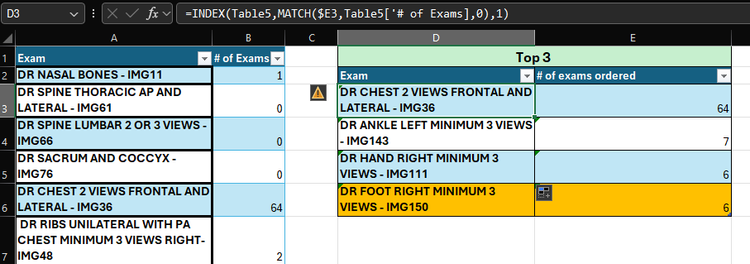
Hi, I am trying to create a table that is basically showing the top 3 results from a another table with 2 columns. However, I've been running into an issue when the values are the same, as it is only returning the first result. I need this table to automatically update monthly when I Change the data in the main table, so my top 3 results may change to more than 3 rows (like say there is two ties, one for first and two for third totaling 5 rows). Is this possible to do using the current formula I have been using, INDEX MATCH, or is there a different formula? I tried the FILTER function, and that returns the correct values, however I can't make it into a table. Ideally I'd like to keep my table, but if it's not possible then I will have to change it to a range. I really need this function to work, as It will be time consuming to go through the data to see if there is any tie breakers and have to manually update my top 3 results. I have figured out how to show the second result in a tie breaker, but as I've said above, I need this to automatically add or delete rows from my top 3 results table when the main data is changed, so if I'm showing the results for the top 3, I don't have to go through my main data to find a tie breaker and then have to manually add those rows to the table. The formula I have in D3 is =INDEX(Table5,MATCH($E3,Table5['# of Exams],0),1) and the only thing that changes for D4 &D5 is the row number in my match formula, so $E4 & $E5.
The formula I have in E3 is =LARGE(Table5['# of Exams],1) and the only thing that changes for E4 & E5 is the last numbers to 2 and .
however for this data I noticed that there is a tie breaker so in cell D6 I have the formula as =INDEX(Table5,MATCH(E5,Table5['# of Exams],2),1). which returned the second result in my table.
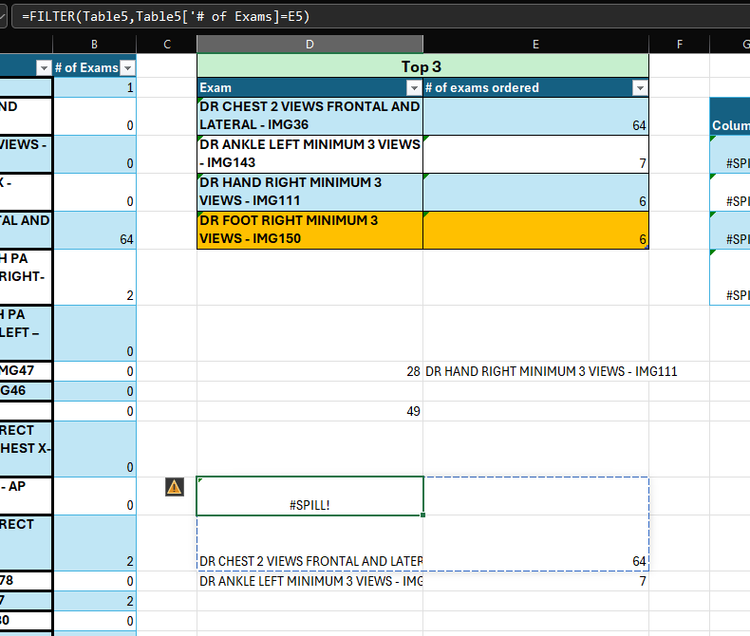
However I did try =FILTER(Table5,Table5['# of Exams]=E3), but if the data set is more then 3 rows, then It says Spill and It's the same problem as above, I need it to automatically add rows so that all my results can be shown.
I've been trying to play around with a fix, but nothing is working
I'm not sure if a power table or somethin might be needed
Any help would be very much appreciated.
Locked Question. This question was migrated from the Microsoft Support Community. You can vote on whether it's helpful, but you can't add comments or replies or follow the question.
The large formula isn't going to work as I'm not going to have time to go through 29 sheets, of 52 rows of data each, to see if there is a Tie breaker and then add that formula. I need a formula that will update automatically and will increase or decrease the amount of rows needed to get that result.
When I follow your link, I get:
We're sorry. We can't open the workbook in the browser because it uses these unsupported features:• Scenario Manager
Also, if there is a two-way tie for first, then the 3rd place is the next lowest value (which you seem to think is 2nd - it is actually 3rd). If there is a 3-way tie for first, the next value is 4th highest.
> ... The large formula isn't going to work .... go through 29 sheets...
Sorry. I was looking at your post:
I incorporated the formula...
*(B:B>=LARGE(xxx,3)...
It does work...
I'll delete my post.
Normally that would be correct, however for my case it's not as there are different titles matched to the data, how is Excel going to rank those title based off of alphabetical order and claim that just because a title that starts with a z, is after a title that starts with an A. They are technically ranked the same, which means they are tied. That's the only reason why sadly it can't be ranked so easily.