Planner: user with basic version accessing/viewing tasks from a premium plan

Anonymous
2025-01-13T01:39:56+00:00

I have a premium planner access and have built a premium plan in microsoft planner. My team only have access to basic and I have seen online that people with basic can still access/view a premium plan (albit with limited functionality). However, I have tested it and my colleague is getting an error "no subscription found". He has access to basic planner when I build a basic one. How can we fix this?

Microsoft 365 and Office | Project | For business | Windows

Locked Question. This question was migrated from the Microsoft Support Community. You can vote on whether it's helpful, but you can't add comments or replies or follow the question.

0 comments No comments

6 answers

Sort by: Most helpful
  1. Anonymous
    2025-04-09T11:01:59+00:00

    Hi I am looking to check a further point on this thread.

    Can someone with basic Planner that comes with Microsoft 365 but does not have the premium features, be able to access the task board. We are trying out Premium Plan 3 to see if it suits our Project but have a sticking point for those that done hold a Premium Plan 3 licence.

    I have tried sharing the plan and takes but an error is presented (No Project subscription found). As a working group with project managers not all need the Premium Plan 3 functions but all need access to the task board to be able to view the board and add updates, is there a way for me to do this?

    Thanks and regards.

    Allan.

    Was this answer helpful?

    2 people found this answer helpful.
    0 comments No comments
  2. Anonymous
    2025-01-13T02:56:56+00:00

    Dear Libby MAU,

    Good day! Thank you for posting to the Microsoft Community. We are happy to help you.

    Based on our search and tests, members will need a "Project for Office" license to have basic edit access for Premium Planner plans. This is a normal situation by design. Please note that the "Project for Office" license is not the same as Premium Plans or Project Plans (Project Plan 1, Project Plan 3, or Project Plan 5). "Project for Office" is included in Microsoft 365 for Business, Microsoft F3, Microsoft E1, E3, and E5, giving users access to any functionality where Microsoft Project and Microsoft Planner for Web overlap.

    You can refer to this official article for more detailed information: Office 365 User access to Project for the web and Roadmap - Project for the web | Microsoft Learn.

    Given this, please ask the member to navigate to the subscription page to check their subscription and license.
    If the member has the correct license assigned, please share the plan again and ask them to check if they can access the plan in another browser using InPrivate mode.

    We appreciate your patience and understanding that sometimes the initial reply may not resolve the concern immediately, or there may be some misunderstanding about your scenario. We would like to hear updates from your side to provide further suggestions.

    Thanks for your time and cooperation. We hope that you are keeping safe and well!

    Sincerely,

    Rhoda | Microsoft Community Moderator

    Was this answer helpful?

    1 person found this answer helpful.
    0 comments No comments
  3. Anonymous
    2025-02-05T15:39:07+00:00

    As well, check if the "Common Data Service for Teams" is active...

    Was this answer helpful?

    0 comments No comments
  4. Anonymous
    2025-01-14T06:49:03+00:00

    Dear Libby MAU,

    Thanks for posting back and sharing update with us.

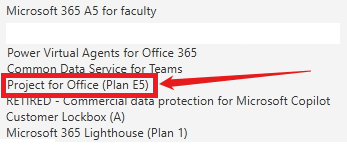
    As per shared by the official article, E3 users should have access to the plan, please navigate to Admin Center > Users > Active User > License and apps tab to check if the license has been assigned and listed under this user:

    Please note that it's showing as Project for Office (Plan E5) as the subscription in our test environment for the current user is A5.

    Image

    Image

    If the issue still persists, we do understand the inconvenience caused and apologize for it. Considering the issue could be related to the account or the tenant background service which need to be checked from the backend, more resources need to be involved in to check further.

    In this situation, we sincerely recommend you contact your Microsoft 365 administrator, follow steps in this article to create a support ticket with Online Support. The support team over there has higher permission than us, they can remotely help check the situation on your side, involve more resource to collect logs and help you do troubleshoot. This would be a more efficient way in handling this case for you.

     For reference: How do I find my Microsoft 365 admin?

    Regards,

    Rhoda

    Was this answer helpful?

    0 comments No comments
  5. Anonymous
    2025-01-13T22:38:29+00:00

    Hi There thank you for your quick response - I got my colleague to look at his subscriptions and below is the screenshot - we can't specifically see "Project for Office (Plan E5)" in there but he does have "MIcrosoft Planner" as you can see.

    What would you recommend as next steps?

    Was this answer helpful?

    0 comments No comments