Hi Marc,
Thanks for posting back and providing the detailed information.
Based on my test, I can reproduce the same situation. When connecting to a project and checking the related Task options to display the tasks, sometimes the Roadmap fails to arrange the main tasks and subtasks in the expected order.
In this case, I think you want all subtasks to be located under the corresponding master task, just like the order in the Project Timeline view.
If my understanding conflicts with your meaning, please point it out and let us know.
If so, I suggest you try the following steps to redisplay the tasks and see if they are in the expected order.
- Remove the "problematic" subtask phases in the roadmap
This does not delete the related tasks in the project, it just removes them from the roadmap view.
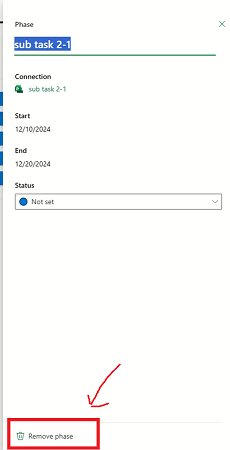
In the roadmap, click on the subtask, in the Phase dialog box, click "Open details". In the Phase pane, click "Remove phase".
- Show the subtasks again
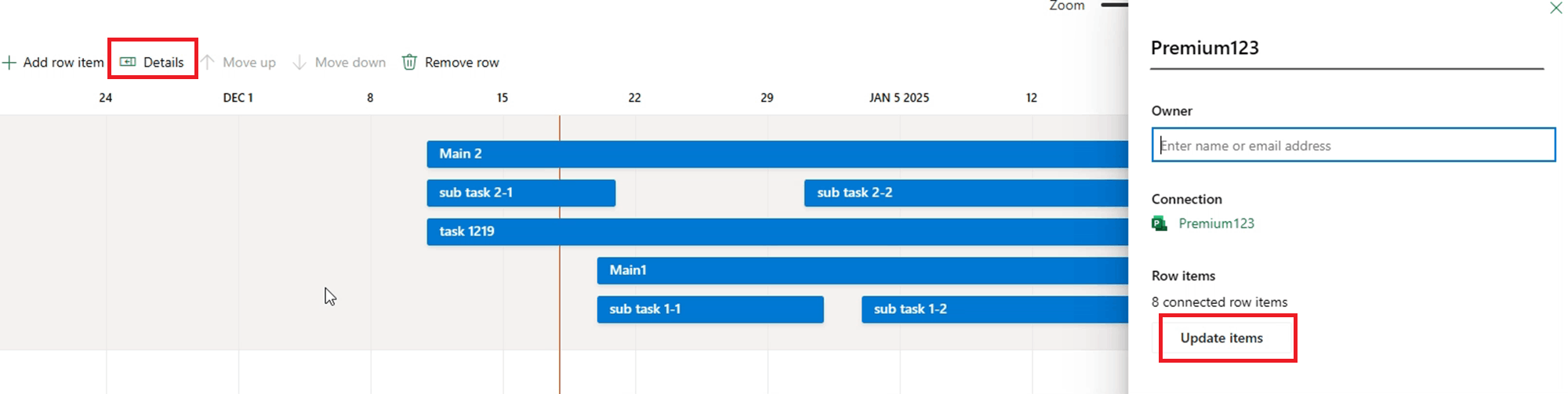
Click on the row> Details> Update items> check the related task options to show these subtasks again. After a few attempts, the main tasks and subtasks should be in the expected order.
We look forward to your response. Thanks for your cooperation. 😊
Sincerely,
George | Microsoft Community Moderator
' cx='32' cy='32' r='32' /%3E%3Ctext x='50%25' y='55%25' dominant-baseline='middle' text-anchor='middle' fill='%23FFF' %3EA%3C/text%3E%3C/svg%3E)
