Developer technologies | .NET | Blazor
A free and open-source web framework that enables developers to create web apps using C# and HTML, developed by Microsoft.
This browser is no longer supported.
Upgrade to Microsoft Edge to take advantage of the latest features, security updates, and technical support.
' cx='32' cy='32' r='32' /%3E%3Ctext x='50%25' y='55%25' dominant-baseline='middle' text-anchor='middle' fill='%23FFF' %3ES%3C/text%3E%3C/svg%3E)
Hi,
I will try to describe my problem.
I have an application where I have made a CRUD which is associated with a database.

In this application I added a dashboard page to do some stat.
For example in my dashnoard I have a cardbox that should counts the number of entries in my database. It's here that I've a problem.

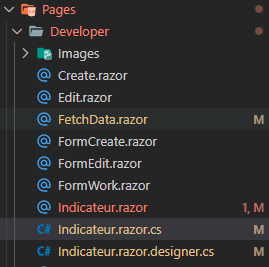
The structure of the client project is :
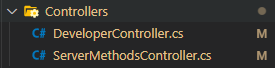
The Structure of the server project is :
When I tried to make : donet build I have 1 erreur.
The problem is in Indicateur.razor :
Have you advise to resolve this problem?
Thanks in advance!
A free and open-source web framework that enables developers to create web apps using C# and HTML, developed by Microsoft.
An object-oriented and type-safe programming language that has its roots in the C family of languages and includes support for component-oriented programming.
' cx='32' cy='32' r='32' /%3E%3Ctext x='50%25' y='55%25' dominant-baseline='middle' text-anchor='middle' fill='%23FFF' %3EA%3C/text%3E%3C/svg%3E)
Dear @sblb ,
Since your error message is not English and its an image. we couldn't understand what is means, could you please translate it to English? Besides, it seems is related with the IndicateurComponent Could you please share these Component related codes?
Answer accepted by question author
Hi @sblb ,
For the first issue:
error message is :
IndicatorComponent.MonthlyStats()' is a method, which is not valid in the given context [WebApp3.Client].
(can be expected) Task<WebApp3.Pages.Stats> WebApp3.Pages.IndicatorComponent.MonthlyStats()
According to your codes and error message, I found you directly call the MonthlyStats to work as an parameter inside an html attribute. This is the reason why you get this error.
We couldn't directly pass a method inside a html attribute, since the html doesn't know when to call this method.
Normally, we will firstly use lifetime method to call the MonthlyStats method to get the result and set to a parameter and then use this parameter inside the html attribute.
For example, if you want to render this textbox when this page is Initialized. You could call this MonthlyStats method inside the OnInitializedAsync method. More details about the blazor lifecycle , you could refer to this article.
For the second issue:
I have enabled Http in IndicatorComponent as follows:
var response = await Http.SendAsync(new HttpRequestMessage(HttpMethod.Get, new Uri($"{UriHelper.BaseUri}api/servermethods/MonthlyStats")));
I left the code for the result in Indicator.razor.
I've a message error :
crit: Microsoft.AspNetCore.Components.WebAssembly.Rendering.WebAssemblyRenderer[100]
Unhandled exception rendering component: Unable to parse the response.
System.Exception: Unable to parse the response.
at Radzen.HttpResponseMessageExtensions.<ReadAsync>d__0`1[[WebApp3.Pages.Stats, WebApp3.Client, Version=1.0.0.0, Culture=neutral, PublicKeyToken=null]].MoveNext()
at WebApp3.Pages.IndicateurComponent.MonthlyStats() in C:\Users...\source\repos\WebApp3\Client\Pages\Developer\Indicateur.razor.cs:line 17
at WebApp3.Client.Pages.Developer.Indicateur.OnInitializedAsync() in C:\Users...\source\repos\WebApp3\Client\Pages\Developer\Indicateur.razor:line 98
at Microsoft.AspNetCore.Components.ComponentBase.RunInitAndSetParametersAsync()
at Microsoft.AspNetCore.Components.RenderTree.Renderer.GetErrorHandledTask(Task taskToHandle)
Below the line 17 from WebApp3.Pages.IndicateurComponent.MonthlyStats()
return await response.ReadAsync<Stats>();
Below the line 98 WebApp3.Client.Pages.Developer.Indicateur.OnInitializedAsync()
protected override async Task OnInitializedAsync()
{
result = await MonthlyStats();
}
Thank you for your details codes and error message, after I tested your codes on my side, I found the reason why you receive this error we couldn't render the null object when Blazor rendering, to solve this issue we should first new a stats object and then it will working well.
More details, you could refer to below codes:
Component codes:
 @page "/Indicateur"

 <h3>IndicateurComponent</h3>


 <input  type="text"  value="@result.NombreECR.ToString()"/>
 @code {
     private Stats result = new Stats();

     protected override async Task OnInitializedAsync()
     {
         result =  await MonthlyStats();
     }
 }
code-behind file:
 public partial class IndicateurComponent
 {
     [Inject]
     HttpClient Http { get; set; }
     public async Task<Stats> MonthlyStats()
     {
         //var response = await Http.SendAsync(new HttpRequestMessage(HttpMethod.Get, new Uri($"{UriHelper.BaseUri}api/servermethods/MonthlyStats")));

         //return await response.ReadAsync<Stats>();
         return new Stats {NombreECR=1, ratio=1 };
     }
 }

 public class Stats
 {
     public int NombreECR { get; set; }
     public int ratio { get; set; }
 }
Result:

Hi,
I am very happy with it and it works very well.
Thank you very much for your support.
So, I did the easy part.
Now I have to add filter calculations and ratios... Do you have any tips on how to integrate other calculations into the api?
Hi @sblb ,
I am very glad I have helped you to make your application working well. For the new issue, I really suggest you created a new thread to talk about it and I will glad to help you again. Besides, I will convert my comment to answer and add some details information about this issue, please mark it as answer so that other folks who faces the same issue could be more easily to find the solution. Thank you very much and have a nice day.
Hi,
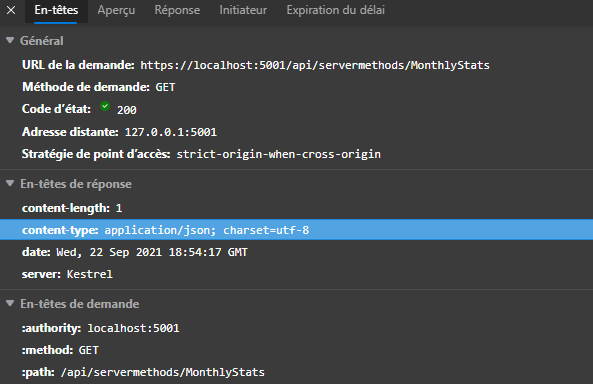
The content type is application/json.
The api is with a status code 200 and return 4. This mean that the problem don't come from api. I think!
When I see the content type I'm not sure that the problem come of format.
The value jsonStr = null
If you are agree I can share with you my code via github.
Sure you could do that, please remove all the personal information inside your application and modify below visible to all users to visible to original posters and Microsoft. 
Hi,
I don't have acces to the drop menu.
Github link :
Thanks in advance to your support
Hi @sblb ,
According to the API controller codes, I found you just return int value to the client side. So you will face the json convert issue.
I suggest you could try to modify your codes to below and then it will work well.
            string jsonStr = await response.Content.ReadAsStringAsync();

            Stats re = new Stats { NombreECR = int.Parse(jsonStr) };
Hi,
Thank you for your explanation
I reproduced what you did and it's ok.
But in my case I have to analyse my local database;
To do this I have to call my API ServerMethodsController.cs where I do the calculations (simple for the moment).
I have enabled Http in IndicatorComponent as follows:
var response = await Http.SendAsync(new HttpRequestMessage(HttpMethod.Get, new Uri($"{UriHelper.BaseUri}api/servermethods/MonthlyStats")));
I left the code for the result in Indicator.razor.
I've a message error :
crit: Microsoft.AspNetCore.Components.WebAssembly.Rendering.WebAssemblyRenderer[100]
      Unhandled exception rendering component: Unable to parse the response.
System.Exception: Unable to parse the response.
   at Radzen.HttpResponseMessageExtensions.<ReadAsync>d__0`1[[WebApp3.Pages.Stats, WebApp3.Client, Version=1.0.0.0, Culture=neutral, PublicKeyToken=null]].MoveNext()
   at WebApp3.Pages.IndicateurComponent.MonthlyStats() in C:\Users\...\source\repos\WebApp3\Client\Pages\Developer\Indicateur.razor.cs:line 17
   at WebApp3.Client.Pages.Developer.Indicateur.OnInitializedAsync() in C:\Users\...\source\repos\WebApp3\Client\Pages\Developer\Indicateur.razor:line 98
   at Microsoft.AspNetCore.Components.ComponentBase.RunInitAndSetParametersAsync()
   at Microsoft.AspNetCore.Components.RenderTree.Renderer.GetErrorHandledTask(Task taskToHandle)
Below the line 17 from WebApp3.Pages.IndicateurComponent.MonthlyStats()
return await response.ReadAsync<Stats>();
Below the line 98 WebApp3.Client.Pages.Developer.Indicateur.OnInitializedAsync()
protected override async Task OnInitializedAsync()
     {
        result = await MonthlyStats();
     }
I really don't understand why there is this problem.
Thanks in advance to your Help!
According to your description, I think you couldn't directly convert the response to the Stas model. I suggest you could firstly read the response as the string and then use JsonSerializer to convert it to model.
More details, you could refer to below codes:
        [Inject]
        HttpClient Http { get; set; }
        public async Task<Stats> MonthlyStats()
        {
            var response = await Http.SendAsync(new HttpRequestMessage(HttpMethod.Get, new Uri($"api/servermethods/MonthlyStats")));

            //return await response.ReadAsync<Stats>();

            string jsonStr = await response.Content.ReadAsStringAsync();

            Stats re = JsonSerializer.Deserialize<Stats>(jsonStr);

            return re;
        }
Hi,
So, I've implemented your proposition ans I've always a problem.
I've checked the network traffic. All things seems OK with status code 200. The variable NombreEcr = 4 which is the correct equality!
Plus, I don't understand why I can't get into the indicator page.
The error is always :
crit: Microsoft.AspNetCore.Components.WebAssembly.Rendering.WebAssemblyRenderer[100]
      Unhandled exception rendering component: The JSON value could not be converted to WebApp3.Pages.Dashboard.Stats. Path: $ | LineNumber: 0 | BytePositionInLine: 1.
System.Text.Json.JsonException: The JSON value could not be converted to WebApp3.Pages.Dashboard.Stats. Path: $ | LineNumber: 0 | BytePositionInLine: 1.
  .....
Indicateur.razor.cs:line 19

Indicateur.razor:line 97
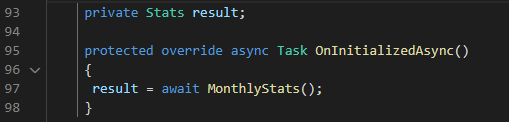
I don't know how I can return this value in UI.
thanks in advance to your support.
Hi sblb-6958,
Could you please share the jsonStr value which returned from the api/servermethods.MonthlyStats? I guess there is something format or value error for this jsonStr .
Dear @sblb ,
Thank you for sharing the details error message and codes.
According to your codes and error message, I found you directly call the MonthlyStats to work as an parameter inside an html attribute. This is the reason why you get this error.
We couldn't directly pass a method inside a html attribute, since the html doesn't know when to call this method.
Normally, we will firstly use lifetime method to call the MonthlyStats method to get the result and set to a parameter and then use this parameter inside the html attribute.
For example, if you want to render this textbox when this page is Initialized. You could call this MonthlyStats method inside the OnInitializedAsync method. More details about the blazor lifecycle , you could refer to this article.
More details, you could refer to below codes:
Component codes:
@page "/Indicateur"

<h3>IndicateurComponent</h3>


<input  type="text"  value="@result.NombreECR.ToString()"/>
@code {
    private Stats result;

    protected override async Task OnInitializedAsync()
    {
        result =  await MonthlyStats();
    }
}
code-behind file:
    public partial class IndicateurComponent
    {
        [Inject]
        HttpClient Http { get; set; }
        public async Task<Stats> MonthlyStats()
        {
            //var response = await Http.SendAsync(new HttpRequestMessage(HttpMethod.Get, new Uri($"{UriHelper.BaseUri}api/servermethods/MonthlyStats")));

            //return await response.ReadAsync<Stats>();
            return new Stats {NombreECR=1, ratio=1 };
        }
    }

    public class Stats
    {
        public int NombreECR { get; set; }
        public int ratio { get; set; }
    }
Result:

Hi,
error message is :
IndicatorComponent.MonthlyStats()' is a method, which is not valid in the given context [WebApp3.Client].
(can be expected) Task<WebApp3.Pages.Stats> WebApp3.Pages.IndicatorComponent.MonthlyStats()
You will find hereafter the code of IndicateurComponent
using System;
using System.Net.Http;
using System.Linq;
using System.Threading.Tasks;
using Microsoft.AspNetCore.Components;
using Radzen;

namespace WebApp3.Pages
{
    public partial class IndicateurComponent
        {
         [Inject]
         HttpClient Http { get; set; }
         public async Task<Stats> MonthlyStats()
            {
                var response = await Http.SendAsync(new HttpRequestMessage(HttpMethod.Get, new Uri($"{UriHelper.BaseUri}api/servermethods/MonthlyStats")));

                return await response.ReadAsync<Stats>();
            }
        }

         public class Stats
        {
            public int NombreECR { get; set; }
            public int ratio { get; set; }
         }
}
In my logic the partial class IndicateurComponent.razor.cs calls the servermethodcontroller;
Thanks in advance to your support!