Hi Jayakumar Ramaswamy.
Welcome to Microsoft Q&A forum. It is my pleasure to help you today.
I understand that you'd like to change the password of your child account. However, this option is no longer available through a parent account. Microsoft takes account security seriously, even for a child account. The option to reset child account's password using a parent account, while convenient, is vulnerable to exploits and security issue, so we have removed that function from the family settings.
However, there is a workaround for you to try if the account is on your family group as a child account. Please follow the steps below:
- Go to account.microsoft.com and log in with your account (this step is not always necessary, but sometimes it will take you straight to the recovery form without it so we just want to make sure.
- Click on your avatar on the upper right corner and choose "Sign-in with another account"
- Select your child's account on the list (proceed to step 5) or select "Add another account".
- Type your child's account and press Enter.
- Select "Forget your password?"
- You should be taken to a window where it will give you an option to send a verification email to the parent account. The window should look like below.
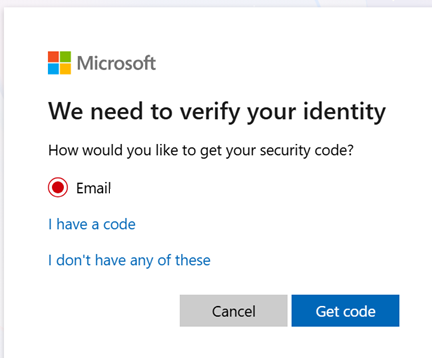
- Select "Get code" and then type in the code that you received in your email.
- You will be taken to a window where you can setup the new password for the account. I hope this helps.
If the steps above fail, please go to our recovery form and follow the instruction to recover your child account.
If the answer is helpful, please click "Accept Answer" and kindly upvote it. If you have extra questions about this answer, please click "Comment".
Note: Please follow the steps in our documentation to enable e-mail notifications if you want to receive the related email notification for this thread.


' cx='32' cy='32' r='32' /%3E%3Ctext x='50%25' y='55%25' dominant-baseline='middle' text-anchor='middle' fill='%23FFF' %3ECS%3C/text%3E%3C/svg%3E)
' cx='32' cy='32' r='32' /%3E%3Ctext x='50%25' y='55%25' dominant-baseline='middle' text-anchor='middle' fill='%23FFF' %3EPS%3C/text%3E%3C/svg%3E)
' cx='32' cy='32' r='32' /%3E%3Ctext x='50%25' y='55%25' dominant-baseline='middle' text-anchor='middle' fill='%23FFF' %3EEA%3C/text%3E%3C/svg%3E)
' cx='32' cy='32' r='32' /%3E%3Ctext x='50%25' y='55%25' dominant-baseline='middle' text-anchor='middle' fill='%23FFF' %3ELB%3C/text%3E%3C/svg%3E)
' cx='32' cy='32' r='32' /%3E%3Ctext x='50%25' y='55%25' dominant-baseline='middle' text-anchor='middle' fill='%23FFF' %3ECL%3C/text%3E%3C/svg%3E)
' cx='32' cy='32' r='32' /%3E%3Ctext x='50%25' y='55%25' dominant-baseline='middle' text-anchor='middle' fill='%23FFF' %3ELO%3C/text%3E%3C/svg%3E)