Hi @Stacey Mattish,
Welcome to the Microsoft Q&A forum.
Thank you for letting us know about the issue with your Class Notebook showing the message "Still setting things up, check back later". This message usually appears when the notebook setup process is stuck due to a sync or authentication issue. Here are some steps you can try on time:
1/ Sign out and log back in:
Log out of your Microsoft account and sign back in to refresh your session.
2/ Try a different browser or device:
If you’re using OneNote Online or Teams, switch to another browser (Edge, Chrome) or try the desktop OneNote app.
3/ Clear Teams cache:
You can follow this: Clear the Teams client cache.
4/ Open in OneNote directly
From the Class Notebook tab, select Open in OneNote and choose OneNote for the web. If it opens, the notebook is fine and the Teams tab just needs to refresh.
5/ Submit a Support ticket:
If you've tried all the above steps and the issue still persists, you can ask your IT admin to create a direct support ticket to Microsoft Support via your school’s admin portal.
By following the steps outlined below, you can easily submit a support ticket and get the assistance you need to resolve the issue.
1/ Log into admin.microsoft.com with your admin credentials. If you don't have admin permissions, you'll need to contact someone in your organization who does.
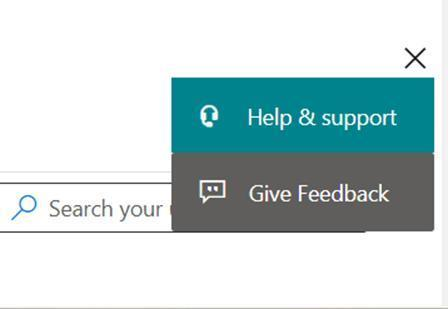
2/ Select the green Help & Support button typically located at the bottom right of the admin center dashboard. Click on it to open the support pane.
3/ Type in “Class Notebook not working" into the search bar.
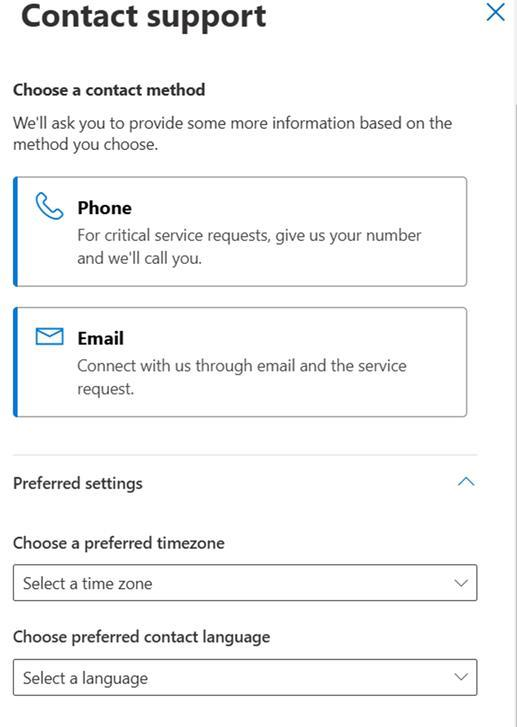
4/ Select “Contact support”.
5/ Choose your preferences: preferred contact method, preferred time zone, and preferred contact language.
6/ Fill in your details and give a strong description of your problem for a quicker resolution. You can add a file, a screenshot, or a video for added support. Once you’ve filled out the details, select Contact me at the bottom.
We appreciate your understanding regarding the scope of support available through this forum. As moderators, our role is to provide general guidance and assist with common troubleshooting steps. While we do not have access to internal systems or administrative tools required to resolve account-specific or backend-related issues but we’ll continue doing our best to support you within the scope of our responsibilities.
I hope the information provided proves useful. Please proceed with the outlined steps and let me know whether they resolve the issue. If not, to better understand the situation, could you please confirm:
- Are you accessing the notebook through Teams, OneNote Online, or the desktop app?
- Has your account role or permissions changed recently?
- Do other teachers or students have the same issue with this notebook?
Thank you for your patience and understanding throughout this process. Should you have any questions or need further assistance, feel free to reach out at any time.
I look forward to hearing from you.
If the answer is helpful, please click "Accept Answer" and kindly upvote it. If you have extra questions about this answer, please click "Comment".
Note: Please follow the steps in our documentation to enable e-mail notifications if you want to receive the related email notification for this thread.
' cx='32' cy='32' r='32' /%3E%3Ctext x='50%25' y='55%25' dominant-baseline='middle' text-anchor='middle' fill='%23FFF' %3ESM%3C/text%3E%3C/svg%3E)


' cx='32' cy='32' r='32' /%3E%3Ctext x='50%25' y='55%25' dominant-baseline='middle' text-anchor='middle' fill='%23FFF' %3EKN%3C/text%3E%3C/svg%3E)