Hi @Jenkins, Stephanie,
Thank you for reaching out to Microsoft Q&A Forum.
By default, if you create a meeting directly on the owner’s calendar, Outlook usually doesn’t send them an invite because they already “own” the event. You can set this up in Outlook, so the calendar owner receives email notifications when you send invites from their shared calendar. These notification settings are the workaround.
Option 1: Use Shared Calendar Notification Settings (New Outlook / Web)
Microsoft recently added a feature that lets users receive notifications for changes made to shared calendars, including when events are created by a delegate.
- In new Outlook, Outlook on the web, or Outlook.com, select View > View settings > Calendar > Shared calendars.
- Under Shared calendars, if you have more than one account, select the account you want to receive notifications for.
- Under Calendar updates, select the shared calendars you want to receive email notifications for.
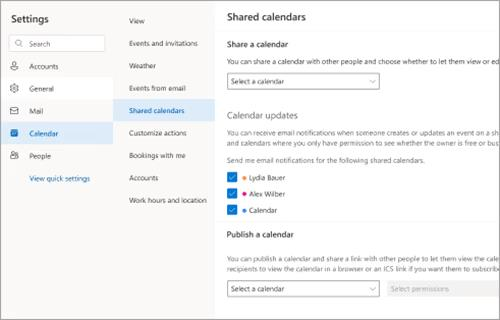
This ensures the owner gets an email whenever you add or modify events.
Option 2: Delegate Settings in Classic Outlook
If you’re using Classic Outlook for Windows:
- The calendar owner should go to File → Account Settings → Delegate Access.
- Select your name (the delegate) and click Permissions.
- Under Deliver meeting requests addressed to me and responses to meeting requests where I am the organizer to: choose My delegates and me.
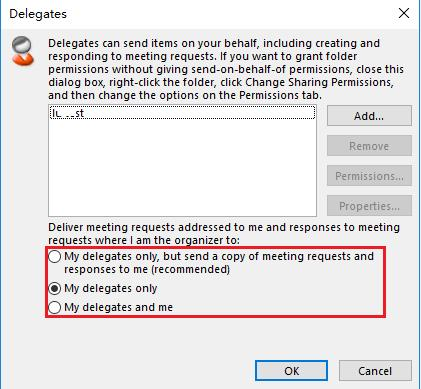
- Save changes. This ensures the owner receives copies of meeting-related messages when you schedule on their behalf.
Alternatively, the calendar owner can set up an Outlook rule to alert them when calendar-related emails arrive. This doesn’t directly notify them of delegate actions but reacts to meeting requests or updates.
- Go to File → Manage Rules & Alerts → New Rule.
- Select Apply rule on messages I receive.
- Configure the rule to capture meeting requests or updates (e.g., messages with “Meeting” in the subject).
Outlook does not provide a specific trigger for “event added by delegate,” so this workaround focuses on catching related notifications.
You can take a look at these articles for references:
About delegates: Allow someone to manage your mail and calendar in Outlook - Microsoft Support
Share and access a calendar with edit or delegate permissions in Outlook - Microsoft Support
I hope this information is helpful.
Thank you for your patience and your understanding. If you have any questions or need further assistance, please feel free to share them in the comments on this post so I can continue to support you.
I look forward to continuing the conversation.
If the answer is helpful, please click "Accept Answer" and kindly upvote it. If you have extra questions about this answer, please click "Comment".
Note: Please follow the steps in our documentation to enable e-mail notifications if you want to receive the related email notification for this thread.
' cx='32' cy='32' r='32' /%3E%3Ctext x='50%25' y='55%25' dominant-baseline='middle' text-anchor='middle' fill='%23FFF' %3EJS%3C/text%3E%3C/svg%3E)

' cx='32' cy='32' r='32' /%3E%3Ctext x='50%25' y='55%25' dominant-baseline='middle' text-anchor='middle' fill='%23FFF' %3EAN%3C/text%3E%3C/svg%3E)
