Hi @Dina Huds,
Thank you for posting your question in the Microsoft Q&A forum.
Regarding to your question, the legacy Salesforce for Outlook plug‑in won’t load in New Outlook and is being retired (full retirement currently planned for Dec 2027), so the quickest fix is to use Salesforce’s Outlook Integration web add‑in (not the old “Salesforce for Outlook” plug‑in).
You can see: Migrate from COM add-ins to web add-ins
Here are a few steps that often help:
1/ Install the add‑in from AppSource:
- In New Outlook for Windows (or Outlook on the web) go to Home > More apps > search “Salesforce” and add Salesforce (Outlook Integration).
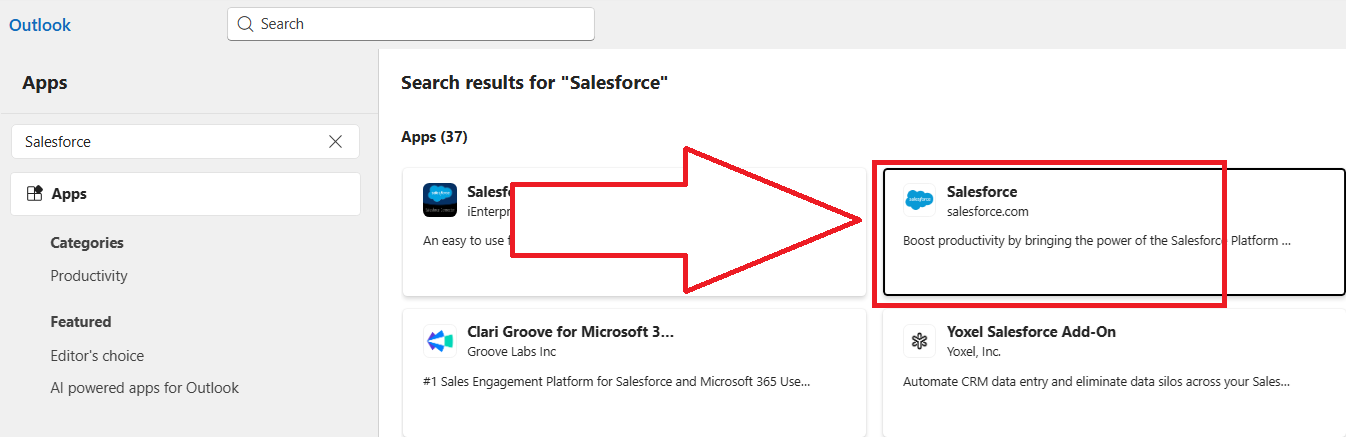
- Open the Salesforce pane in Outlook and sign in to Salesforce to connect.
References:
Note: Microsoft is providing this information as a convenience to you. The sites are not controlled by Microsoft. Microsoft cannot make any representations regarding the quality, safety, or suitability of any software or information found there. Please make sure that you completely understand the risk before retrieving any suggestions from the above link.
2/ Make sure your Outlook build is supported:
- Salesforce’s current requirements call for recent Microsoft 365 builds of Outlook for Windows (e.g., version 2409 or later) or Outlook on the web. If you’re below that, update Office and try again.
Reference: Outlook Integration System Requirements
Note: Microsoft is providing this information as a convenience to you. The sites are not controlled by Microsoft. Microsoft cannot make any representations regarding the quality, safety, or suitability of any software or information found there. Please make sure that you completely understand the risk before retrieving any suggestions from the above link.
3/ If your company blocks the Store, ask your IT admin to deploy it centrally:
- Your IT admin can deploy the Salesforce add‑in via Microsoft 365 admin center > Settings > Integrated apps > View more apps > Search for Salesforce and click Get it now.
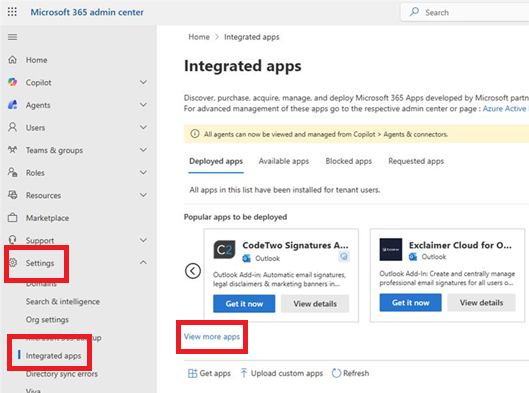
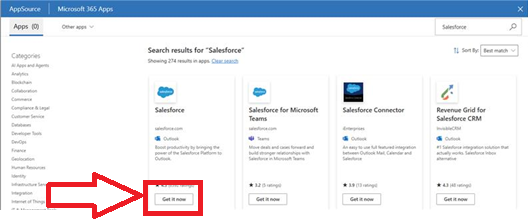
- This ensures it appears for your mailbox (it can take up to 24 hours).
References:
4/ If you still get a “something went wrong” error:
- Try Outlook on the web to see if it loads there, update Office, and retry. Microsoft’s add‑in troubleshooting steps cover common manifest/load issues.
- If the error seems specific to the Salesforce add‑in, use the Support link on the AppSource page to contact Salesforce (publishers can resolve tenant‑side issues).
References:
I hope this information is helpful. Please follow these steps and let me know if it works for you. If not, we can work together to resolve this.
Thank you for your patience and your understanding. If you have any questions or need further assistance, please feel free to share them in the comments on this post so I can continue to support you.
I look forward to continuing the conversation.
If the answer is helpful, please click "Accept Answer" and kindly upvote it. If you have extra questions about this answer, please click "Comment".
Note: Please follow the steps in our documentation to enable e-mail notifications if you want to receive the related email notification for this thread.
' cx='32' cy='32' r='32' /%3E%3Ctext x='50%25' y='55%25' dominant-baseline='middle' text-anchor='middle' fill='%23FFF' %3EDH%3C/text%3E%3C/svg%3E)


' cx='32' cy='32' r='32' /%3E%3Ctext x='50%25' y='55%25' dominant-baseline='middle' text-anchor='middle' fill='%23FFF' %3EKN%3C/text%3E%3C/svg%3E)